How to Send RCS Messages Using API: Developer Guide
As businesses move beyond traditional SMS, developers are increasingly looking for ways to create richer and more interactive customer communication experiences. Rich Communication Services (RCS) is emerging as the next generation of business messaging, enabling brands to send images, videos, carousels, suggested replies, and branded messages directly through the native messaging application.
For SaaS platforms, CRM systems, eCommerce applications, and enterprise communication tools, integrating an RCS API can significantly improve customer engagement and conversion rates.
This guide explains how RCS messaging APIs work, the architecture behind RCS Business Messaging, integration steps, common use cases, and best practices for developers.
What is an RCS API?
An RCS API is a programmable interface that allows applications to send and receive Rich Communication Services messages.
Unlike traditional SMS APIs that only support plain text, RCS APIs support:
- Rich cards
- Images and videos
- Suggested replies
- Call-to-action buttons
- Carousels
- Branded sender profiles
- Read receipts
- Interactive messaging
Developers can integrate these capabilities directly into applications, websites, CRMs, and customer engagement platforms.
Understanding RCS Business Messaging (RBM)
Before integrating an API, it's important to understand RCS Business Messaging (RBM).
RBM is Google's business messaging framework built on RCS technology.
It enables verified businesses to communicate with customers using rich, interactive experiences within supported messaging apps.
Key components include:
- Business Messaging Agent
- RCS Messaging Platform
- Carrier Network Support
- End User Device
- Messaging API Layer
This infrastructure allows businesses to deliver modern conversational experiences without requiring users to install additional applications.
How RCS API Architecture Works
A typical RCS messaging API workflow looks like this:
Step 1: Application Creates Message
Your application generates content such as:
- Promotional messages
- Order updates
- Appointment reminders
- Customer support responses
Step 2: API Request is Sent
The application sends a request to the RCS platform using REST APIs.
Typical request elements include:
- Recipient number
- Message content
- Media URLs
- Interactive buttons
- Campaign metadata
Step 3: RCS Platform Processes Message
The RCS platform validates:
- Sender credentials
- Business verification
- Device compatibility
- Message formatting
Step 4: Customer Receives Message
The message is delivered through an RCS-enabled messaging client.
Customers can:
- View rich media
- Click buttons
- Respond instantly
- Navigate product catalogs
Prerequisites Before RCS API Integration
Before starting integration, developers should prepare the following:
Business Verification
Most RCS providers require:
- Business registration documents
- Domain verification
- Brand approval
RCS Agent Setup
An RCS Business Messaging Agent represents your business on the platform.
The agent contains:
- Brand name
- Logo
- Description
- Contact details
API Credentials
Your provider typically supplies:
- API Key
- Client ID
- Authentication Token
- Webhook URL
Development Environment
Recommended tools:
- Postman
- Node.js
- Python
- Java
- PHP
- REST API Client
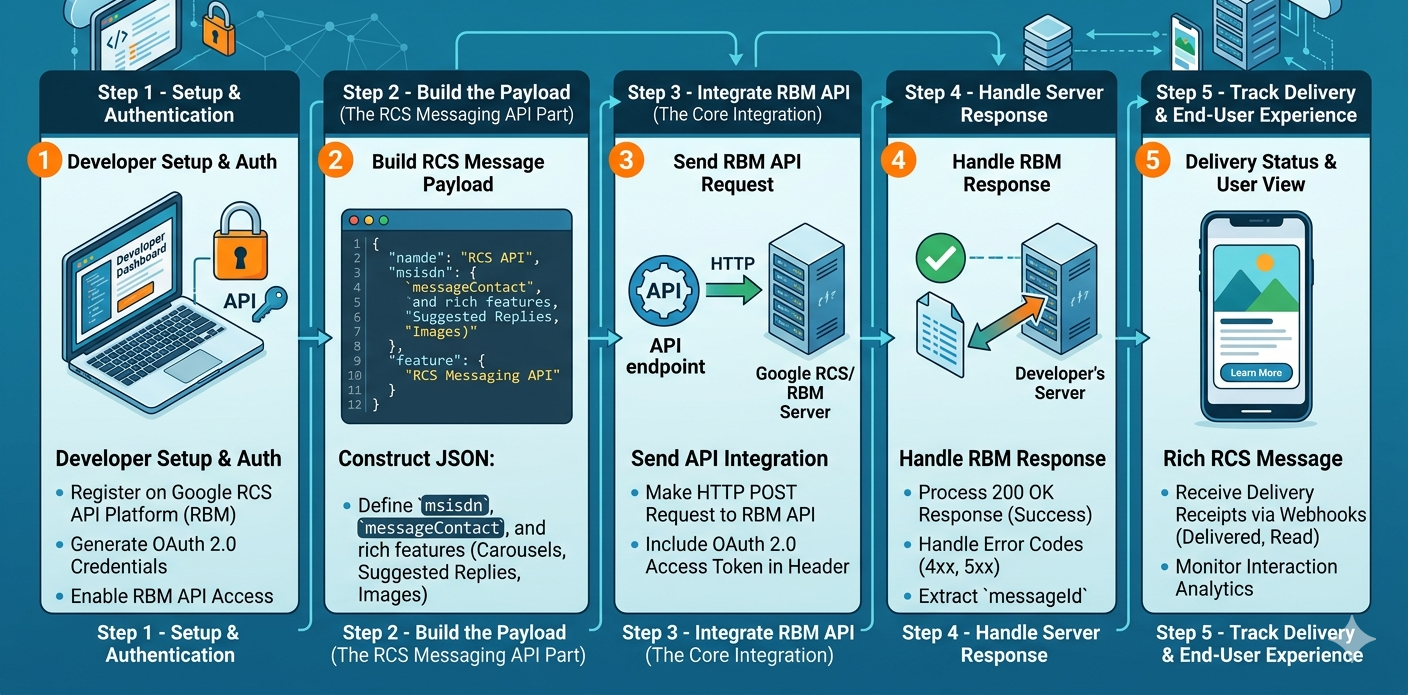
Step-by-Step RCS API Integration
Step 1: Obtain API Access
Choose an RCS messaging provider that supports:
- RBM API integration
- Enterprise messaging
- Delivery reporting
- Rich media support
After onboarding, obtain API credentials.
Step 2: Configure Authentication
Most providers use:
- OAuth 2.0
- Bearer Tokens
- API Keys
Example request header:
Authorization: Bearer YOUR_ACCESS_TOKEN
Content-Type: application/json
Authentication secures communication between your application and the messaging platform.
Step 3: Create Message Payload
A typical RCS payload includes:
{
"phoneNumber": "+919876543210",
"message": {
"text": "Welcome to our service"
}
}
For rich messaging, payloads may include:
- Images
- Videos
- Buttons
- Rich cards
- Suggested replies
Step 4: Send API Request
Most providers offer REST-based endpoints.
Example flow:
POST /messages/sendThe API processes and routes the message to the recipient.
Step 5: Handle Delivery Status
The API usually returns:
- Accepted
- Delivered
- Read
- Failed
These events can be captured using webhooks.
Using Webhooks for Real-Time Updates
Webhooks allow applications to receive event notifications automatically.
Common webhook events include:
- Message delivered
- Message read
- User response
- Button click
- Session expiration
Webhook integration enables real-time customer engagement tracking.
Rich Messaging Features Developers Can Build
One of the biggest advantages of a Google RCS API implementation is support for advanced messaging experiences.
Rich Cards
Rich cards display:
- Product image
- Product title
- Description
- CTA buttons
Perfect for eCommerce promotions.
Suggested Replies
Users can respond quickly using predefined options.
Example:
- Yes
- No
- Talk to Sales
Carousels
Carousels allow users to browse multiple products or services inside a single message.
Ideal for:
- Product catalogs
- Travel packages
- Educational courses
Action Buttons
Developers can add buttons such as:
- Buy Now
- Call Us
- View Details
- Book Demo
This reduces customer friction.
Common RCS API Use Cases
Ecommerce Platforms
Use cases include:
- Product recommendations
- Cart recovery
- Order tracking
- Promotional campaigns
Banking & Financial Services
Applications include:
- Transaction alerts
- Fraud notifications
- Account updates
- Loan offers
Healthcare Systems
Healthcare organizations use RCS APIs for:
- Appointment reminders
- Patient engagement
- Prescription notifications
SaaS Platforms
SaaS companies often integrate RBM API integration capabilities for:
- User onboarding
- Trial activation
- Product updates
- Customer support
RCS API vs SMS API
| Feature | SMS API | RCS API |
|---|---|---|
| Text Messaging | Yes | Yes |
| Images & Videos | No | Yes |
| Branding | No | Yes |
| Interactive Buttons | No | Yes |
| Read Receipts | No | Yes |
| Rich Cards | No | Yes |
| Customer Experience | Basic | Advanced |
For businesses seeking modern communication, RCS offers significant advantages.
Best Practices for RCS API Integration
Design Mobile-Friendly Experiences
Messages should be optimized for smartphone users.
Keep Interactions Simple
Avoid overwhelming users with excessive choices.
Use Strong CTAs
Examples include:
- Get Started
- Buy Now
- Schedule Demo
Track Engagement Metrics
Monitor:
- Delivery rates
- Read rates
- Click-through rates
- Conversion rates
Implement Fallback SMS
Not all devices support RCS.
A fallback SMS strategy ensures message delivery.
Security Considerations
Developers should follow security best practices:
- Secure API keys
- Use HTTPS connections
- Validate webhook requests
- Implement access controls
- Rotate credentials regularly
These measures help protect customer communication data.
Future of RCS API Development
The future of RCS messaging APIs includes:
- AI-powered conversations
- Conversational commerce
- Interactive customer journeys
- CRM automation
- Omnichannel communication
As businesses demand richer engagement tools, RCS is expected to become a core component of modern communication platforms.