🚀 How to Apply for WhatsApp Business API in India: Step-by-Step Guide
WhatsApp has become one of the most effective business communication channels in India. From customer support and lead generation to order updates and appointment reminders, businesses are increasingly adopting WhatsApp to engage customers where they already spend their time.
However, unlike the standard WhatsApp Business App, the WhatsApp Business API is designed for medium and large businesses that require automation, CRM integrations, chatbots, and large-scale messaging capabilities.
One of the most common questions businesses ask is:
"How do I apply for WhatsApp Business API in India?"
In this guide, we'll explain the complete WhatsApp Business API apply process, required documents, approval requirements, and best practices to help you get started smoothly.
📱 What Is WhatsApp Business API?
The WhatsApp Business API is a business messaging solution that enables organizations to:
- Send customer notifications
- Automate conversations
- Integrate CRM systems
- Deploy AI chatbots
- Manage customer support teams
- Scale customer communication
Unlike the WhatsApp Business App, the API is built for businesses handling large volumes of customer interactions.
🎯 Who Should Apply for WhatsApp Business API?
The API is ideal for:
✅ E-commerce businesses
✅ Healthcare providers
✅ Educational institutions
✅ Real estate companies
✅ Financial services
✅ Travel agencies
✅ SaaS companies
✅ Customer support teams
If your business communicates with hundreds or thousands of customers, WhatsApp Business API can significantly improve efficiency.
📋 Prerequisites Before Applying
Before starting the application process, ensure your business has the following:
1. A Registered Business
You should have a legally registered business entity.
Examples include:
- Private Limited Company
- LLP
- Partnership Firm
- Sole Proprietorship
- Registered Organization
2. Business Website 🌐
Your website should clearly display:
- Business information
- Products or services
- Contact details
- Privacy policy
A professional website helps during verification.
3. Dedicated Mobile Number 📞
You'll need a phone number that:
- Can receive OTP verification
- Is not actively used on a personal WhatsApp account
- Will be dedicated to WhatsApp Business communication
4. Meta Business Account
A Meta Business Account is required to access WhatsApp Business API services.
🔍 Understanding Meta Business Verification
One of the most important steps in the process is Meta Business Verification WhatsApp.
Verification helps Meta confirm that your business is legitimate.
Benefits include:
✔ Improved trust
✔ Access to advanced business features
✔ Better account credibility
✔ Enhanced customer confidence
📝 Documents Commonly Required
Depending on your business type, verification may require:
Business Registration Proof
Examples:
- Certificate of Incorporation
- GST Registration
- Business License
Business Contact Information
- Business email
- Business phone number
- Website URL
Business Address Verification
Documents that show your business address.
Maintaining accurate business information improves approval chances.
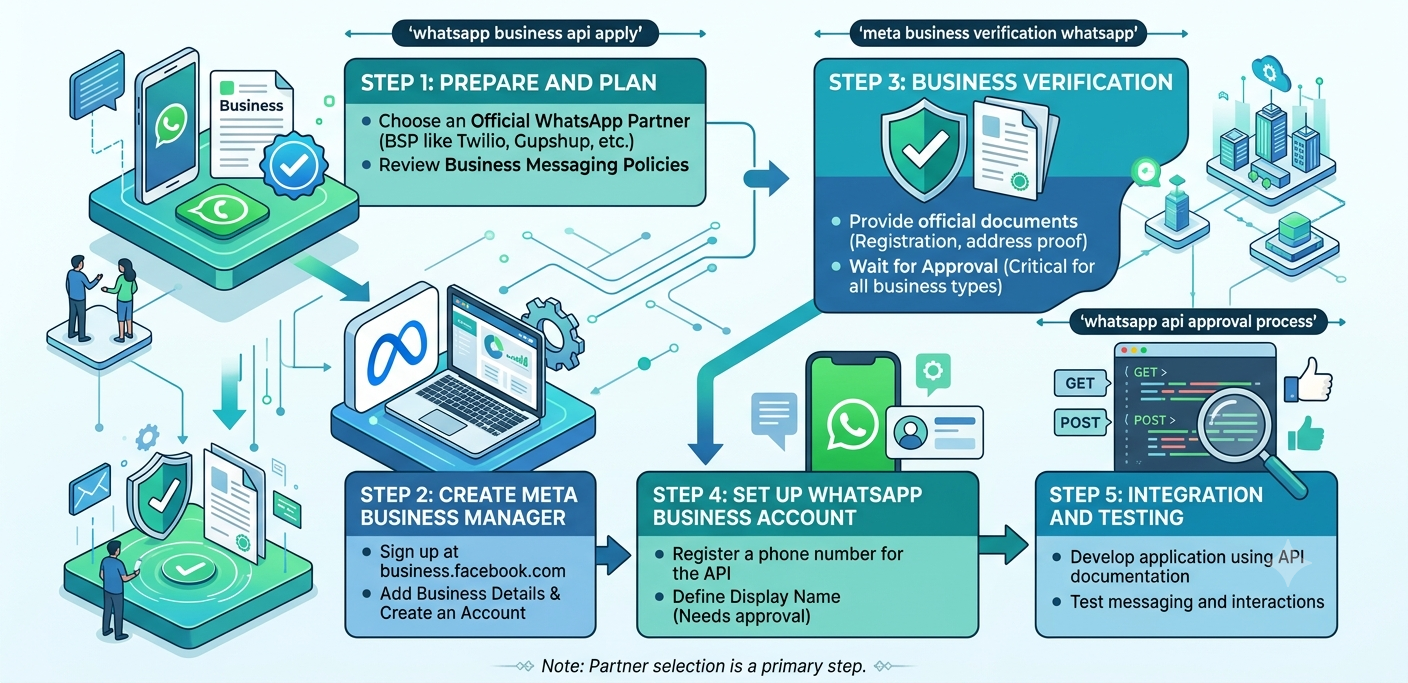
⚙️ WhatsApp API Approval Process: Step-by-Step
Let's look at the complete WhatsApp API approval process.
Step 1: Create a Meta Business Account
First, create and configure your Meta Business Account.
Add:
- Business name
- Website
- Contact details
- Business category
Ensure all information matches your official documents.
Step 2: Verify Your Business 🏢
Submit the required business information for verification.
During this stage:
- Business details are reviewed
- Documents may be validated
- Contact information may be checked
Verification timelines can vary depending on the completeness of your information.
Step 3: Register Your WhatsApp Number 📱
Choose a dedicated business number.
The number will be verified through an OTP process.
Important:
The number should be intended for business communication.
Step 4: Configure WhatsApp Business Profile
Create a professional profile including:
- Business Name
- Description
- Website
- Email Address
- Business Category
- Support Details
A complete profile improves customer trust.
Step 5: Connect Through a WhatsApp Business Solution Provider
Most businesses work with a WhatsApp Business Solution Provider (BSP) to simplify implementation.
Benefits include:
✔ Faster onboarding
✔ Technical support
✔ Dashboard access
✔ API integrations
✔ Message management tools
Step 6: Create Message Templates 📩
Businesses often need pre-approved templates for:
- Order confirmations
- Appointment reminders
- Payment notifications
- Delivery updates
Templates should provide clear and useful information to customers.
Step 7: Launch Customer Communication 🚀
After setup is complete, businesses can begin:
- Customer support
- Notifications
- Lead management
- Marketing automation
- Chatbot deployment
🤖 Integrating AI Chatbots
Many businesses combine WhatsApp API with AI chatbots.
Popular chatbot use cases include:
- FAQ automation
- Appointment booking
- Lead qualification
- Product recommendations
- Customer support
Chatbots help reduce response times and improve customer experience.
⚠️ Common Reasons for Delays
Some businesses experience delays due to:
Incomplete Business Information
Missing details can slow verification.
Website Issues
A website with limited business information may create additional review requirements.
Inconsistent Business Details
Ensure:
- Business name
- Contact details
- Website information
are consistent across all records.
Number Conflicts
Using a number already associated with another WhatsApp setup can create onboarding issues.
📈 Benefits of WhatsApp Business API
Once approved, businesses gain access to:
Automated Messaging
Send notifications without manual effort.
CRM Integration
Connect customer communication with sales and support systems.
AI Automation
Improve efficiency using intelligent chatbot workflows.
Multi-Agent Support
Allow multiple team members to handle conversations.
Better Customer Engagement
Communicate with customers on their preferred messaging platform.
💡 Best Practices for Faster Approval
To improve your chances of smooth approval:
✔ Maintain a professional website
✔ Keep business records updated
✔ Use a dedicated business number
✔ Complete Meta Business Verification
✔ Work with an experienced provider
✔ Ensure accurate documentation
These practices help reduce onboarding challenges.