🔗 How to Send Bulk Voice Calls Using API (Step-by-Step Guide)
Modern businesses increasingly rely on automation to improve customer communication. Whether it's appointment reminders, payment alerts, OTP verification, delivery notifications, or marketing campaigns, automated communication has become a critical part of business operations.
While web-based voice broadcasting platforms are useful, many organizations require deeper integration with their existing systems. This is where a Bulk Voice Call API becomes essential.
A voice calling API allows developers to trigger automated voice calls directly from applications, websites, CRM platforms, ERP software, mobile apps, and business workflows without manual intervention.
In this guide, you'll learn how a Bulk Voice Call API works, how to integrate it, and how businesses use voice automation to streamline communication.
📞 What Is a Bulk Voice Call API?
A Bulk Voice Call API is an application programming interface that enables software systems to initiate automated voice calls programmatically.
Instead of logging into a dashboard and uploading contacts manually, developers can trigger calls automatically through API requests.
Businesses commonly use APIs for:
✅ Appointment reminders
✅ Payment due notifications
✅ Order updates
✅ Delivery alerts
✅ Emergency announcements
✅ Marketing campaigns
✅ Customer feedback collection
✅ IVR interactions
The API connects your software directly with a cloud telephony platform.
⚙️ How Does a Voice Call API Work?
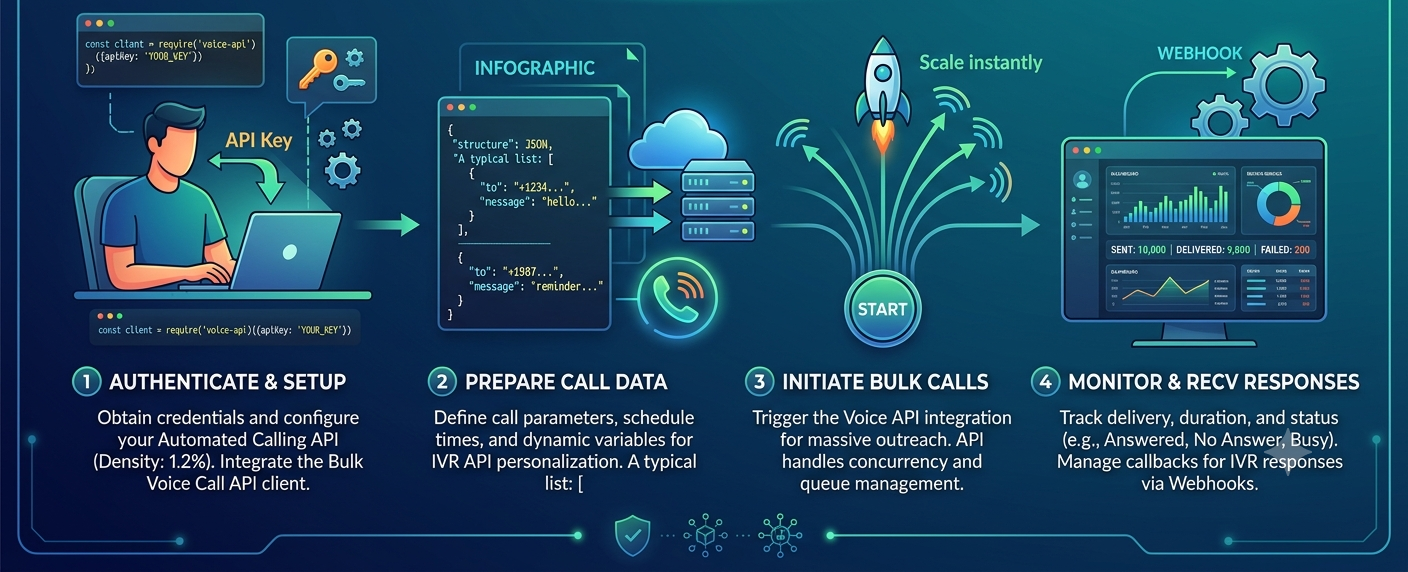
The workflow is simple.
Step 1: Application Triggers Event
A business event occurs.
Examples:
- New order placed
- Appointment booked
- Payment overdue
- Lead generated
Step 2: API Request Is Sent
Your application sends a request to the voice API.
The request contains:
- Customer mobile number
- Voice message
- Campaign information
- Language preferences
Step 3: Platform Processes Request
The cloud telephony platform receives the request and schedules the call.
Step 4: Automated Call Is Placed
The platform dials the recipient automatically.
Step 5: Message Is Played
Once the call connects, the pre-recorded voice message is played.
Step 6: Reporting Is Generated
Developers receive real-time delivery reports and analytics.
🏗️ Components Required Before API Integration
Before implementing a voice API integration, ensure you have:
1. Voice Call API Account
Choose a provider offering:
- Reliable uptime
- API documentation
- IVR support
- Delivery reports
- Regional language support
2. API Credentials
Typically includes:
🔑 API Key
🔑 Secret Key
🔑 Authentication Token
3. Voice Recording
Prepare a professional voice message.
Examples:
- Appointment reminder
- Delivery update
- Promotional announcement
- Customer alert
4. Development Environment
Popular environments include:
- PHP
- Python
- Node.js
- Java
- .NET
- Laravel
- Django
🚀 Step-by-Step Bulk Voice Call API Integration
Step 1: Obtain API Credentials
After account activation, obtain:
- API Endpoint
- Authentication Token
- Campaign ID (if applicable)
Store credentials securely.
Step 2: Upload Voice Message
Upload your recorded audio file through:
- Dashboard
- API upload endpoint
Supported formats typically include:
🎵 WAV
🎵 MP3
Step 3: Prepare Recipient Data
Example:
|
Customer |
Mobile Number |
|
Rahul |
XXXXXXX |
|
Priya |
XXXXXXX |
|
Amit |
XXXXXXX |
This data may come from:
- CRM
- Database
- ERP
- E-commerce platform
Step 4: Send API Request
Typical API request contains:
Parameters
- Mobile Number
- Voice File ID
- Language
- Campaign Name
- Retry Settings
The system validates the request and schedules the call.
Step 5: Receive Delivery Reports
Most APIs provide:
📊 Connected Calls
📊 Answered Calls
📊 Failed Calls
📊 Call Duration
📊 IVR Responses
These reports help optimize future campaigns.
🎯 Integrating an Automated Calling API with CRM
One of the most valuable use cases involves CRM integration.
Example Workflow
New Lead Generated
⬇
CRM Creates Contact
⬇
Automated Calling API Triggered
⬇
Welcome Voice Message Sent
⬇
Sales Team Notified
This eliminates manual follow-up tasks.
📞 Using IVR API for Interactive Campaigns
A modern IVR API adds customer interaction capabilities.
Example:
"Press 1 to connect with Sales."
"Press 2 to receive a callback."
"Press 3 for Support."
This transforms one-way communication into a lead qualification and customer engagement tool.
🏢 Real-World Bulk Voice Call API Use Cases
🎓 Education Sector
Schools automate:
- Fee reminders
- Holiday notifications
- Parent communication
- Exam schedules
Example
A school management system automatically sends voice alerts to parents when attendance falls below a threshold.
🏥 Healthcare Industry
Hospitals use APIs for:
- Appointment reminders
- Follow-up care
- Vaccination campaigns
Example
A patient booking automatically triggers a reminder call one day before the appointment.
🏠 Real Estate
Developers automate:
- Project launch announcements
- Site visit confirmations
- Lead nurturing campaigns
Example
A CRM triggers voice calls when a prospect submits a property inquiry.
🛒 Ecommerce & Retail
Online stores automate:
- Order confirmations
- Delivery notifications
- Promotional campaigns
Example
Customers receive automated voice updates when shipments are dispatched.
🏦 Banking & Financial Services
Financial institutions use voice APIs for:
- EMI reminders
- Payment alerts
- Customer notifications
Example
A loan management system automatically initiates reminder calls before due dates.
📊 Benefits of Voice API Integration
Improved Automation
Reduce manual communication tasks.
Faster Customer Outreach
Reach customers instantly after triggering events.
Higher Operational Efficiency
Automate repetitive workflows.
Better Customer Engagement
Voice communication creates stronger engagement than many traditional channels.
Easy Scalability
Handle thousands of calls without increasing manpower.
🔒 Security and Compliance Best Practices
When implementing an automated calling API, follow these guidelines:
✅ Secure API credentials
✅ Use encrypted connections
✅ Maintain customer consent records
✅ Follow TRAI regulations
✅ Restrict unauthorized access
Compliance helps ensure reliable and lawful communication.
⚠️ Common Integration Mistakes to Avoid
Poor Error Handling
Always validate API responses.
Ignoring Delivery Reports
Monitor campaign performance continuously.
Low-Quality Voice Recordings
Use professional audio for better engagement.
Missing Retry Logic
Failed calls should be retried automatically.
Lack of Testing
Test campaigns thoroughly before deployment.
🔮 Future of Voice APIs
Voice communication is evolving rapidly.
Future innovations include:
🤖 AI Voice Agents
🧠 Conversational IVR
📊 Predictive Calling
🎯 Personalized Voice Campaigns
🌐 Omnichannel Automation
Businesses investing in API-driven communication today will be better prepared for the next generation of customer engagement.