
CRM for Logistics, Courier and Transport Companies
Log every shipper enquiry, route it to the right branch, and follow up on rates and trial shipments until the account is onboarded.
What is Lead Management CRM?
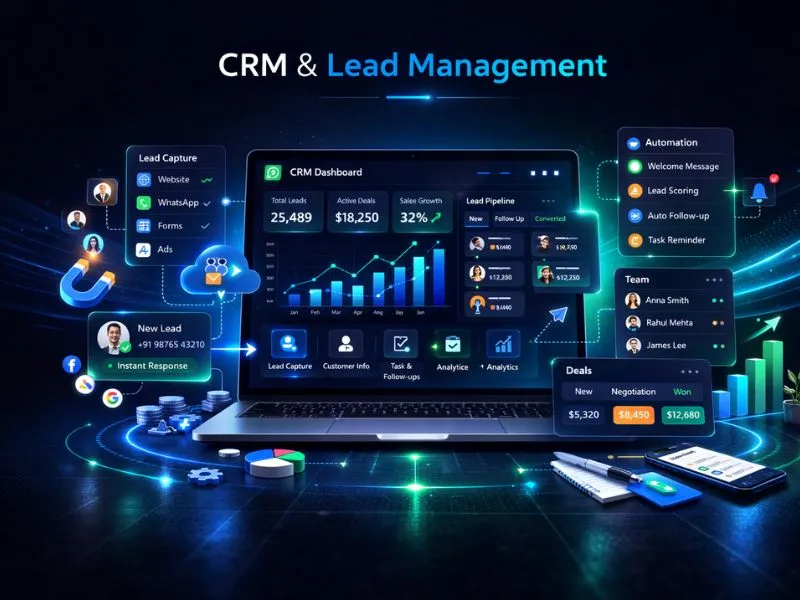
Nexcomm's Lead Management CRM is a unified platform built to capture, organize, and nurture leads coming in from multiple channels. It removes the need for manual data entry, closes the gaps that cause lead leakage, and gives sales teams the tools to follow up via SMS, Email, and WhatsApp — all from a single dashboard. With a structured sales funnel at the center, no opportunity slips through the cracks.
Who is this for?
Sales and key-account teams at courier companies, freight forwarders, truck operators, warehousing firms and last-mile delivery partners, plus cab and staff-transport providers who win corporate contracts.
CRM for Logistics & Transport
A CRM for logistics and courier companies is a shared record of every shipper enquiry, from the first rate request to onboarding, with an owner and a next step on each one. A seller who has asked three couriers for rates is waiting to see who follows up.
Facebook, Google and Justdial leads, seller enquiry forms on your website and inbound IVR calls arrive in one dashboard by themselves, while seller referrals are added by the executive who took them. Custom fields hold pincodes or lanes, vehicle type, weight and shipments per day. Courier and e-commerce accounts can move through Rate card shared, Trial shipment, Agreement signed and Onboarded, and lane-based truck enquiries through Quote given, Rate negotiated, Trial trip and Contract signed. Task automation sets the next follow-up at each stage.
A transport business often runs several branches, so role-based access control lets you decide which team members see which shipper records, and audit trails are part of the CRM's data security. Executives follow up by SMS, email or WhatsApp, through WhatsApp Web or the WhatsApp Business API, and WhatsApp goes only to shippers who have agreed to receive it. Nexcomm, based in Baner, Pune, assigns a dedicated onboarding manager to set up your lanes and stages.
How Our CRM Works
Capture Leads
Automatically pull in leads from Facebook Ads, Google Forms, website inquiry forms, and IVR calls — no manual importing needed.
Assign & Distribute
Route leads to the right sales agent automatically using round-robin distribution or territory-based assignment rules.
Nurture
Trigger instant welcome messages via SMS or WhatsApp the moment a new lead enters the system.
Track Pipeline
Move leads through stages — New, Contacted, Interested, and Closed — using a simple drag-and-drop pipeline view.
Close & Analyze
Review agent performance, track conversion rates, and spot bottlenecks with visual reporting dashboards.
Key Features
Omnichannel Inbox
Capability: Unified Communication
Benefit:
Lead Scoring
Capability: AI Prioritization
Benefit:
Task Automation
Capability: Workflow Builder
Benefit:
Mobile App
Capability: On-the-Go Access
Benefit:
Click-to-Call
Capability: Integrated Telephony
Benefit:
Custom Fields
Capability: Flexible Data Structure
Benefit:
How Logistics Teams Use the CRM
Rate requests from new shippers
Log the request as it arrives, note the lane and the expected volume, and send a welcome SMS so the shipper knows who will call.
Branch and lane routing
Send a Mumbai-to-Surat lane enquiry to the origin branch by territory rule, while managers see what each executive has followed up.
Shipper onboarding
Move e-commerce sellers and corporate accounts through Trial shipment, Agreement signed and Onboarded, with a reminder set for the end of the trial.
After a warehouse or plant visit
The executive notes the monthly volume, the dispatch cut-off the shipper needs and the rate asked from the mobile app, and the CRM reminds them before the quarterly rate review.
Why Logistics Companies Choose Nexcomm CRM
All-in-One Solution
CRM, telephony, and marketing automation bundled into a single subscription — no need to stitch together multiple tools.
User-Friendly Interface
Designed with non-technical sales teams in mind. Clean layout, intuitive navigation, and minimal onboarding time.
Deep Integrations
Native connections with Facebook Ads, Google Ads, and Justdial to keep your lead sources in sync automatically.
Local Support
A dedicated onboarding manager works with you to configure your workflow and get your team up and running.
Data Security
Customer data handled through Nexcomm CRM is protected at every level.
POST /api/v1/messages
// Request Payload
{
"to": "+919876543210",
"body": "Your OTP is 1234",
"type": "transactional"
}
Developer Friendly API
Connect your own lead sources or internal systems directly to the CRM using our well-documented APIs.
Transparent Pricing
Nexcomm CRM is priced on a per-user, per-month basis — with plans structured to work for both early-stage startups and established enterprise teams. No bloated packages, just what your team actually needs.
View PlansNo hidden fees. Pay for what you use.
Frequently Asked Questions
Find Services Available Near You
Explore our service availability across major cities, states, and industries.
Politics & Election Campaigns
Voter outreach & campaign management
Education & Coaching Institutes
Student engagement & admissions
Real Estate Developers & Brokers
Property alerts & lead generation
Healthcare & Hospitals
Appointment reminders & patient care
E-commerce & Retail
Order updates & promotional offers
Finance & NBFC
Secure transactions & fraud alerts
Travel & Hospitality
Booking confirmations & travel updates
Manufacturing & Industrial
Supply chain & workforce management
IT & SaaS Companies
Product updates & user onboarding
Event Management
Event updates & ticket delivery
Logistics, Transport & Courier
Shipment alerts & delivery coordination
Two-Wheeler & Car Showrooms
Test drives, bookings & service reminders
Tours & Holiday Packages
Holiday enquiries, itineraries & booking follow-ups