📱 WhatsApp Business API vs WhatsApp Business App: Which One Is Right for Your Business?
WhatsApp has become one of the most powerful customer communication channels in India. From handling customer inquiries to sending order updates and marketing campaigns, businesses increasingly rely on WhatsApp to engage customers in real time.
However, many organizations face a common challenge: choosing between the WhatsApp Business App and the WhatsApp Business API.
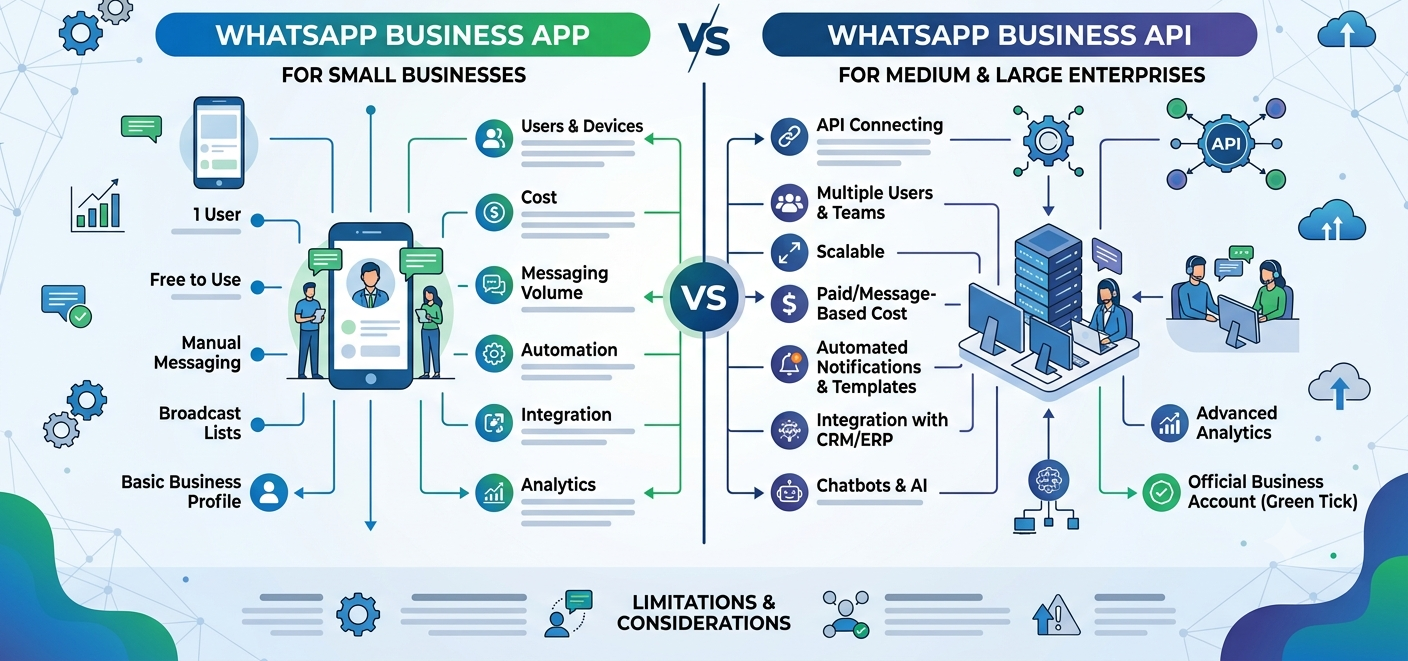
Although both solutions are built for business communication, they serve very different purposes. The app is designed for small businesses handling conversations manually, while the API is built for companies that need automation, integrations, team collaboration, and large-scale messaging.
In this guide, we'll compare WhatsApp Business API vs App, explore their features, limitations, and help you determine which option is best suited for your business.
🤔 Understanding the Difference at a Glance
Before diving into details, it's important to understand the fundamental distinction.
WhatsApp Business App
A free mobile application designed for:
- Small businesses
- Local stores
- Freelancers
- Individual professionals
Communication is mostly manual and managed from a smartphone.
WhatsApp Business API
An enterprise-grade messaging solution designed for:
- Growing businesses
- E-commerce brands
- Educational institutions
- Healthcare organizations
- Enterprises
The API enables automation, CRM integration, chatbots, and multi-agent communication.
⚖️ WhatsApp Business API vs App: Comparison Table
| Feature | WhatsApp Business App | WhatsApp Business API |
|---|---|---|
| Cost | Free | Paid Solution |
| Business Size | Small Businesses | Medium & Large Businesses |
| Multi-Agent Access | Limited | Yes |
| CRM Integration | No | Yes |
| Chatbot Support | No | Yes |
| Automation | Basic | Advanced |
| Bulk Notifications | Not Supported | Supported |
| Analytics | Basic | Advanced |
| Shared Team Inbox | No | Yes |
| API Access | No | Yes |
| Scalability | Low | High |
For businesses expecting growth, the API offers significantly greater flexibility.
🚀 Key Features of WhatsApp Business App
The WhatsApp Business App includes several useful tools for startups and small businesses.
Business Profile
Create a professional profile with:
- Business name
- Website
- Address
- Working hours
Product Catalog
Display products and services directly inside WhatsApp.
Customers can browse offerings without leaving the app.
Quick Replies
Save frequently used responses to answer customers faster.
Example:
"Thank you for contacting us. Our team will respond shortly."
Greeting & Away Messages
Automatically welcome customers or notify them when you're unavailable.
⚠️ WhatsApp Business Limitations
As businesses scale, several challenges emerge.
Single Device Dependency
Managing customer communication through a single device becomes difficult as inquiry volume grows.
Limited Team Collaboration
Customer conversations cannot be efficiently distributed among multiple agents.
No CRM Integration
Customer data remains disconnected from sales and support workflows.
No Advanced Automation
The app lacks sophisticated workflow automation capabilities.
No AI Chatbots
Businesses cannot deploy intelligent conversational experiences directly through the app.
Not Built for Large Volumes
Managing hundreds or thousands of conversations manually becomes inefficient.
💼 Key WhatsApp API Features
The WhatsApp Business API is designed to solve these limitations.
🤖 AI Chatbot Integration
One of the most valuable WhatsApp API features is chatbot automation.
Businesses can automate:
- Customer support
- Lead qualification
- Appointment booking
- Order tracking
- Frequently asked questions
This reduces response times and operational costs.
🔄 Workflow Automation
Automatically send:
- OTPs
- Payment reminders
- Delivery notifications
- Appointment confirmations
- Service updates
without manual intervention.
👥 Multi-Agent Support
Multiple team members can handle customer conversations simultaneously.
Ideal for:
- Customer support teams
- Sales departments
- Service operations
🔗 CRM & Software Integration
The API can integrate with:
- Zoho CRM
- Salesforce
- HubSpot
- Freshworks
- ERP Systems
- Custom Applications
This creates a unified customer communication ecosystem.
📊 Advanced Analytics
Businesses gain visibility into:
- Message delivery rates
- Agent performance
- Customer engagement
- Conversion metrics
This helps optimize communication strategies.
🎯 When Should You Use WhatsApp Business App?
The app is ideal if:
✅ You are a local business
✅ You receive fewer than 50 inquiries daily
✅ You manage conversations yourself
✅ You don't need automation
✅ You don't use CRM software
Examples
- Retail shops
- Freelancers
- Consultants
- Home-based businesses
- Local service providers
🚀 When Should You Upgrade to WhatsApp Business API?
The API becomes essential when:
✅ Customer inquiries exceed manual handling capacity
✅ Multiple team members need access
✅ You want automated notifications
✅ You require chatbot support
✅ CRM integration is important
✅ Customer experience is a business priority
Examples
- E-commerce businesses
- Hospitals
- Educational institutions
- Real estate companies
- Financial service providers
- SaaS businesses
📈 Real Business Growth Scenario
Consider an online retailer.
Stage 1: Startup
- 20 customer inquiries per day
- WhatsApp Business App works perfectly
Stage 2: Growth
- 300+ inquiries per day
- Response delays begin
- Leads are missed
Stage 3: Scale
After implementing WhatsApp Business API:
✔ Automated responses
✔ CRM synchronization
✔ Team collaboration
✔ AI-powered support
✔ Faster lead conversion
The transition enables sustainable growth.
💰 Cost Comparison
WhatsApp Business App
- Free to use
- No setup charges
- Suitable for basic communication
WhatsApp Business API
Potential costs include:
- Setup fees
- Platform subscription
- Meta conversation charges
- Chatbot implementation
- CRM integration
However, the return on investment is often significantly higher due to automation and improved efficiency.
🔒 Security and Reliability
Both solutions benefit from WhatsApp's secure messaging infrastructure.
Features include:
🔒 End-to-End Encryption
🔒 Business Verification
🔒 Secure Communication Channels
🔒 User Privacy Controls
Businesses should always obtain customer consent before initiating conversations.