How AI Chatbots Improve WhatsApp Customer Support: Benefits, Examples and Best Practices
Customer support is not just about answering questions. It is about helping people resolve problems without unnecessary waiting, repeated explanations or confusing processes.
As customer conversations increase, support teams often spend a large part of their day answering the same questions: Where is my order? How do I change an appointment? Why has my payment not been updated? How can I report a technical issue? These enquiries are important, but handling each one manually can slow down the entire support operation.
AI chatbots can help businesses manage these conversations more efficiently on WhatsApp. They can recognise common customer needs, provide answers from approved information, collect relevant details, guide customers through routine tasks and prepare complex cases for human agents.
The biggest improvement does not come from sending more automated messages. It comes from helping customers reach the right answer or next step with less effort.
In this guide, we explain how AI chatbots improve customer support on WhatsApp, where they make the biggest difference, how businesses can use them across industries, which performance metrics to track and how to avoid common implementation mistakes.
Table of Contents
Why customer support operations need to evolve
What AI changes in a customer support conversation
10 ways AI chatbots improve customer support
Real-world examples across industries
Practical customer support conversation examples
AI chatbots versus traditional customer support
How to implement AI-assisted support successfully
Common limitations and risks
Customer support metrics to measure
Best practices for improving results
Frequently asked questions
1. Why Customer Support Operations Need to Evolve
Customers often choose messaging because it lets them ask a question without making a phone call or waiting for an email response. They may send a message while travelling, shopping, working or managing another task.
However, a messaging channel alone does not guarantee a good support experience. Customers can still face delayed replies, inconsistent information, repeated questions and unclear next steps.
Consider a business receiving 500 customer enquiries in a day. Some customers may need a simple policy answer, while others may have a payment dispute, an urgent technical issue or a complaint requiring investigation.
If every conversation enters the same queue and follows the same manual process, the support team may spend valuable time on routine enquiries while complex cases wait.
AI can help separate these needs.
Straightforward questions can receive answers from approved information.
Requests requiring customer details can follow a guided process.
Account-specific questions can retrieve information from connected systems when authorised.
Unusual or sensitive cases can be routed to a human representative.
Repeated customer problems can be identified through conversation analysis.
This approach allows businesses to organise support around the complexity of the request rather than treating every message identically.
Why WhatsApp is useful for customer support
WhatsApp offers a familiar messaging experience. Customers can explain a problem, share relevant information and continue a conversation without necessarily starting from scratch each time.
For businesses, conversations can also provide useful context about the customer's issue, the steps already attempted and the outcome they need.
When an AI system is appropriately connected to business information and support processes, this context can help the business respond more consistently.
The important distinction is that WhatsApp is the communication channel, while the quality of the support process determines whether the customer's problem is actually resolved.
2. What AI Changes in a Customer Support Conversation
Traditional support automation often relies on fixed menus, exact keywords and predefined responses. These can work well for predictable tasks, but they may struggle when customers describe the same problem in different ways.
AI can help interpret the meaning behind a message, identify the likely intent and select an appropriate next step.
For example, a customer might write:
“Where is my package?”
“My order hasn't arrived yet.”
“Can you check the delivery status?”
“Has my shipment been dispatched?”
Although the wording differs, the customer is probably asking about the same underlying issue.
An AI system can recognise this intent and direct the conversation towards the relevant order-checking process. If order information is available through an authorised integration, the system can retrieve the current status.
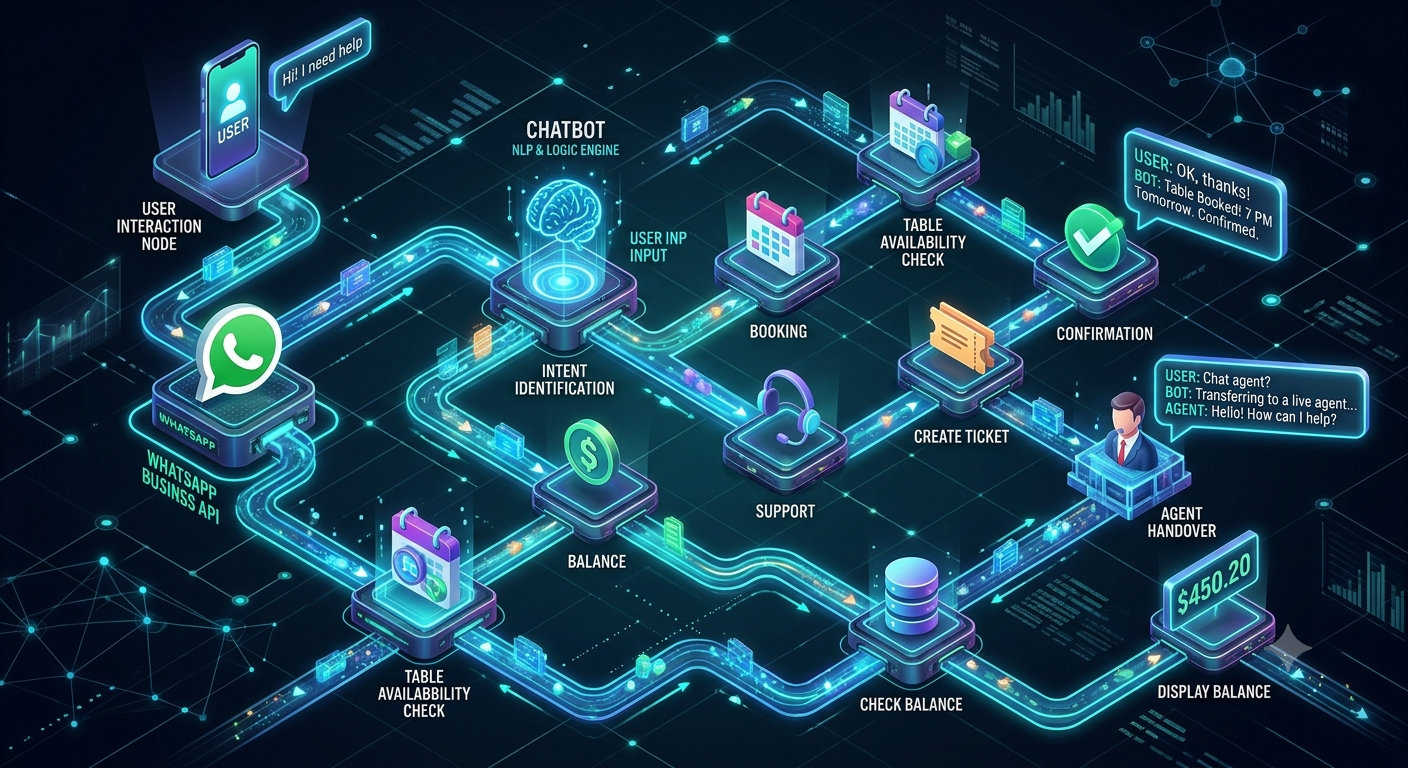
A reliable workflow looks like this:
The customer describes the issue.
The AI identifies the likely intent.
The system checks whether the request can be answered safely.
The chatbot retrieves approved information or asks a necessary follow-up question.
The customer receives an answer or completes the required action.
If the issue remains unresolved, the conversation is routed to a human agent.
AI should not invent information when a system lookup fails or when the answer is uncertain. In those situations, it should explain the limitation and provide a suitable alternative.
AI does not mean every response should be generated freely
A useful customer support system combines flexibility with control.
AI can help understand natural-language questions, while predefined rules govern important actions such as account verification, refund eligibility, appointment confirmation and complaint escalation.
This distinction matters because a plausible-sounding answer is not necessarily a correct answer. Support automation must be judged by the accuracy and usefulness of its outcomes, not merely by how natural its messages sound.
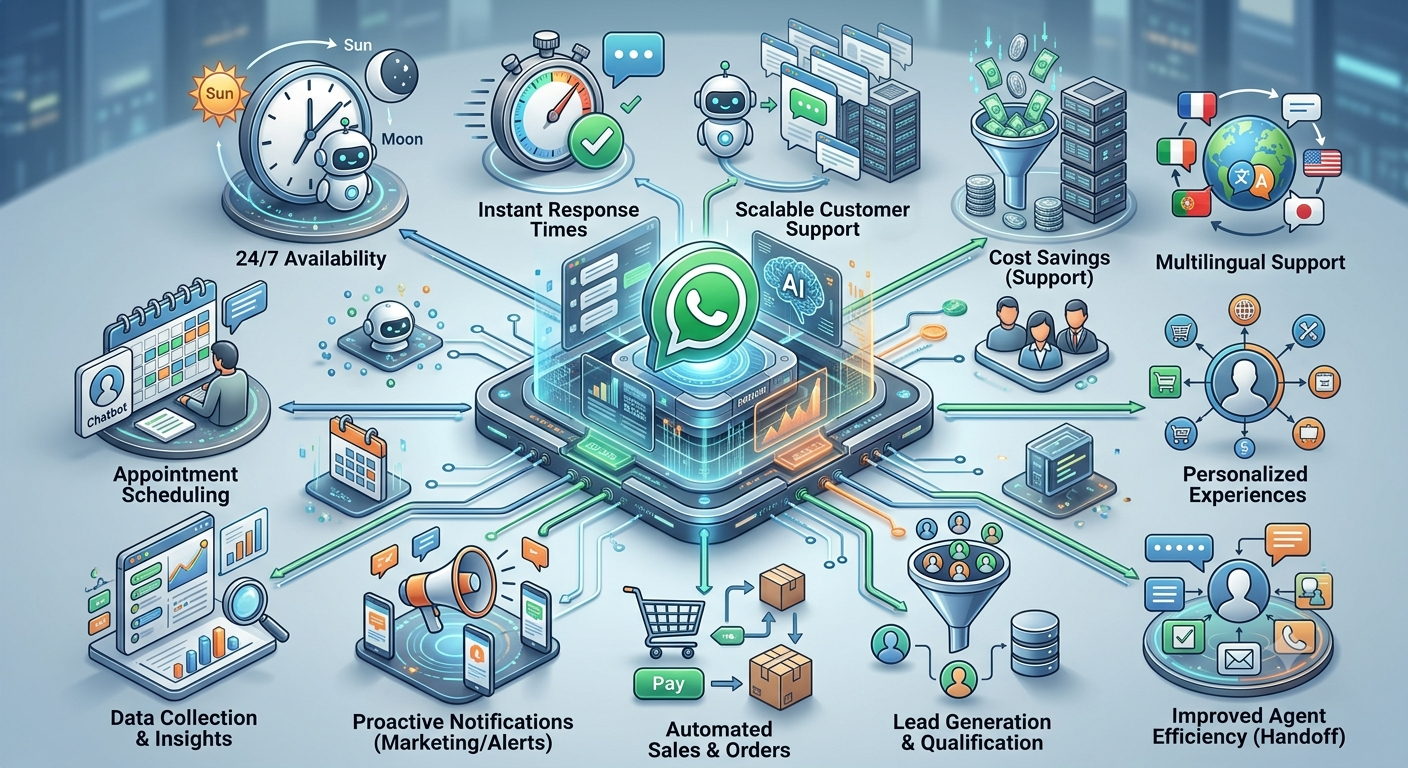
3. 10 Ways AI Chatbots Improve Customer Support on WhatsApp
3.1 Faster handling of routine enquiries
Many customer enquiries involve information that is already documented and does not require individual investigation.
Examples include:
Business hours and location.
Return and exchange policies.
Required documents.
Service availability.
Delivery procedures.
Basic product instructions.
Appointment preparation information.
An AI chatbot can retrieve the relevant approved answer and present it during the conversation.
This reduces the need for a customer to wait for an agent to respond to a straightforward question. It also allows human representatives to focus on issues that require investigation, judgement or coordination.
Example: A customer asks about a store's return window. Instead of waiting in a support queue, the customer receives the current policy and a link to the official returns process.
The benefit depends on maintaining accurate source information. If the policy changes but the chatbot's knowledge remains outdated, automation can spread the wrong answer more quickly.
3.2 Better understanding of customer intent
Customers do not always use the exact terminology a company expects.
A customer might say “I was charged twice,” “There are two payments on my statement” or “Why did the money get deducted again?” These messages may all indicate a possible duplicate charge, but the customer may need to provide more information before the issue can be confirmed.
AI can help identify the likely issue and ask the next relevant question.
For example:
Customer: I think I have been charged twice.
Chatbot: I can help you check this. Are the two charges related to the same order or invoice?
Customer: Yes, the same order.
Chatbot: Please provide the order reference. We'll check the available payment records or connect you with our billing team if further investigation is required.
The chatbot should not declare that a duplicate charge has occurred until the payment records support that conclusion.
3.3 More consistent answers across conversations
Customers may receive different answers when multiple agents interpret the same policy differently. This can create confusion, repeat contacts and unnecessary complaints.
A chatbot using approved information can deliver a consistent explanation for routine questions.
Consistency is particularly useful when businesses handle enquiries across multiple shifts, locations or teams.
However, consistency does not mean every customer should receive the same response regardless of circumstances. The chatbot must account for relevant differences, such as product type, order status, policy eligibility or customer location.
The goal is consistent application of the correct information.
3.4 Less repetitive work for support agents
Support teams often spend time collecting information before they can begin resolving an issue.
A customer reporting a technical problem, for example, may need to provide the product name, account reference, error message and steps already attempted.
A guided conversation can collect those details before the case reaches an agent.
Without structured intake:
The agent asks what happened, requests the order reference, asks for the error message and then discovers the customer has already tried the recommended troubleshooting steps.
With structured intake:
The chatbot gathers the initial details, records the troubleshooting steps already completed and passes the information to the support representative.
The agent can then spend more time investigating the actual problem.
This does not eliminate the need for human support. It reduces the amount of repetitive preparation that happens before meaningful support begins.
3.5 More useful after-hours assistance
Customer enquiries do not always arrive during business hours. A customer may need to check an order in the evening, review a cancellation policy on a weekend or understand what information is required for a service request.
An AI chatbot can provide approved information and guide routine tasks outside normal staffing hours.
For requests that require human intervention, it can collect the necessary details and explain the next step.
For example:
“Your request has been recorded. Our support team will review it during its operating hours. Your reference number is [case ID].”
This is more useful than pretending that an issue has already been resolved.
Round-the-clock automated responses should not be confused with round-the-clock human investigation. Businesses should communicate support hours and escalation arrangements honestly.
3.6 Better preparation before human escalation
Some requests cannot be resolved automatically. Examples include disputed payments, complicated technical faults, exceptions to company policy and complaints that require a manager's review.
AI can still improve the experience by preparing the case.
Before transferring the conversation, it may collect:
A concise description of the problem.
The relevant order, invoice or ticket reference.
The steps already attempted.
The customer's preferred next action.
Relevant conversation context.
The receiving agent should be able to review the information without forcing the customer to repeat everything unnecessarily.
A well-designed handoff also tells the customer what is happening next. If no agent is immediately available, the system should explain how and when the request will be handled according to the business's actual process.
3.7 More accessible support for multilingual customers
Businesses often serve customers who prefer different languages. Language preferences can affect whether customers understand instructions, describe a problem accurately or complete a support task.
An AI system may help interpret or respond in supported languages, depending on its configuration and the quality of its language capabilities.
For example, a customer may ask a question in Hindi while the company's support documentation is maintained in English. A multilingual system may help match the question to the relevant approved answer and explain it in Hindi.
However, language support should be tested rather than assumed. Technical terms, regional expressions, mixed-language messages and sensitive instructions can be misunderstood.
For important policies, financial matters or safety-related information, ensure that translated responses preserve the original meaning.
3.8 Better handling of busy periods
Support demand can rise sharply during product launches, seasonal sales, billing cycles, service interruptions and delivery delays.
When every enquiry must be answered manually, response times can increase as the queue grows.
AI can help manage repetitive questions during these periods by providing verified information, collecting case details and directing customers to the correct process.
For example, during a delivery delay, customers may repeatedly ask whether their orders are affected. If the business has an approved, current service update, the chatbot can share it with relevant customers.
It should not guess an individual delivery date or claim that every order is affected in the same way.
The value comes from handling repeatable tasks at higher volumes while keeping a clear path open for customers with individual problems.
3.9 More context-aware conversations
When appropriately authorised and integrated with customer records, an AI system can use relevant context to avoid asking questions the business already has the answer to.
For example, a customer following up on an existing support case may provide a ticket number. The system can retrieve the case status and explain the next step rather than restarting the entire intake process.
Personalisation should be limited to information that is relevant to the request and permitted for use.
Businesses should not expose account information simply because a person messages from a familiar number. Verification may still be required before showing order, payment or personal details.
3.10 Better visibility into recurring customer problems
Customer conversations can reveal patterns that are difficult to identify when support records are reviewed individually.
With appropriate data handling, businesses can analyse common questions, frequent complaint categories, repeated troubleshooting failures and points where customers abandon a process.
For example, a rise in questions about a payment failure may indicate a problem in the payment journey. A growing number of delivery-related contacts may indicate that shipping information is unclear or that a logistics issue needs investigation.
These insights can help teams improve the underlying service instead of merely responding to the same symptoms.
Conversation analysis should respect privacy requirements, limit access to sensitive information and use reliable definitions when categorising issues.
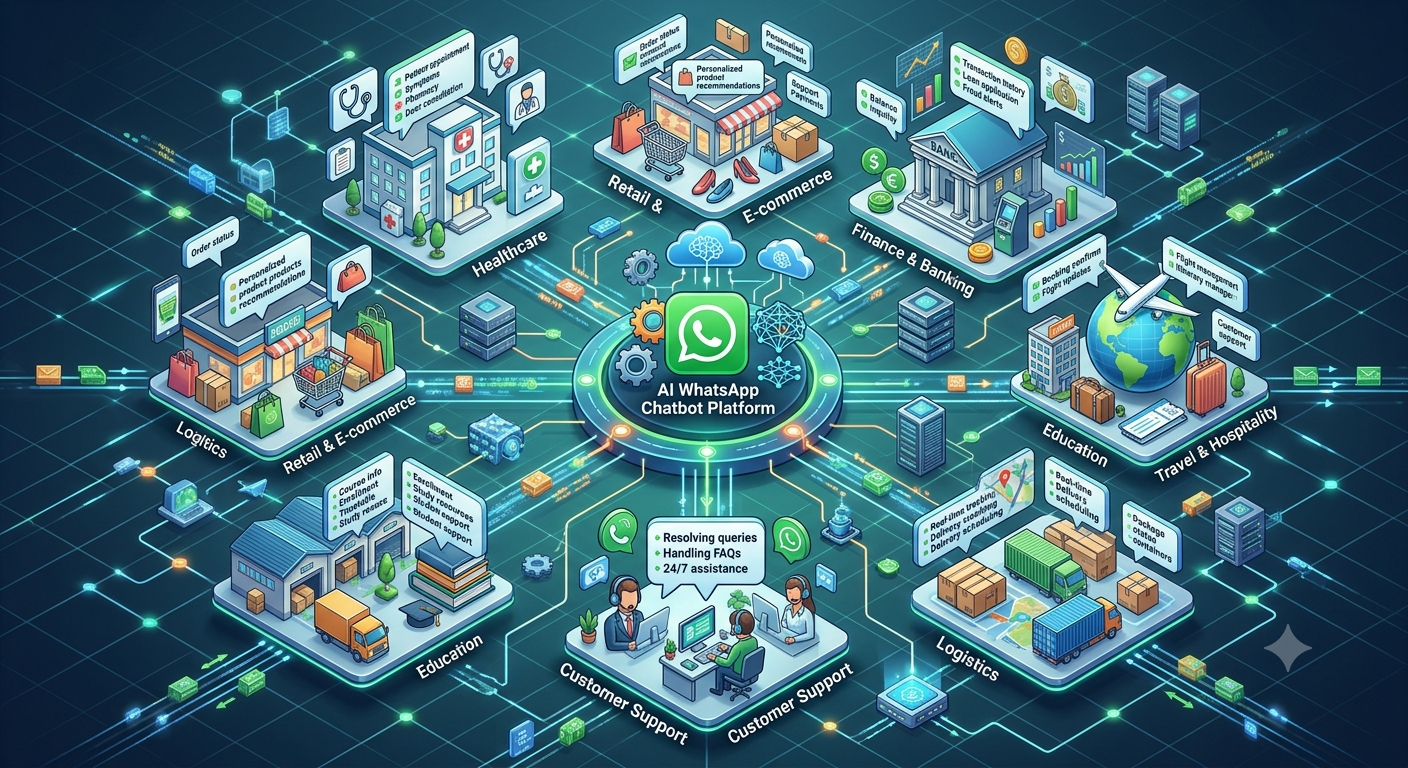
4. Real-World Examples Across Industries
The most useful application of AI depends on the type of support customers need and the business systems available.
E-commerce and online retail
Online shoppers frequently need information about delivery, returns, product availability and order changes.
An AI-assisted support workflow can help customers:
Understand the return process.
Find the correct order-tracking route.
Check order status when authorised system data is available.
Identify what information is needed for an exchange request.
Find answers to product-use questions.
Submit an issue for human review.
Example: A customer says, “My parcel arrived, but one item is missing.”
The chatbot identifies a possible incomplete order, asks for the order reference and explains how to report the missing item. If the business's system supports it, the request can be recorded with the relevant order details and sent to the fulfilment team.
The chatbot should not promise a refund or replacement until the business's rules and investigation process allow it.
Healthcare providers and clinics
Healthcare organisations may use AI-assisted conversations for administrative questions such as appointment information, clinic timings, directions and preparation instructions.
Possible workflows include:
Sharing verified clinic hours.
Helping customers request appointments.
Explaining how to reschedule a booking.
Providing approved administrative instructions.
Directing sensitive questions to qualified staff.
Example: A patient asks to reschedule an appointment. The system checks available booking options, presents the permitted choices and confirms the change only after the appointment system records it.
Healthcare workflows require particular care with personal information. Clinical advice, diagnosis and urgent medical concerns should not be handled as though they were ordinary administrative FAQs.
Banking, financial services and insurance
Financial services customers may need help understanding a statement, checking a claim's status, locating a document or finding the correct support channel.
AI can help explain approved procedures and direct enquiries to the appropriate team.
Example: A customer asks why a claim has not been updated. The chatbot explains how to check the claim status and, after appropriate verification, retrieves the available status or records a request for the claims team.
It should not invent a reason for a delay, promise claim approval or disclose confidential financial information without the required verification.
Education and training institutions
Schools, colleges and training providers receive repeated questions about timetables, course requirements, admission procedures, documents and fee deadlines.
A support workflow can direct students and parents to verified information, explain administrative processes and route exceptions to staff.
Example: A student asks which documents are required for enrolment. The chatbot provides the current checklist for the selected programme and links to the official instructions.
If the student's eligibility requires individual assessment, the chatbot should refer the question to the admissions team rather than making an unsupported decision.
Travel and hospitality
Travel and hospitality businesses handle questions about reservations, check-in instructions, itinerary changes and service availability.
A chatbot can explain standard policies, retrieve reservation details after appropriate verification and direct customers to staff when a booking requires manual changes.
Example: A guest asks whether late check-in is possible. The chatbot shares the property's verified policy and, if necessary, sends the request to the relevant team for confirmation.
It should not guarantee a room change, refund or special arrangement unless the responsible system or team has approved it.
Telecommunications and internet services
Customers may report connectivity issues, billing questions, service interruptions and installation delays.
A structured support process can identify the problem category, gather the relevant service reference and guide the customer through approved troubleshooting.
Example: A customer reports that their internet connection has stopped working. The chatbot checks whether there is a known outage, if that information is available, and provides the appropriate next step.
If troubleshooting fails, it creates or routes a support request with the details already collected.
Software and technology companies
Software businesses often receive enquiries about login problems, feature behaviour, integrations and error messages.
An AI-assisted support workflow can search approved documentation, ask for the relevant product version and help the customer follow documented troubleshooting steps.
Example: A customer cannot export a report. The chatbot asks which screen they are using, checks the documented export procedure and provides the relevant steps. If the problem persists, it records the error details and routes the issue to technical support.
The chatbot should distinguish a documented workaround from a confirmed fix.
5. Practical Customer Support Conversation Examples
These examples show how an AI-assisted support interaction can be structured. They are illustrative templates, not claims about actions a system can perform without the required integration.
Example A: Order delay
Customer: My order hasn't arrived. Can you help?
Chatbot: I'm sorry your order is delayed. I can help you check its status. Please share your order reference.
Customer: ORD-2458.
Chatbot: Thank you. I'll check the available order information.
After a successful order lookup:
Your order is currently marked as [verified status]. The latest available update is [verified update].
Would you like to review the tracking information or contact our support team?
View tracking
Contact support
Why this works: The conversation identifies the problem, checks the actual record and offers an appropriate next action without inventing a delivery estimate.
Example B: Technical problem
Customer: I can't log in to my account.
Chatbot: I can help you troubleshoot this. Which situation best describes the problem?
I forgot my password.
I am not receiving the verification code.
I see an error message.
Something else is happening.
Customer selects “I see an error message.”
Chatbot: Please share the error message, but do not send your password or any one-time verification code.
After receiving the information:
Based on the message you shared, try the following documented steps: [approved troubleshooting steps].
Did this solve the issue?
Yes, it works now.
No, I still need help.
If unresolved:
I'll pass the issue details to our technical support team so they can investigate further.
Why this works: The chatbot collects useful diagnostic context while avoiding requests for authentication secrets.
Example C: Billing dispute
Customer: My invoice amount looks wrong.
Chatbot: I can help direct this to our billing team. Please share the invoice reference so we can identify the relevant record.
After the necessary verification:
Thank you. Would you like to:
Review the available invoice details.
Submit a billing query.
Speak to the billing team.
Customer selects “Submit a billing query.”
Chatbot: Please briefly describe what you believe is incorrect.
After the billing system creates a case:
Your billing query has been recorded under reference [case ID]. The billing team will review the details according to its support process.
Why this works: The chatbot collects the information needed to begin an investigation but does not make an unsupported judgement about the invoice.
Example D: Appointment rescheduling
Customer: I can't attend my appointment tomorrow. Can I change it?
Chatbot: I can help you check the rescheduling options. Please provide your booking reference.
After verification:
Your current appointment is listed for [verified date and time].
Available alternatives are:
[Available option 1]
[Available option 2]
Speak to the booking team
Customer selects an available option.
Chatbot: Would you like to request this change?
After the booking system confirms the change:
Your appointment has been rescheduled to [confirmed date and time]. Your reference is [booking reference].
Why this works: The customer receives relevant options, and the final confirmation is sent only after the change is recorded.
6. AI Chatbots Versus Traditional Customer Support
AI should not be treated as a replacement for every part of customer service. Different tasks need different levels of automation and human judgement.
Support task | AI-assisted automation | Human support |
|---|---|---|
Repetitive FAQs | Can answer from approved information | Reviews unusual or disputed answers |
Routine status checks | Can retrieve information through authorised integrations | Investigates missing or inconsistent records |
Initial issue collection | Can gather structured details | Clarifies complex circumstances |
Standard troubleshooting | Can guide customers through documented steps | Handles failures and unusual technical problems |
Complaints | Can categorise and record the issue | Investigates, exercises judgement and resolves exceptions |
Sensitive account matters | Can guide the customer through approved verification | Handles exceptions and complex decisions |
Emotional or high-stakes interactions | Can recognise a need for escalation when configured appropriately | Provides empathy, context and judgement |
Unusual requests | Can ask clarifying questions or provide a fallback | Determines the appropriate response |
The most effective model is usually a division of responsibilities.
Automation handles tasks that are repeatable, well-defined and supported by reliable information. People handle tasks where context, discretion, empathy or accountability matters.
When should a conversation be escalated?
A business should define escalation rules before launching its AI support system.
Consider transferring the conversation when:
The customer explicitly requests a person.
The issue remains unresolved after the permitted troubleshooting steps.
The answer depends on a policy exception or discretionary decision.
The customer reports a serious complaint.
The system cannot verify the required information.
The chatbot is uncertain or the connected system fails.
The request involves a sensitive or high-risk situation.
Escalation is not necessarily a failure. In many situations, identifying the limits of automation and reaching the right human is the correct outcome.
7. How to Implement AI-Assisted WhatsApp Support Successfully
A useful implementation begins with the customer problems that the business wants to solve, not with a decision to automate everything.
Step 1: Review existing support enquiries
Start by examining recent support conversations, helpdesk tickets, email enquiries and call reasons.
Group them into categories such as:
General information.
Order or booking status.
Product-use questions.
Billing and payment.
Technical troubleshooting.
Complaints and exceptions.
Estimate which categories are frequent, predictable and suitable for automation. Identify the enquiries that need human judgement or access to sensitive systems.
This gives the business a practical starting point.
Step 2: Select one high-value workflow
Choose a common problem with a clear outcome.
For example, a retailer may begin with order-status enquiries, while a clinic may begin with appointment information and rescheduling requests.
A good first workflow has:
A clearly defined customer objective.
Reliable source information.
A manageable number of decision points.
A suitable fallback.
A clear success condition.
An escalation route.
Avoid starting with a complex workflow that depends on several unreliable systems or discretionary approvals.
Step 3: Prepare an approved knowledge source
The chatbot needs reliable information to answer questions accurately.
Create or organise approved content covering the relevant policies, procedures, product instructions and common questions.
For each important answer, define:
The approved wording or source.
Who owns the information.
How frequently it should be reviewed.
Which customer situations it applies to.
What the chatbot should do if the answer is missing or ambiguous.
Do not assume that connecting a large collection of documents automatically creates a reliable support experience. The content needs to be current, relevant and suitable for the intended use.
Step 4: Map the workflow and decision rules
Define the conversation path before deployment.
For every step, decide what the chatbot needs to know, which answer it can provide, what action it can take and when it must stop or escalate.
Include unexpected situations such as missing references, failed verification, conflicting records and unavailable services.
A support workflow should always have a reasonable recovery path. Customers should not be trapped in a loop when the system cannot complete a task.
Step 5: Connect the relevant business systems
Some questions can be answered from approved static information. Others depend on current records.
For example:
Order questions may require an e-commerce or fulfilment system.
Booking changes may require a live calendar.
Billing queries may require invoice records.
Technical problems may require a ticketing system.
Account-related enquiries may require an authorised verification process.
Define which information the chatbot may retrieve and which actions it may perform.
Apply access controls, logging and verification appropriate to the sensitivity of the data.
Step 6: Define safe limits for AI responses
Specify which subjects the chatbot may answer independently, which require a source lookup and which must be escalated.
For example, the chatbot may explain a standard refund policy but should not approve an exception unless the relevant process authorises it.
It may retrieve a delivery status but should not invent a delivery date.
It may provide documented troubleshooting instructions but should not claim that a technical issue has been fixed unless the outcome is confirmed.
Clear boundaries make the system more trustworthy.
Step 7: Test with realistic conversations
Test the workflow using examples of how customers actually communicate.
Include:
Short and incomplete messages.
Spelling errors and informal language.
Multiple questions in one message.
Unclear or contradictory details.
Requests outside the chatbot's scope.
Incorrect references.
Failed API calls.
Requests to speak to a person.
Sensitive information that should not be requested or exposed.
Check not only whether the chatbot sends a response but also whether the response is correct, relevant and useful.
Step 8: Launch with clear ownership
Decide who is responsible for maintaining the chatbot's knowledge, reviewing escalations and correcting problems.
The support team should know how to identify an incorrect answer, report a broken workflow and update approved information.
Begin with a manageable scope and expand once the business has evidence that the first workflow performs reliably.
Step 9: Review outcomes and improve
After launch, examine the questions the chatbot cannot answer, the steps where customers abandon conversations and the cases that require repeated human intervention.
Update the content, simplify confusing questions and improve routing rules.
Do not optimise solely for the number of conversations handled automatically. A chatbot that prevents customers from reaching support may show a low escalation rate while delivering a poor experience.
8. Common Limitations and Risks
AI can improve customer support, but it also introduces risks that need to be managed.
Incorrect or unsupported answers
AI can generate a plausible answer that is not supported by the available information.
How to reduce the risk: Ground answers in approved sources, test common and unusual questions, restrict unsupported claims and escalate when reliable information is unavailable.
Outdated information
A chatbot may continue using old prices, procedures or policies if the source content is not updated.
How to reduce the risk: Assign content owners, schedule reviews and connect dynamic questions to current business records wherever appropriate.
Poor handling of complex cases
A system may repeatedly suggest the same steps even when the customer's situation requires investigation.
How to reduce the risk: Define clear escalation triggers and stop repetitive troubleshooting when the permitted steps have failed.
Privacy and security concerns
Customer conversations may contain personal information, financial details, account references or other sensitive data.
How to reduce the risk: Collect only what is needed, apply appropriate verification, limit access to records and establish suitable retention and security practices. Never ask customers to share passwords or one-time verification codes in ordinary chat.
Over-automation
Automating every interaction can make the experience frustrating when customers need flexibility or empathy.
How to reduce the risk: Give customers an accessible route to human assistance and allow exceptions to leave the automated workflow.
Misleading performance claims
A high number of automated responses does not necessarily mean a high number of resolved problems.
How to reduce the risk: Define resolution clearly and compare automation metrics with customer feedback, repeat contacts and case outcomes.
Dependence on integrations
If the order, booking or ticketing system is unavailable, the chatbot may be unable to complete a task.
How to reduce the risk: Add failure handling, avoid false confirmations and explain the alternative process to the customer.
9. Customer Support Metrics to Measure
Businesses should measure whether AI is improving the customer experience and the support team's ability to resolve problems.
Metric | What it tells you | How to interpret it |
|---|---|---|
First response time | How long customers wait for an initial response | Lower waiting time may improve the experience, but the response must also be useful |
Resolution time | Time from the start of a case to its resolution | Compare similar issue types and account for cases requiring investigation |
First-contact resolution | Cases resolved during the initial support interaction | Define what counts as resolved and check whether the customer needed to return |
Repeat contact rate | Customers who contact support again about the same unresolved issue | A rising rate may indicate incomplete answers or unresolved problems |
Customer satisfaction (CSAT) | Customer feedback after support | Review results by issue type, channel and outcome |
Escalation rate | Conversations transferred to human support | Interpret alongside resolution and satisfaction; lower is not always better |
Containment rate | Conversations completed without human handoff | Count only cases meeting the defined completion criteria |
Fallback rate | Conversations where the system could not proceed as intended | Review recurring unknown questions and integration failures |
Reopen rate | Cases reopened after being marked resolved | Can reveal premature closure or incomplete fixes |
Cost per resolved case | Support cost associated with a successfully resolved case | Include relevant operating and maintenance costs, not just message volume |
A practical example of measurement
Suppose a company introduces automation for order-status questions.
Before deployment, the team records the typical response time, repeat-contact rate and customer satisfaction for that category.
After deployment, it measures the same indicators for comparable enquiries.
If initial responses become faster but repeat contacts increase, the chatbot may be giving incomplete or unclear answers. If routine questions are resolved successfully and agents spend less time collecting information, the workflow may be delivering a more meaningful improvement.
The business should review the complete picture instead of celebrating one metric in isolation.
Measure the impact on the support team too
Customer outcomes are only part of the evaluation. Businesses can also measure whether support agents spend less time on repetitive intake, whether case notes are more complete and whether complicated issues reach the right team sooner.
These operational indicators help identify where automation genuinely improves the workflow and where further changes are needed.
10. Best Practices for Sustainable Results
Keep messages short and clear
Use simple wording and ask for one piece of information at a time when possible. Long, complicated messages can make it harder for customers to understand what they need to do.
Give customers a way out
Allow them to request a human representative, change their selection or leave a workflow that does not match their needs.
Make the next step explicit
Tell customers whether the system has answered their question, submitted a request, confirmed a booking or simply recorded a query for later review.
Keep dynamic information connected to its source
If an answer depends on current stock, an order status, a payment record or a booking calendar, retrieve the information from the appropriate system when possible.
Review unanswered questions regularly
Unanswered questions often reveal gaps in documentation, unclear policies or new customer needs. Use these patterns to improve both the chatbot and the underlying support process.
Train support agents to work with AI
Human representatives should understand what information the chatbot collects, what it can and cannot confirm, and how to review an escalated conversation.
A good handoff depends on the human team being prepared to continue the conversation.
Respect customer preferences and platform rules
Follow the applicable WhatsApp messaging policies, respect opt-outs and use the correct procedures for business-initiated messages. Avoid repeated, irrelevant follow-ups that create frustration.
Treat customer feedback as a source of improvement
When customers say that an answer was confusing or that they had to repeat information, investigate the underlying workflow rather than simply changing the wording.
11. How Nexcomm Fits Into the Customer Support Journey
Once a business has identified the support problems it wants to address, the next step is to assess how those workflows can be implemented within its existing operations.
Nexcomm's customer conversation solution is relevant for businesses evaluating ways to organise WhatsApp interactions, handle routine enquiries and connect conversations with their support processes.
Before implementation, businesses should confirm that the proposed setup supports the workflows they need, the necessary integrations, the appropriate handoff process and the required privacy controls.
The right implementation should be based on a practical assessment:
Which customer questions occur most frequently?
Which answers can be provided from approved information?
Which requests require live system data?
Which issues must be reviewed by a human?
How will the business verify that a case is resolved?
Which metrics will determine whether the implementation is successful?
This keeps the focus on solving real support problems rather than adopting automation simply for its own sake.
12. Frequently Asked Questions
How do AI chatbots improve customer support on WhatsApp?
AI chatbots can interpret common customer questions, provide approved information, collect details before a case reaches an agent and guide customers through routine tasks. When connected to suitable business systems, they can also retrieve current records and initiate supported actions.
Their effectiveness depends on the quality of the information, the reliability of integrations and the design of the escalation process.
Can AI chatbots replace human customer support agents?
AI can handle some repetitive and predictable interactions, but it should not replace human judgement in every situation. Complex complaints, exceptions, sensitive cases and problems requiring investigation often need a person.
A well-designed support process combines automation with accessible human assistance.
Can an AI chatbot answer customer questions outside business hours?
Yes. A chatbot can provide approved information and guide supported tasks outside normal operating hours. Requests requiring investigation can be recorded for follow-up, provided the business has an appropriate process.
Businesses should clearly distinguish an automated acknowledgement from a confirmed resolution.
Can AI chatbots resolve customer complaints?
They can help categorise a complaint, collect relevant details, provide an approved explanation and submit a case to the appropriate team. Some straightforward complaints may be resolved through a defined workflow.
Complaints requiring investigation, discretion or an exception to policy should be routed to an authorised human representative.
How do AI chatbots reduce the workload of customer support teams?
They can handle repetitive questions, collect relevant information before escalation and guide customers through documented processes. This can reduce the amount of manual intake and repetitive answering performed by support agents.
The actual workload reduction depends on how many enquiries are suitable for automation and whether the chatbot resolves them accurately.
Can AI chatbots understand different languages?
Some AI systems can interpret and respond in multiple languages, including supported regional languages. Performance depends on the model, configuration, source material and the way customers phrase their questions.
Businesses should test the languages their customers use and verify important translations.
How can businesses ensure that chatbot answers are accurate?
Use approved and current information, define the topics the chatbot can answer, connect dynamic queries to trusted systems and test the responses against representative customer questions.
The chatbot should admit when it cannot find a reliable answer and offer an appropriate escalation route.
Which industries benefit from AI-assisted customer support?
E-commerce, healthcare administration, education, financial services, telecommunications, travel, hospitality, software companies and many service businesses can benefit.
The best opportunities are usually repetitive, clearly defined support tasks where accurate information is available and the business can establish a reliable outcome.
How should a business measure whether its AI chatbot is successful?
Track response time, resolution time, first-contact resolution, repeat contacts, customer satisfaction, escalation rate and the cost per resolved case.
Define each metric consistently and evaluate them together. A high automation or containment rate alone does not prove that customers are receiving good support.
What happens when an AI chatbot does not understand a question?
It should ask a clarifying question, offer a simpler route or explain that it cannot answer reliably. If the issue remains unresolved, it should provide an appropriate path to human support.
Repeatedly returning the same fallback message without helping the customer move forward is a sign that the workflow needs improvement.
Is customer information safe when using an AI chatbot?
Safety depends on the implementation, the data collected, access controls, system integrations and applicable privacy obligations. Businesses should minimise unnecessary data collection, verify identity before disclosing sensitive records and establish suitable security and retention practices.
They should also review the privacy and data-handling arrangements of the systems used to process customer conversations.
How long does it take to implement AI-assisted customer support?
The timeline depends on the complexity of the workflow, the readiness of the knowledge base, the integrations required, testing needs and the level of review required by the business.
A straightforward FAQ workflow may be simpler to implement than a process involving financial records, booking changes or multiple backend systems. The business should plan enough time for testing and operational preparation rather than choosing a launch date based only on the chatbot's initial configuration.
Conclusion
AI chatbots can improve WhatsApp customer support by helping customers find answers, reducing repetitive manual work, collecting useful information and directing complex issues to the right people.
However, successful automation is not measured by how many messages a chatbot sends or how many conversations it keeps away from human agents. It is measured by whether customers get accurate information, complete the task they came to perform and know what to do when a problem needs further attention.
Businesses should start with a clear support problem, use reliable information, connect the systems needed for real actions, define safe escalation rules and measure outcomes over time.
When these foundations are in place, AI can become a practical part of a better support operation—helping customers move forward while allowing human teams to focus on the cases where their expertise matters most.
To explore how these workflows could fit your business, visit Nexcomm's customer conversation solution.
Related reading
WhatsApp Chatbot Conversation Flow Examples — examples of structured customer journeys.
How to Build an AI WhatsApp Chatbot — a practical guide to planning and implementing an AI chatbot.
What Is an AI WhatsApp Chatbot and How Does It Work? — an introduction to the underlying technology.