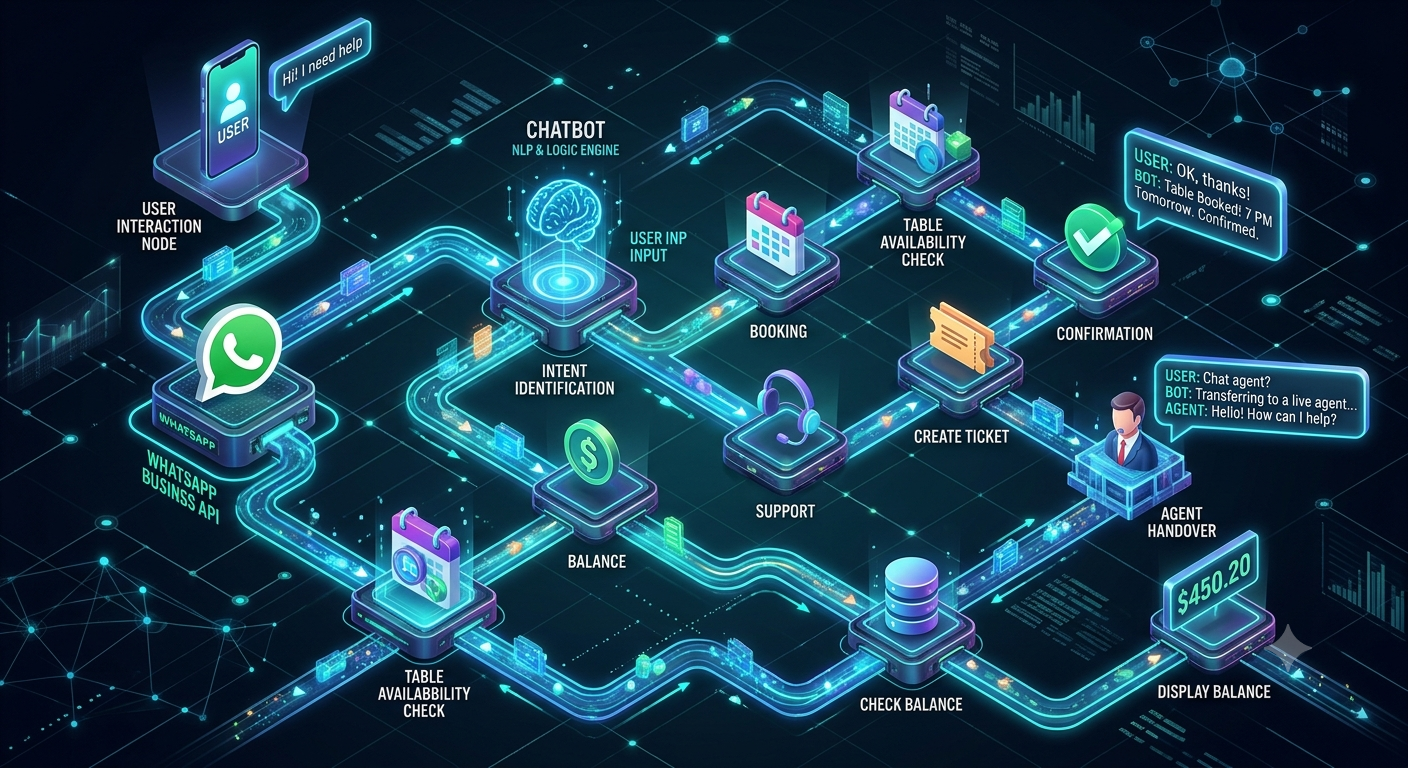
WhatsApp Chatbot Conversation Flow Examples: 15 Ready-to-Use Templates for Businesses
New to this topic? Start with our guide to what an AI WhatsApp chatbot is and how it works.
A WhatsApp chatbot is only as effective as the conversation flow behind it. Even a feature-rich chatbot can frustrate customers if it asks confusing questions, provides irrelevant responses, or makes it difficult to reach a real person.
A well-designed WhatsApp chatbot conversation flow guides customers from their first message to the next useful action. Depending on the business, that action could be requesting a quotation, booking an appointment, tracking an order, resolving a support issue, exploring a product or speaking with a sales representative.
Businesses can use WhatsApp chatbot flows to automate customer support, qualify leads, manage enquiries, schedule appointments, recommend products and improve customer communication without manually handling every conversation.
In this guide, you will find practical WhatsApp chatbot conversation flow examples, ready-to-use WhatsApp chatbot scripts, industry-specific templates, branching logic, AI chatbot workflows, and best practices for building conversations that are easy for customers to complete.
Whether you run an e-commerce store, real estate company, educational institution, healthcare practice, service business or B2B company, these templates will help you plan a chatbot experience around your customers' needs.
If you are looking for a platform to implement these workflows, explore Nexcomm's WhatsApp API chatbot service.
Table of Contents
What is a WhatsApp chatbot conversation flow?
How does a WhatsApp chatbot conversation flow work?
Essential components of an effective chatbot flow
15 WhatsApp chatbot conversation flow examples and templates
WhatsApp chatbot conversation flow for lead generation
Rule-based chatbots vs AI-powered chatbots
How to create a WhatsApp chatbot conversation flow
Best practices for designing chatbot conversations
Common chatbot flow mistakes to avoid
How to measure chatbot performance
How Nexcomm can help businesses automate WhatsApp conversations
Frequently asked questions
1. What Is a WhatsApp Chatbot Conversation Flow?
A WhatsApp chatbot conversation flow is a structured sequence of messages, questions, responses and actions that guides a customer through an automated conversation on WhatsApp.
It defines how the chatbot greets a user, identifies what the user wants, collects relevant information, provides an answer and determines the next step.
For example, an online store might use this flow:
Customer opens WhatsApp → Selects Track My Order → Enters Order ID → Receives Order Status → Requests Human Support if Needed.
A real estate company could use a different flow:
Customer enquires about a property → Selects Property Type → Shares Budget and Preferred Location → Views Matching Properties → Books a Site Visit.
Both workflows use the same messaging channel, but their questions, decision points and business outcomes are different.
A WhatsApp chatbot conversation flow can be built using predefined rules, interactive buttons, lists, API integrations or AI-powered intent recognition. Some businesses combine these approaches, using structured flows for predictable tasks and AI for questions that require more flexible responses.
Why do businesses need chatbot conversation flows?
A properly planned flow helps businesses:
Respond to routine enquiries without requiring an agent for every message.
Collect lead information in a structured format.
Guide customers towards relevant products or services.
Automate bookings, order updates and frequently asked questions.
Route conversations to the appropriate department.
Maintain a consistent customer experience.
Reduce repetitive manual work.
Identify where customers abandon a conversation and improve the experience.
The objective is not to automate every interaction. It is to make common tasks easier while keeping human assistance available whenever it adds value.
2. How Does a WhatsApp Chatbot Conversation Flow Work?
A typical WhatsApp chatbot follows a series of steps. The exact implementation depends on whether the business uses a simple rule-based chatbot, an AI-powered chatbot or a combination of both.
Step 1: A customer starts the conversation
A conversation may begin when someone messages a business directly, scans a WhatsApp QR code, clicks a website chat link or responds to an eligible business message.
Example:
Customer: Hi, I want to know more about your services.
Step 2: The chatbot welcomes the customer
The chatbot acknowledges the message and provides clear options.
Chatbot:
Hello! Welcome to ABC Solutions.
How can we help you today?
Explore our services
Request pricing
Book a demo
Speak to our team
The options help the customer identify the right path without having to guess what to type.
Step 3: The chatbot identifies the customer's intent
The chatbot determines whether the user needs sales assistance, support, product information, an appointment or another service.
A rule-based chatbot may identify the intent through button selections and predefined keywords. An AI-powered chatbot may also interpret natural-language messages such as “I need to know how much this costs” or “Can someone explain your plans?”
Step 4: The chatbot asks relevant questions
The next question should depend on the user's selection.
For example, someone requesting pricing might be asked about the service they need, their approximate usage and their business requirements.
A customer seeking support should not have to answer sales qualification questions first.
Step 5: The chatbot provides information or triggers an action
Depending on the flow, the chatbot may:
Display relevant information.
Share a product catalogue or brochure.
Retrieve order information through an API.
Record a lead in a CRM.
Schedule an appointment.
Send a confirmation.
Route the conversation to an agent.
Step 6: The chatbot confirms the next step
Every important workflow should finish with a useful confirmation.
For example:
“Thank you! Your request has been received. Our team will review your requirements and contact you through the details you provided.”
If the chatbot cannot resolve the query, it should explain how to get human assistance rather than leaving the customer stuck.
3. Essential Components of an Effective WhatsApp Chatbot Flow
Before creating templates, define the components that make the conversation understandable and useful.
3.1 Welcome message
The welcome message introduces the business and explains what the chatbot can help with.
A good welcome message is short, friendly and action-oriented.
Example:
“Hello! Welcome to ABC Store. I can help you find products, check orders, understand our return policy or connect you with our support team. What would you like to do?”
Avoid long introductions that force customers to read a paragraph before they can take action.
3.2 Intent selection
Intent selection identifies the customer's primary objective.
Common options include:
Sales enquiry
Product information
Pricing
Order tracking
Appointment booking
Technical support
Billing assistance
Speak to an agent
Keep the initial menu focused. If a business has many departments, group related options into categories instead of displaying every possible action at once.
3.3 Information collection
The chatbot should collect only the information required to complete the selected task.
For example, a lead generation flow may ask for a name, business type and service requirement. An order tracking flow may need an order reference and a suitable verification step.
Do not ask for sensitive information simply because the chatbot can collect it. Explain why necessary details are required and handle personal information appropriately.
3.4 Conditional branching
Conditional branching means the next step changes according to the user's answer.
For example:
If the customer selects “New Purchase,” show product discovery options.
If the customer selects “Existing Order,” show tracking and returns.
If the customer selects “Speak to Support,” route the conversation to an agent.
If the customer enters an invalid order number, explain how to correct it.
This makes the chatbot feel relevant rather than forcing every user through the same script.
3.5 Fallback responses
A fallback response handles messages that the chatbot cannot understand or process.
Example:
“Sorry, I couldn't identify what you need. Please choose one of the options below, or type ‘Agent’ to speak with our team.”
A good fallback helps customers recover. It should not repeat the same unhelpful response indefinitely.
3.6 Human handoff
Some conversations require judgment, empathy, investigation or approval.
Provide an option to contact a human representative, especially for complaints, complex technical problems, billing disputes and unusual requests.
When transferring a conversation, pass the available conversation history and relevant details to the agent so the customer does not have to explain everything again.
3.7 Confirmation and closure
A completed flow should confirm what happened and tell the customer what to expect next.
For example, an appointment booking confirmation should state the selected date, time and any necessary next steps. A support flow should provide a reference number if one is generated by the connected system.
A chatbot should not claim that an order, booking, payment or request has been completed unless the relevant system has confirmed it.
4. 15 WhatsApp Chatbot Conversation Flow Examples and Templates
The following examples can be adapted for different industries. Replace the placeholders with your business information and adjust the questions to match your actual processes.
Example 1: WhatsApp Chatbot Welcome Message
Best for: Businesses receiving enquiries from websites, advertisements, QR codes and WhatsApp links.
Objective: Help users quickly choose the correct conversation path.
Conversation flow
Customer starts chat → Welcome message → Selects an option → Enters the relevant flow.
Ready-to-use template
Chatbot:
Hello! 👋 Welcome to [Company Name].
Thanks for reaching out. How can we help you today?
Explore our products or services
Request pricing
Book an appointment or demo
Get customer support
Speak to our team
If the customer selects “Explore our products or services”:
Great! What are you interested in?
[Product or Service A]
[Product or Service B]
[Product or Service C]
If the customer selects “Speak to our team”:
Of course. Please briefly tell us what you need help with so we can connect you with the right person.
Flow design tips
Keep the greeting concise.
Use labels customers immediately understand.
Do not display options that the business cannot actually fulfil.
Offer a fallback for customers who type a message instead of selecting an option.
If the business has several product categories, use a second menu rather than an overloaded first menu.
Example 2: WhatsApp Chatbot for Lead Generation
Best for: B2B companies, service providers, agencies, software businesses and professional services.
Objective: Capture relevant enquiries and route qualified prospects to the sales team.
Conversation flow
Welcome → Identify requirement → Ask qualifying questions → Capture contact details → Assign lead → Arrange follow-up.
Ready-to-use template
Chatbot:
Hello! 👋 Thanks for your interest in [Company Name].
I can help you find the right solution.
What would you like to do?
Get pricing
Explore services
Book a demo
Speak to sales
Customer selects “Get pricing.”
Chatbot:
Certainly! Which solution are you interested in?
[Service A]
[Service B]
[Service C]
Not sure yet
Chatbot:
Thanks! Could you tell us a little about your requirement?
Customer: We need a solution for our business.
Chatbot:
Understood. What best describes your organisation?
Small or medium-sized business
Enterprise
Agency or reseller
Other
Chatbot:
What is your approximate requirement?
Getting started
Moderate usage
High-volume requirement
Need help estimating
Chatbot:
Thank you. May I have your name and business email or preferred contact details so our team can follow up?
Chatbot:
Thanks, [Name]. Your enquiry has been recorded. Our team will review your requirement and contact you using the details provided.
Recommended backend actions
When a lead completes the flow, the chatbot can:
Create or update a CRM record.
Store the service category and qualification answers.
Assign the enquiry to the appropriate salesperson.
Record the lead source, where available.
Create a follow-up task.
Notify the sales team.
Track whether the lead progresses to a demo, quotation or sale.
Important: Collect only the information needed for follow-up. Do not promise a response time unless your team can consistently meet it.
Example 3: WhatsApp Chatbot for Customer Support
Best for: Businesses receiving repeated product, service, account and technical questions.
Objective: Resolve common issues quickly and route unresolved cases to the right team.
Conversation flow
Welcome → Identify issue → Ask for relevant details → Provide answer or troubleshooting → Confirm resolution → Escalate if needed.
Ready-to-use template
Chatbot:
Hello! Welcome to [Company Name] Support.
How can we help you today?
Product or service question
Technical issue
Billing or payment
Account assistance
Existing support request
Speak to an agent
Customer selects “Technical issue.”
Chatbot:
Sorry you're experiencing a problem. Which issue best describes your situation?
Unable to log in
Feature not working
Error message
Something else
Chatbot:
Please briefly describe the problem. If an error message appears, you can share its text or an appropriate screenshot.
Chatbot after receiving the information:
Thank you. Here are the suggested troubleshooting steps:
Check that your internet connection is working.
Refresh the application or sign in again if appropriate.
Note any error message that remains.
Did this resolve the issue?
Yes, it's resolved
No, I still need help
If “No, I still need help”:
I'll help you connect with our support team. Your conversation details will be passed along where supported, so you won't need to start from scratch.
Why this flow works
It separates common issues from cases that need human investigation. It also gathers context before escalation, reducing repetitive questioning.
For account-related issues, use appropriate verification before revealing personal or confidential information.
Example 4: WhatsApp Chatbot for E-commerce Order Tracking
Best for: Online retailers, direct-to-consumer brands and online marketplaces.
Objective: Answer order-related questions and reduce repetitive tracking enquiries.
Conversation flow
Welcome → Select order assistance → Enter order reference → Verify customer where necessary → Retrieve status → Provide update or escalate.
Ready-to-use template
Chatbot:
Hi! Welcome to [Store Name]. What can we help you with?
Track my order
Delivery question
Return or exchange
Product information
Talk to support
Customer selects “Track my order.”
Chatbot:
Please enter your order number.
Customer: ORD-12345
Chatbot:
Thank you. Please complete the required verification so we can retrieve your order information securely.
After successful verification and a successful order lookup:
Here is your order update:
Order number: [Order ID]
Current status: [Confirmed status]
Expected delivery: [Estimated date, if available]
Would you like to do anything else?
View another order
Ask about a delivery
Contact support
If the order cannot be found:
We couldn't locate an order with those details. Please check the order number and try again, or select “Contact support” for assistance.
Implementation considerations
The chatbot needs access to the order management system or another trusted data source to provide real order statuses. A static script alone cannot retrieve live delivery information.
Never display a delivery date or status that has not been returned by the connected system.
Example 5: WhatsApp Chatbot for Product Recommendations
Best for: Retail, beauty, electronics, fashion, home goods and other product-led businesses.
Objective: Help customers discover relevant products without searching through an entire catalogue.
Conversation flow
Welcome → Choose category → Collect preferences → Retrieve suitable products → Share product details → Help customer purchase.
Ready-to-use template
Chatbot:
Hi! 👋 Looking for something specific? I can help you find the right product.
Which category interests you?
Electronics
Fashion
Beauty and personal care
Home and living
Browse all products
Customer selects “Electronics.”
Chatbot:
Great! What are you shopping for?
Smartphone
Headphones
Laptop
Accessories
Customer selects “Headphones.”
Chatbot:
What matters most to you?
Budget-friendly
Noise cancellation
Long battery life
Premium sound quality
Chatbot:
Based on your preferences, here are some products to explore:
[Product Name 1] — [Accurate short description and current price, if available]
[Product Name 2] — [Accurate short description and current price, if available]
[Product Name 3] — [Accurate short description and current price, if available]
Select a product to view details or continue to the product page.
How to improve this flow
Connect the chatbot to a current product catalogue or inventory source where possible. Use real product details, available stock and current pricing rather than hardcoded information that may become outdated.
Keep recommendations relevant to the customer's selected preferences. Avoid presenting an excessive number of products at once.
Example 6: WhatsApp Chatbot for Appointment Booking
Best for: Clinics, salons, consultants, repair services, fitness centres and appointment-based businesses.
Objective: Allow customers to request or book a suitable time without waiting for manual assistance.
Conversation flow
Welcome → Select appointment type → Choose location or provider → Retrieve available slots → Confirm selection → Create booking → Send confirmation.
Ready-to-use template
Chatbot:
Hello! Welcome to [Business Name].
What would you like to do?
Book an appointment
Change an existing appointment
Cancel an appointment
Ask a question
Speak to our team
Customer selects “Book an appointment.”
Chatbot:
What type of appointment do you need?
[Service A]
[Service B]
[Service C]
Chatbot:
Which date would you prefer?
[Available date-selection options]
Chatbot:
These appointment times are currently available:
[Available time 1]
[Available time 2]
[Available time 3]
Customer selects a time.
Chatbot:
Please review your appointment request:
Service: [Service]
Date: [Date]
Time: [Time]
Would you like to confirm?
Confirm appointment
Choose another time
Cancel
After the booking system confirms the appointment:
Your appointment is confirmed.
Reference: [Booking reference]
Date: [Confirmed date]
Time: [Confirmed time]
We look forward to assisting you.
Important implementation detail
If the chatbot cannot access a live booking calendar, it should collect the customer's preferred time and label the interaction as a request rather than a confirmed booking.
For healthcare and other sensitive services, minimise personal data collection and apply appropriate privacy and security safeguards.
Example 7: WhatsApp Chatbot for Real Estate Lead Qualification
Best for: Property developers, brokers, real estate agencies and commercial property consultants.
Objective: Understand a buyer's requirements and connect relevant enquiries to the sales team.
Conversation flow
Property enquiry → Select property type → Choose location → Share budget and requirements → View relevant options → Book site visit or speak to an advisor.
Ready-to-use template
Chatbot:
Hello! Welcome to [Real Estate Company].
Are you looking for a property to:
Buy
Rent
Invest in
Explore for business use
Customer selects “Buy.”
Chatbot:
What type of property are you interested in?
Apartment
Villa
Commercial property
Plot
Other
Chatbot:
Which location do you prefer?
[Location options or customer input]
Chatbot:
What is your approximate budget?
Below ₹50 lakh
₹50 lakh–₹1 crore
₹1 crore–₹2 crore
Above ₹2 crore
Need help deciding
Chatbot:
When are you planning to purchase?
As soon as possible
Within 3 months
Within 6 months
Just exploring
Chatbot:
Thank you! We can help you explore suitable properties based on your preferences.
What would you like to do next?
View matching properties
Schedule a site visit
Speak to a property advisor
Recommended next step
Save the customer's property type, location, budget range and timeline in the CRM. Assign the enquiry to the relevant sales representative and use the details to prepare a more relevant follow-up.
Do not promise that a matching property is available until the inventory has been checked.
Example 8: WhatsApp Chatbot for Education and Admissions
Best for: Schools, colleges, universities, coaching centres and online learning providers.
Objective: Answer admission questions and help prospective students connect with the correct counsellor.
Conversation flow
Welcome → Select programme → Share course information → Ask admission-related questions → Capture enquiry → Route to counsellor.
Ready-to-use template
Chatbot:
Hello! Welcome to [Institute Name]. 🎓
What information are you looking for?
Courses and programmes
Admission process
Fees and scholarships
Eligibility requirements
Speak to an admissions counsellor
Customer selects “Courses and programmes.”
Chatbot:
Which programme interests you?
[Programme A]
[Programme B]
[Programme C]
Help me choose
Chatbot:
Here is a brief overview of [Programme Name]:
Duration: [Verified programme duration]
Eligibility: [Verified eligibility criteria]
Mode: [Online, offline or hybrid]
Course details: [Link to official course page]
Would you like to know about fees or speak to a counsellor?
Customer selects “Speak to a counsellor.”
Chatbot:
Certainly. Please share your name and preferred contact details so our admissions team can assist you.
Thank you! Your enquiry has been recorded.
Best practices for education chatbots
Keep course details and eligibility criteria updated.
Link to official pages for detailed information.
Separate general enquiries from application-status enquiries.
Collect only the student information needed for the enquiry.
Route complex questions about eligibility, scholarships or admissions decisions to a counsellor.
Example 9: WhatsApp Chatbot for Healthcare Appointments
Best for: Clinics, hospitals, diagnostic centres and healthcare practices.
Objective: Simplify routine administrative interactions, such as appointment requests, clinic information and reminders.
Conversation flow
Welcome → Select administrative service → Choose department or appointment type → Retrieve available options → Confirm booking or route to staff.
Ready-to-use template
Chatbot:
Hello! Welcome to [Clinic Name].
How can we assist you?
Request an appointment
View clinic timings
Find our location
Ask about available services
Speak to our team
Customer selects “Request an appointment.”
Chatbot:
Which department would you like to contact?
General medicine
Paediatrics
Orthopaedics
Other
Chatbot:
Please choose your preferred date from the available options.
[Available date options]
Chatbot:
Thank you. Please select a suitable available time.
[Available time options]
Chatbot:
Would you like to submit this appointment request?
Yes, submit request
Change date or time
Speak to the clinic
After the booking system confirms the appointment:
Your appointment is confirmed.
Date: [Confirmed date]
Time: [Confirmed time]
Location: [Clinic address or map link]
For medical concerns, please contact a qualified healthcare professional. This chatbot is intended for appointment assistance and general administrative information.
Healthcare chatbot considerations
Healthcare flows should avoid collecting unnecessary sensitive health information. Appointment confirmation should come from the booking system, and clinical advice should be routed to an appropriate qualified professional.
Do not present a general-purpose chatbot as a substitute for medical assessment or emergency services.
Example 10: WhatsApp Chatbot for Customer Complaints
Best for: Retail, utilities, financial services, travel, logistics and service businesses.
Objective: Record complaints, identify their category and route them for resolution.
Conversation flow
Customer selects complaint → Identify issue → Capture a concise description → Create case → Share reference → Route to the responsible team.
Ready-to-use template
Chatbot:
We're sorry you have a problem. We'll help you get this to the right team.
What is your complaint about?
Product or service
Delivery or fulfilment
Payment or billing
Staff or service experience
Other
Customer selects “Delivery or fulfilment.”
Chatbot:
Please share your order or reference number, if you have one.
Chatbot:
Could you briefly describe the problem?
Customer: My order has not arrived.
Chatbot:
Thank you for explaining. I'll record this for our support team.
After the complaint system creates a case:
Your complaint has been registered.
Reference number: [Case ID]
Category: Delivery or fulfilment
Our team will review the case and follow up according to our support process.
Would you like to add more information or speak to an agent?
Add information
Speak to an agent
Return to main menu
What makes this flow effective?
It acknowledges the issue, captures enough information to begin investigating and provides a reference when the system generates one.
Avoid forcing customers to navigate the entire menu again when they need to escalate a complaint.
Example 11: WhatsApp Chatbot for FAQs and Business Information
Best for: Businesses receiving repetitive questions about operating hours, locations, service availability, payment methods and policies.
Objective: Provide consistent answers to common questions.
Conversation flow
Welcome → Select topic → Retrieve approved answer → Offer related information → Escalate if unresolved.
Ready-to-use template
Chatbot:
Hello! What would you like to know about [Company Name]?
Business hours
Our location
Products and services
Payment methods
Policies
Talk to our team
Customer selects “Business hours.”
Chatbot:
Our current business hours are:
[Verified operating hours]
For the latest information about holiday schedules, please visit [Official page link] or contact our team.
Would you like help with anything else?
Yes, show more options
Speak to an agent
End conversation
Implementation tips
Store approved answers in a central knowledge source where possible. This makes it easier to update business hours, pricing policies, service descriptions and contact information without editing multiple scripts.
If an answer depends on location, account type or current availability, ask the necessary follow-up question before responding.
Example 12: WhatsApp Chatbot for Payment Reminders
Best for: Subscription businesses, educational institutions, service providers and businesses managing invoices.
Objective: Help customers check payment information and follow a secure payment process.
Conversation flow
Customer receives an eligible reminder → Opens conversation → Selects invoice → Retrieves verified amount and status → Opens approved payment route → Confirms status.
Ready-to-use template
Chatbot:
Hello, [Customer Name]. This is [Company Name].
You can use this chat to check your invoice or contact our billing team.
What would you like to do?
View invoice
Check payment status
Ask a billing question
Speak to billing support
Customer selects “Check payment status.”
Chatbot:
Please select the invoice you want to check.
[Available invoice references]
After appropriate verification and a successful lookup:
Invoice: [Invoice ID]
Amount: [Verified amount]
Payment status: [Verified status]
Would you like to open the official payment page or speak to our billing team?
Open payment page
Contact billing
Return to menu
Security considerations
Use verified invoice records and official payment links. Do not ask customers to send passwords, card security codes, one-time passwords or other authentication secrets through chat.
Payment confirmation should be based on the payment system's actual status, not simply on a customer's message.
Example 13: WhatsApp Chatbot for SaaS and B2B Product Enquiries
Best for: Software companies, IT providers, communication platforms and B2B service businesses.
Objective: Understand a business requirement and connect the prospect with the right solution or sales representative.
Conversation flow
Welcome → Identify business need → Select product or service → Ask about use case → Offer relevant information → Request demo or sales contact.
Ready-to-use template
Chatbot:
Hello! Welcome to [Company Name].
What would you like help with?
Explore our platform
Get pricing
Book a product demo
Technical or integration question
Speak to sales
Customer selects “Explore our platform.”
Chatbot:
What are you looking to achieve?
Automate customer communication
Improve customer support
Generate more qualified leads
Integrate our systems
Other
Chatbot:
Thanks! Which type of organisation best describes your business?
Small or medium-sized business
Large organisation
Agency or technology partner
Other
Chatbot:
Would you like to see product information or arrange a discussion with our team?
View product details
Request a demo
Discuss my requirements
If the customer requests a demo:
Please share your name and business contact details. Our team can use this information to follow up about a suitable demo.
How this helps B2B teams
The flow captures the prospect's objective before sending the lead to sales. This helps the sales team prepare a more relevant conversation instead of treating every enquiry as identical.
For complex products, offer technical documentation and a human discussion rather than trying to explain every capability inside a long chatbot script.
Example 14: WhatsApp Chatbot for Feedback and Customer Surveys
Best for: Retailers, hospitality, education, service providers and customer success teams.
Objective: Collect structured feedback after a purchase, appointment or support interaction.
Conversation flow
Eligible follow-up → Ask for feedback → Collect rating → Ask optional follow-up → Route negative feedback → Thank the customer.
Ready-to-use template
Chatbot:
Hello, [Customer Name]. Thank you for choosing [Company Name].
We'd appreciate your feedback about your recent experience.
How would you rate your experience?
Very good
Good
Average
Poor
If the customer selects “Very good” or “Good”:
Thank you for your feedback! We're glad to hear that.
Is there anything we could improve?
No, everything was good
Share a suggestion
If the customer selects “Poor”:
We're sorry your experience did not meet expectations.
Would you like to tell us what went wrong or request a follow-up from our team?
Share feedback
Request a follow-up
Not now
Closing message:
Thank you for sharing your feedback. It will help us understand your experience and identify opportunities to improve.
Good survey design
Keep the survey short, avoid leading questions and make optional questions genuinely optional. Route serious complaints to the appropriate team instead of treating them as ordinary survey responses.
Only send follow-up messages when permitted by the applicable messaging rules and the customer's preferences.
Example 15: WhatsApp Chatbot for Service Requests and Field Support
Best for: Repair services, maintenance providers, internet service providers, equipment suppliers and facility management companies.
Objective: Capture service requests, collect relevant details and track the next step.
Conversation flow
Welcome → Identify service type → Capture issue or request → Verify service details → Create ticket → Assign team → Provide status updates.
Ready-to-use template
Chatbot:
Hello! Welcome to [Company Name] Service Support.
What do you need help with?
Report a problem
Request a service visit
Check an existing ticket
View service information
Speak to support
Customer selects “Report a problem.”
Chatbot:
Which service or product is affected?
[Service or product options]
Chatbot:
Please briefly describe the issue.
Chatbot:
If you have a service reference number, please enter it here. If not, you can continue without it.
After required details are collected:
Thank you. We'll submit the service request.
After the service system confirms creation:
Your service request has been registered.
Reference: [Ticket ID]
Current status: [Verified status]
You can use the existing ticket option to check for updates.
Recommended backend workflow
The chatbot can create a ticket in a service management system, assign it to a team, record the issue category and send status notifications when the system reports a meaningful update.
Do not promise a technician arrival time unless the scheduling system has confirmed it.
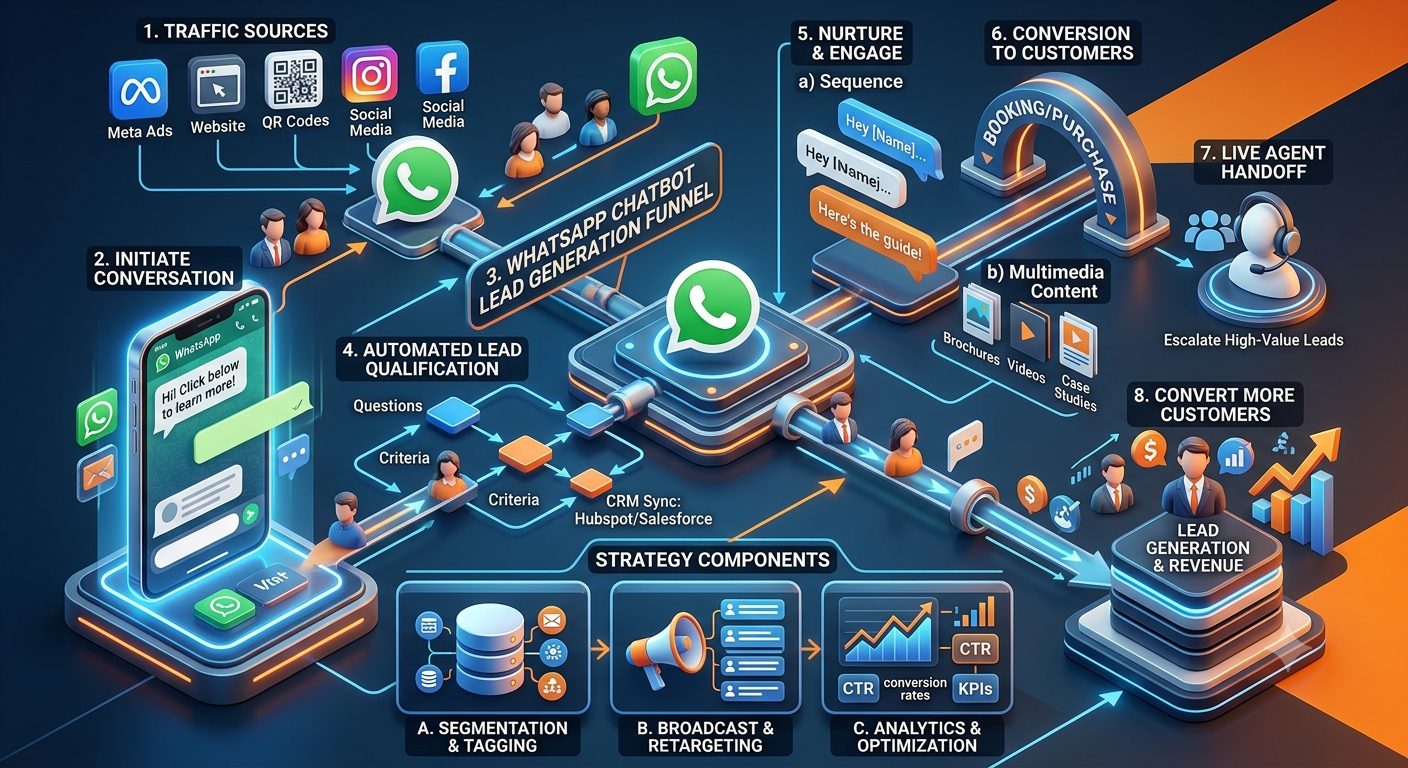
5. WhatsApp Chatbot Conversation Flow for Lead Generation: A Complete Example
Lead generation deserves a more detailed workflow because a chatbot should do more than collect a phone number. It should understand the prospect's requirement, determine the right next step and pass useful context to the sales team.
This is particularly valuable for service businesses, B2B companies, agencies, consultants and technology providers.
Stage 1: Start the conversation
A visitor clicks a WhatsApp link from a landing page, website, QR code or eligible advertising campaign.
Chatbot:
Hi! 👋 Thanks for contacting [Company Name].
I can help you explore our services, request pricing or speak to a specialist.
What would you like to do?
Explore services
Request pricing
Book a demo
Speak to sales
Stage 2: Understand the requirement
Customer selects “Explore services.”
Chatbot:
Which area are you interested in?
[Service A]
[Service B]
[Service C]
Help me choose
If the customer selects “Help me choose,” the chatbot asks a brief question about the business objective.
Chatbot:
What are you mainly trying to achieve?
Generate leads
Improve customer support
Automate routine communication
Integrate with an existing system
Something else
Stage 3: Qualify the lead
Ask only the questions that help determine the next step.
For example:
Chatbot: What type of business do you operate?
Chatbot: What is the approximate size of your requirement?
Chatbot: When are you looking to get started?
Avoid collecting a long list of details before providing any value. A prospect who only wants a brochure should not have to complete the same qualification process as someone requesting a tailored enterprise proposal.
Stage 4: Offer the right action
Based on the answers, provide a useful next step:
View relevant product information.
Download a brochure.
Request pricing.
Book a demo.
Speak to a specialist.
The chatbot should not pretend to provide a personalised quotation if pricing requires a human assessment.
Stage 5: Capture contact information
Chatbot:
Would you like our team to follow up about this requirement?
If yes, please share your name and preferred business contact details.
Explain how the information will be used and collect any required consent.
Stage 6: Transfer the lead to sales
After submission, the system should create or update the CRM record, assign the lead, retain the relevant conversation context and trigger an appropriate follow-up task.
Chatbot:
Thank you, [Name]. Your enquiry has been submitted.
Our team will review your requirement and follow up using your preferred contact details.
You can also ask another question here or request assistance from our team.
Example of a useful lead record
Field | Example |
|---|---|
Lead source | Website WhatsApp link |
Interested service | [Selected service] |
Primary objective | Generate leads |
Business type | [Selected business type] |
Purchase timeline | [Selected timeline] |
Contact details | [Information provided by customer] |
Lead owner | [Assigned salesperson] |
Next action | [Follow-up task] |
The values should come from the actual conversation and connected systems. The chatbot should never fabricate qualification data.
For a deeper look at chatbot-led lead generation, see WhatsApp chatbot lead generation strategy.
6. Rule-Based WhatsApp Chatbots vs AI-Powered Chatbots
A common question when designing conversation flows is whether to use fixed rules, AI or both.
The right approach depends on the complexity of the task, the quality of available information and the consequences of an incorrect answer.
Capability | Rule-based chatbot | AI-powered chatbot |
|---|---|---|
How it responds | Predefined rules, menus and branches | Interprets natural-language messages and context |
Best suited for | Structured, predictable workflows | Flexible questions and varied phrasing |
Appointment booking | Works well with defined steps and a booking integration | Can understand requests, but still needs verified availability and booking actions |
FAQs | Works well for known questions | Can handle more variations when grounded in reliable information |
Lead qualification | Collects structured answers | Can interpret free-text answers and extract relevant details |
Order tracking | Requires an order-system integration | Also requires an order-system integration |
Handling unusual requests | Uses fallback or predefined branches | May interpret more variations, but still needs boundaries |
Human escalation | Triggered by defined conditions | Can be triggered by rules, user requests or uncertainty |
AI is not automatically more accurate than a rule-based chatbot. An AI system may misinterpret a question or produce an unsupported answer if it lacks reliable information or suitable controls.
When should you use a rule-based chatbot?
Choose a structured flow when:
Customers must follow a predictable process.
The number of choices is limited.
Answers must be drawn from approved options.
The workflow needs clearly defined conditions.
The business needs predictable actions and outcomes.
Examples include selecting a department, submitting a basic request or navigating a service menu.
When should you use an AI-powered chatbot?
AI can be useful when:
Customers phrase the same question in many different ways.
The chatbot needs to interpret natural-language enquiries.
Questions require retrieving information from approved documentation.
Customers need help finding the right product or service.
A flexible conversational experience is important.
AI should be connected to reliable knowledge sources and designed to escalate questions it cannot answer confidently.
When should you combine both?
For many businesses, a hybrid model is practical.
For example, AI can interpret a customer's message and identify that they need an appointment. A structured workflow can then collect the required details, retrieve real availability, confirm the selection and submit the booking.
This combines conversational flexibility with predictable business logic.
To understand the implementation process in more detail, read Nexcomm's step-by-step guide to building an AI WhatsApp chatbot.
7. How to Create a WhatsApp Chatbot Conversation Flow
Use the following process to build a chatbot that supports a real business objective.
Step 1: Define one primary objective
Start by deciding what the chatbot should accomplish.
Possible objectives include:
Qualify sales leads.
Answer frequently asked questions.
Track orders.
Schedule appointments.
Register service requests.
Route customer enquiries.
Help users discover products.
Avoid trying to build every workflow into the first version. Start with the highest-value or most repetitive customer journey.
Step 2: Understand customer intent
Review the questions customers already ask through WhatsApp, phone calls, email, website forms and support tickets.
Group these into categories such as:
Information requests
Pricing enquiries
Product discovery
Booking requests
Order or account questions
Complaints
Requests for human assistance
This creates a practical foundation for the chatbot's menu and branching logic.
Step 3: Map the conversation before writing messages
Write the sequence in plain language first.
For example:
Customer starts chat → Selects pricing → Chooses a service → Answers relevant qualification questions → Receives available information → Requests sales follow-up.
For every step, decide:
What does the customer need?
What information is required?
What happens after each answer?
What happens if the answer is invalid?
When should a human take over?
What system action must be completed?
Mapping the logic first prevents the flow from becoming a collection of disconnected messages.
Step 4: Write concise messages
Each message should communicate one main idea.
Instead of sending a large paragraph with several questions, ask one question and offer clear choices.
Less effective:
“Please tell us your name, company, industry, location, budget, required services, estimated monthly volume, purchase timeline and whether you want a demo.”
Better:
“Which service are you interested in?”
Then ask the next relevant question based on the answer.
This approach makes the conversation easier to complete and helps the chatbot collect cleaner data.
Step 5: Choose appropriate interactive elements
Where supported by the WhatsApp implementation, use interactive buttons and lists for structured choices.
Use free-text input when the customer needs to explain a problem, provide a name or describe a requirement.
Use media and links when they help the user complete a task, such as viewing a product catalogue, reading a policy or opening a booking page.
Keep the number of options within the limits supported by the current WhatsApp interface and implementation.
Step 6: Define the data and integrations
Identify which systems the chatbot needs to access.
Examples include:
CRM for lead capture and assignment.
E-commerce platform for product and order information.
Calendar or booking system for appointment availability.
Ticketing software for customer support.
Billing system for invoice status.
Knowledge base for approved answers.
Analytics platform for conversation performance.
Use APIs or supported integrations to retrieve or update the relevant information. If a required integration is not available, make the limitation clear instead of pretending the action is automated.
Step 7: Define fallback and escalation rules
Plan for the cases where a customer types something unexpected, changes their mind or asks for a human.
For example:
Repeated invalid input → Offer simpler choices.
Unknown question → Explain the limitation and provide an alternative.
Explicit request for an agent → Start handoff.
Complaint or sensitive issue → Route according to business policy.
Integration failure → Explain that the action could not be completed and provide a support path.
The customer should always have a reasonable way to continue.
Step 8: Test the complete flow
Before launch, test:
Every menu option.
Every branch and condition.
Invalid or unexpected input.
Back navigation and restart behaviour.
CRM or API updates.
Booking and order retrieval.
Human-agent handoff.
Confirmation messages.
Failure states and recovery paths.
Mobile readability and supported interactive elements.
Test with real examples of how customers speak, including spelling mistakes, short messages and questions that do not exactly match the script.
Step 9: Launch and improve
Start with the highest-priority workflow. Monitor how customers use it and review the places where they abandon the conversation, request an agent or receive an unsatisfactory answer.
Update the flow based on actual customer behaviour rather than assuming the first version will be perfect.
8. WhatsApp Chatbot Conversation Flow Best Practices
Keep the first menu simple
A first menu should help customers identify their next step quickly. If there are many products or departments, use categories and submenus.
Ask only relevant questions
Every question should support the customer's task or a legitimate business requirement. Unnecessary questions add friction and can reduce completion.
Personalise responses responsibly
Use customer names, selected preferences or previous interactions when those details are available and appropriate. Avoid pretending to know information the customer has not provided or authorised the business to use.
Give customers control
Let users return to the main menu, correct an answer, restart the flow or ask for a human where appropriate.
A rigid flow that prevents customers from changing direction often creates frustration.
Make human support visible
A chatbot should complement human support, not become a barrier to it.
Provide a clear escalation option for complicated requests, complaints, sensitive matters and situations the bot cannot resolve.
Keep answers current
Product information, service details, prices, operating hours, availability and policies can change. Establish an owner and review process for chatbot content.
For AI chatbots, ensure answers are grounded in current approved information and that the bot knows when to escalate.
Design for mobile conversations
WhatsApp is a messaging interface. Keep messages readable on a small screen, avoid overly long blocks of text and use lists or short sections where useful.
Respect WhatsApp messaging policies
Use the official WhatsApp Business Platform or an authorised implementation, follow applicable opt-in and messaging requirements, and respect opt-outs and customer preferences.
Where business-initiated messaging requires approved templates or other conditions, follow the current Meta rules applicable to the account and message type.
Protect customer information
Collect only what is needed, restrict access to conversation records, and apply suitable retention and security practices. Use appropriate verification before revealing order, account, payment or other sensitive information.
Measure the customer outcome
A chatbot that completes many conversations is not necessarily effective. Track whether it actually resolves the customer's problem, creates useful leads or completes the intended action.
9. Common WhatsApp Chatbot Flow Mistakes to Avoid
Mistake 1: Too many options at the beginning
A large menu forces customers to scan too much information.
Better approach: Group related options and reveal more detailed choices only after the customer selects a category.
Mistake 2: Asking for contact details too early
Customers may leave if they are required to provide personal information before receiving basic help.
Better approach: Offer useful information first, then request contact details when they are genuinely needed for the next step.
Mistake 3: No fallback for unexpected messages
If the bot only recognises exact keywords, customers can get stuck when they phrase a question differently.
Better approach: Add understandable fallback messages, alternate choices and human escalation. If using AI, set clear limits on what it may answer.
Mistake 4: No human handoff
A chatbot can be useful for routine tasks but may struggle with complex or emotionally sensitive situations.
Better approach: Make agent support accessible and transfer relevant conversation context whenever possible.
Mistake 5: Giving answers without checking the source
A chatbot may display outdated pricing, incorrect order information or unavailable appointment slots if it relies on static text.
Better approach: Retrieve dynamic information from the relevant business system and confirm actions only after successful completion.
Mistake 6: Building flows without a business objective
A chatbot can become an elaborate menu that does not help the customer or the business.
Better approach: Give each flow a clear purpose, such as resolving a support request, capturing a qualified lead or booking an appointment.
Mistake 7: Ignoring analytics
Without measurement, businesses cannot identify which questions cause abandonment or which paths lead to useful outcomes.
Better approach: Track completion, escalation, errors and business results, then improve the weakest parts of the flow.
Mistake 8: Sending too many automated follow-ups
Repeated, irrelevant or unexpected messages can frustrate users and damage trust.
Better approach: Use relevant follow-ups, respect user preferences and comply with current WhatsApp messaging requirements.
10. How to Measure WhatsApp Chatbot Performance
Measure performance against the objective of each flow. A sales chatbot and an order tracking chatbot should not be judged by exactly the same metrics.
Metric | What it measures | Why it matters |
|---|---|---|
Flow start rate | Users who begin a specific workflow | Indicates whether the entry point attracts interest |
Completion rate | Users who reach the intended endpoint | Helps identify friction and abandonment |
Drop-off by step | Where users leave the conversation | Shows which questions or branches need improvement |
Lead qualification rate | Leads meeting the defined qualification criteria | Helps assess lead quality |
Lead-to-meeting rate | Qualified leads that book a meeting | Connects chatbot activity to sales progress |
Resolution rate | Requests resolved without additional support, using a clearly defined method | Helps evaluate support automation |
Human escalation rate | Conversations transferred to an agent | Identifies flows that need better automation or different routing |
Error or fallback rate | Conversations where the bot cannot proceed as intended | Highlights gaps in logic or knowledge |
Customer satisfaction | Feedback collected after an interaction | Adds a direct view of the user experience |
Cost per completed outcome | Cost associated with a completed booking, qualified lead or other target action | Helps evaluate business value |
Define each metric consistently before comparing results. For example, a low escalation rate is not always good: customers may be unable to reach support rather than having their questions resolved.
How to improve a weak conversation flow
If many customers abandon the same step:
Review the question and available options.
Check whether the information requested is necessary.
Simplify the wording.
Add a relevant alternative.
Check whether the next step depends on a slow or failing integration.
Test the revised flow with representative customer scenarios.
Compare results after the change.
Change one important element at a time where practical, so you can better understand which improvements make a difference.
11. How Nexcomm Can Help Businesses Automate WhatsApp Conversations
Designing a chatbot conversation flow is only one part of implementation. Businesses also need a way to deploy the workflow, connect it to their systems, manage customer conversations and maintain the automation over time.
Nexcomm provides WhatsApp API chatbot capabilities for businesses looking to automate customer interactions. Depending on the implementation and requirements, chatbot workflows can include structured menus, lead capture, FAQ responses, API integrations, routing and human-agent handoff.
Businesses can explore Nexcomm's WhatsApp API chatbot service to understand the available capabilities and discuss the right setup for their requirements.
What should businesses look for in a WhatsApp chatbot platform?
Before choosing a platform, assess whether it supports the following capabilities.
Visual flow building: A visual interface can help teams create and maintain structured conversation paths without manually writing every interaction.
Interactive messaging: Buttons and lists can make it easier for customers to select options and move through a workflow.
CRM integration: Connecting the chatbot to a CRM can help teams record enquiries, assign leads and manage follow-ups.
API connectivity: Integrations can retrieve order status, availability, customer records and other information from business systems.
Human-agent handoff: The platform should provide a practical way to transfer conversations that require human assistance.
AI capabilities where appropriate: AI may help interpret natural-language messages and answer questions using approved information, but it should have clear limits and escalation rules.
Reporting and analytics: Teams should be able to understand how customers use the chatbot and whether the intended business outcomes are being achieved.
Privacy and compliance controls: The implementation should support suitable access controls, data handling practices, opt-out management and compliance with applicable platform policies.
The right combination depends on the business. A simple FAQ chatbot may need only a few structured flows, while a company automating sales, support, booking and account-related tasks may require deeper integration.
12. Frequently Asked Questions About WhatsApp Chatbot Conversation Flows
What is a WhatsApp chatbot conversation flow?
A WhatsApp chatbot conversation flow is a sequence of messages, questions, choices and actions that guides users through an automated conversation. It determines how the chatbot responds to a customer, what information it collects, what action it performs and when it transfers the conversation to a human.
What are some examples of WhatsApp chatbot conversation flows?
Common examples include lead generation, customer support, order tracking, product recommendations, appointment booking, real estate lead qualification, education admissions, payment enquiries, feedback collection and service request management.
The best flow depends on the customer's objective and the task the business wants to automate.
How do I create a WhatsApp chatbot conversation flow?
Start by choosing one business objective. Map the customer's journey, write a concise welcome message, define the questions and decision branches, connect the required systems, add fallback and human handoff paths, and test the entire workflow before launching it.
After launch, use conversation analytics and customer feedback to improve the flow.
Can I use WhatsApp chatbot templates for my business?
Yes. Templates can provide a starting point for welcome messages, lead qualification, FAQs, bookings, support requests and other workflows. However, they should be adapted to your products, customer journey, data requirements and operational processes.
A template is not a substitute for checking whether the business can fulfil the action it promises.
What is the difference between a WhatsApp chatbot script and a conversation flow?
A chatbot script contains the messages the bot sends and the responses it expects. A conversation flow describes the full journey, including the order of messages, user choices, conditional branches, system actions and escalation paths.
A script is one component of a conversation flow.
Can a WhatsApp chatbot generate leads automatically?
A WhatsApp chatbot can ask qualifying questions, capture relevant contact details, record the lead in a CRM and route the enquiry to a sales team when the required integrations are available.
Lead quality depends on the questions asked, the audience, the business offer and the follow-up process. A chatbot does not guarantee that every captured lead will become a customer.
Can a WhatsApp chatbot connect to a CRM?
Yes, if the chatbot platform and CRM support a suitable integration through an API, connector or other supported method. The integration can record lead details, update contact records, assign enquiries and trigger follow-up tasks.
The exact capabilities depend on the systems being connected and the permissions configured.
Should I use a rule-based chatbot or an AI WhatsApp chatbot?
A rule-based chatbot is often suitable for predictable tasks with clearly defined options. An AI-powered chatbot can be useful when customers express their needs in varied language or ask questions that require more flexible interpretation.
A hybrid approach often works well: AI can understand the request, while structured workflows perform important actions such as bookings, lead capture and status checks.
How do I make a WhatsApp chatbot sound more human?
Use natural, concise language, acknowledge what the customer has said, ask one clear question at a time and provide relevant options. Avoid repetitive greetings and generic responses.
Offer a human handoff when the conversation requires judgment, empathy or investigation. Natural wording should not come at the expense of accuracy.
What should a WhatsApp chatbot do when it does not understand a question?
It should acknowledge the problem, ask the customer to rephrase or choose from simpler options, and provide a way to contact a human representative. Repeating the same fallback message indefinitely is a poor experience.
For AI-powered chatbots, define what information the bot can answer from and when it should admit that it cannot provide a reliable answer.
Can WhatsApp chatbots book appointments and track orders?
Yes, when connected to the relevant booking or order management system. The chatbot can collect the necessary details, retrieve current information and initiate the appropriate action.
The chatbot should confirm a booking or report an order status only after the connected system verifies the result.
Are WhatsApp chatbot conversation flows suitable for small businesses?
Yes. Small businesses can begin with a simple flow for FAQs, service enquiries, lead capture or appointment requests. They can expand the workflow as customer volume and operational needs grow.
Start with a problem that occurs frequently and is straightforward to automate.
How can I improve WhatsApp chatbot conversion rates?
Make the first menu clear, ask only relevant questions, reduce unnecessary steps, provide useful information before requesting details, ensure integrations work correctly and make human support easy to access.
Track the completion rate and business outcome of each flow. Use the results to identify and improve points where customers abandon the conversation.
Do WhatsApp chatbot flows need to follow WhatsApp policies?
Yes. Businesses should use an appropriate WhatsApp Business Platform implementation, respect customer preferences and opt-outs, and follow the current Meta rules that apply to their messages, templates and use cases. The exact requirements depend on the type of message and the way the business initiates or continues a conversation.
Conclusion: Build WhatsApp Chatbot Flows Around Real Customer Needs
A successful WhatsApp chatbot is not simply a collection of automated messages. It is a structured customer journey that helps people find information, complete tasks and reach the right person when necessary.
Start with one clear objective, such as lead generation, customer support, order tracking or appointment booking. Use concise messages, relevant questions, useful integrations and clear fallback paths. Then measure how customers use the flow and improve it based on actual results.
The most effective WhatsApp chatbot conversation flows combine automation with customer choice. They make routine interactions faster without forcing every customer into the same path.
If your business wants to automate WhatsApp enquiries, qualify leads, connect conversations to business systems or build structured customer journeys, explore Nexcomm's WhatsApp API chatbot solution to discuss an implementation suited to your requirements.
Related Resources
WhatsApp API Chatbot Service
Editorial note: Keep all examples, capabilities, pricing references and integration claims aligned with the features that are actually available in your implementation. Review WhatsApp's current policies before publishing operational or compliance-specific claims.
More in AI and chatbot guides.