WhatsApp Chatbot for Lead Generation: A Complete Strategy to Capture, Qualify, and Convert Leads
New to this topic? Start with our guide to what an AI WhatsApp chatbot is and how it works.
Generating leads is only the first step in growing a business. The real challenge is responding to enquiries promptly, understanding what prospects need, identifying serious buyers, and helping them take the next step toward a purchase.
When businesses rely entirely on manual follow-ups, potential customers may wait too long for answers, sales teams may spend time on unsuitable enquiries, and interested prospects may lose momentum before a conversation progresses.
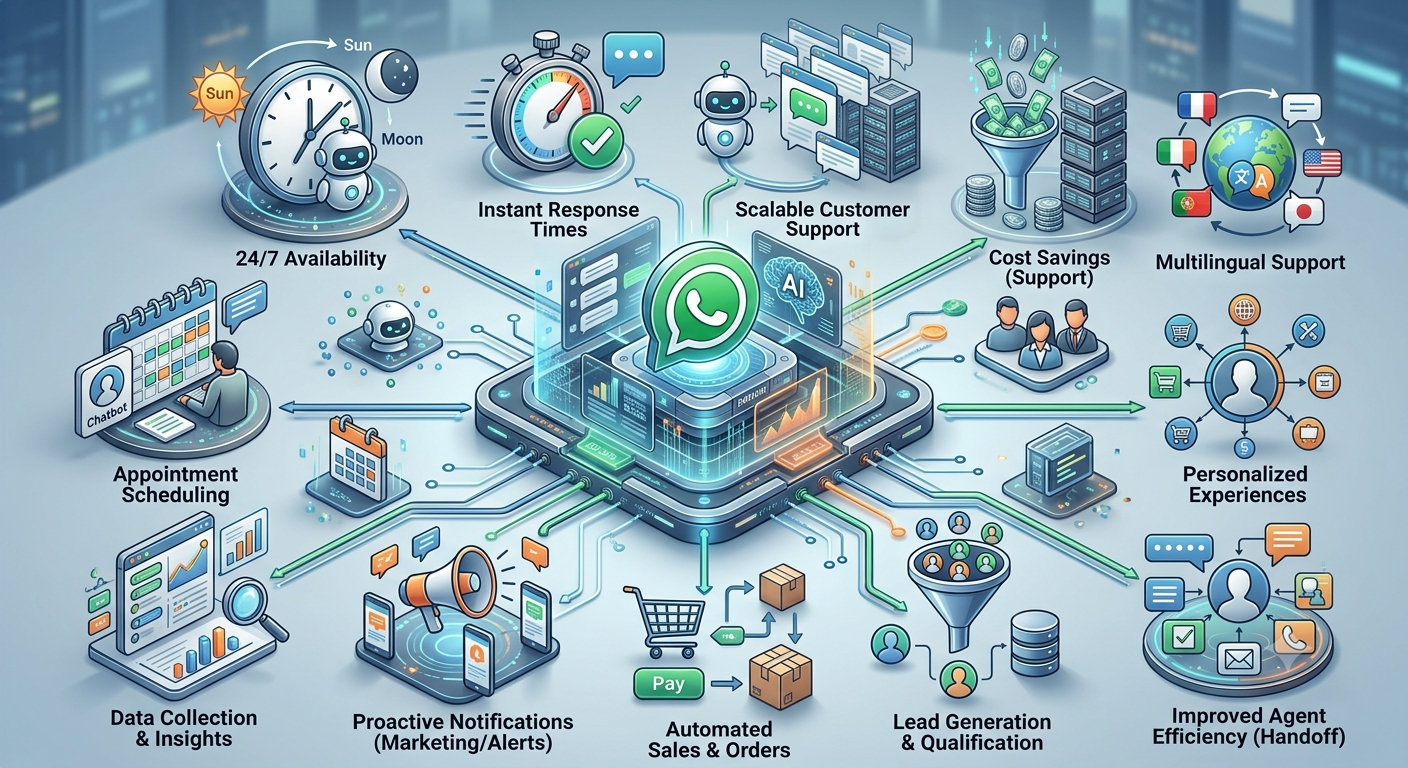
A WhatsApp chatbot can help organise this process by collecting enquiries, asking relevant qualification questions, sharing approved information, and routing prospects to the right sales representative. Businesses evaluating Nexcomm’s WhatsApp API and chatbot solutions can use this guide to understand how these workflows fit into a broader lead generation strategy.
This article explains how to plan a WhatsApp lead generation funnel, capture useful prospect information, qualify leads, connect conversations to sales systems, manage follow-ups, measure performance, and improve conversion opportunities across different industries.
Table of Contents
What is WhatsApp chatbot lead generation?
Why use WhatsApp for lead generation?
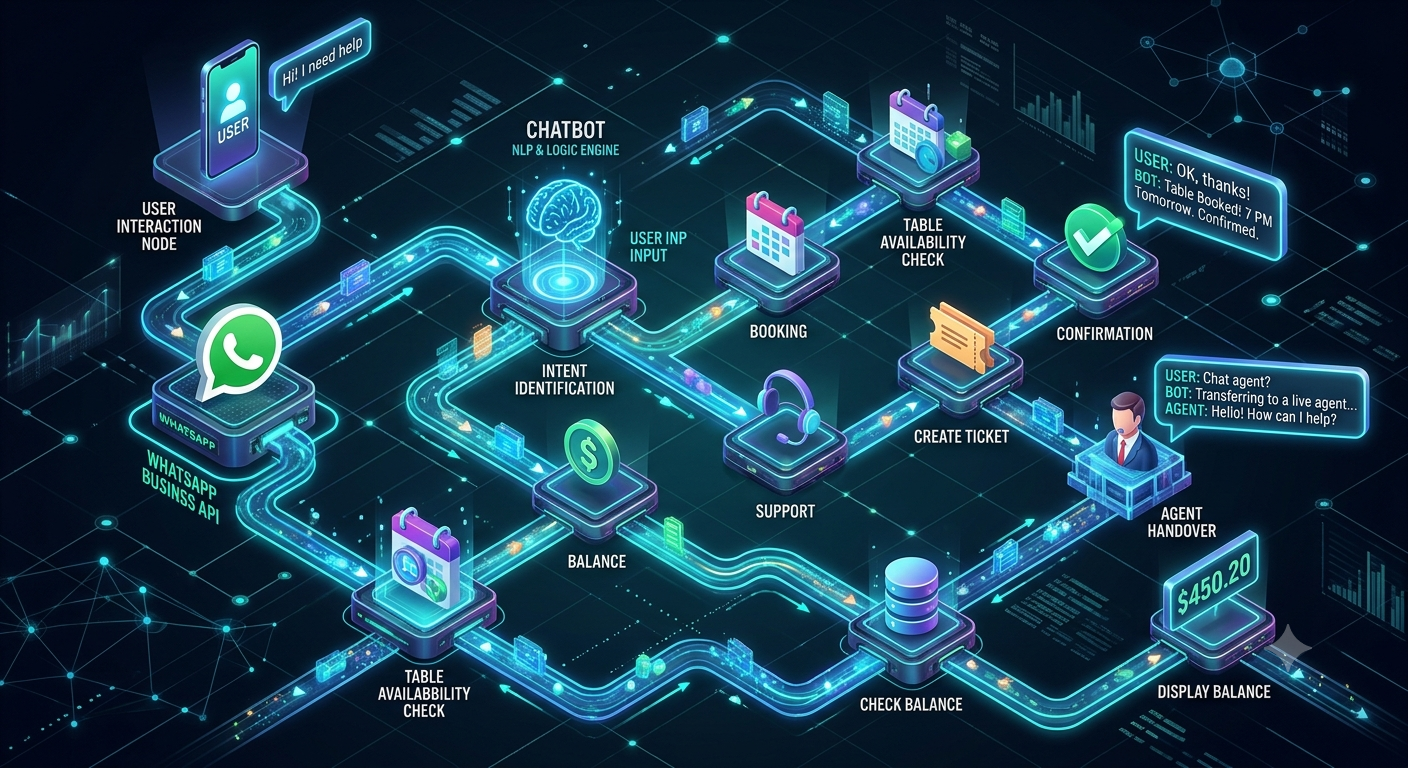
How a WhatsApp lead generation funnel works
How to attract prospects to WhatsApp
How to design an effective chatbot conversation
How to capture lead information without losing prospects
How to qualify leads using practical criteria
How to score and prioritise leads
How to connect WhatsApp leads with a CRM
How to nurture leads and manage follow-ups
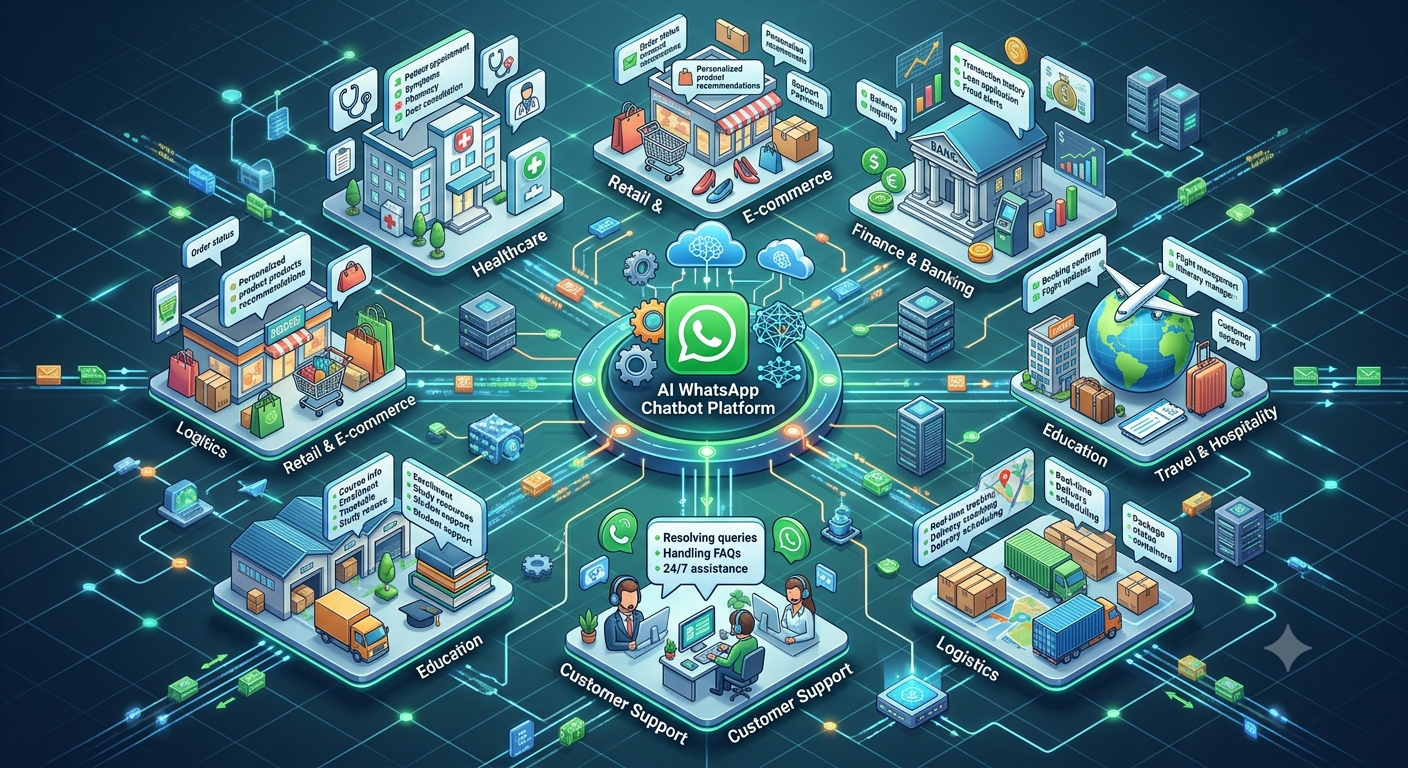
Industry-specific lead generation strategies
WhatsApp chatbot message examples and templates
Common lead generation mistakes
How to measure chatbot lead generation performance
How to improve lead conversion over time
Implementation checklist
Frequently asked questions
1. What Is WhatsApp Chatbot Lead Generation?
WhatsApp chatbot lead generation is the process of using automated conversations on WhatsApp to attract prospects, understand their requirements, collect relevant information, and guide them toward an appropriate next step.
Depending on the workflow, the chatbot may use predefined conversation paths, AI-assisted responses, or a combination of both.
For example, a person who clicks a WhatsApp link from a business website might want pricing information. The chatbot can ask which service they are interested in, collect the minimum details needed for follow-up, provide approved information, and offer to arrange a sales consultation.
The sales team can then receive the enquiry with useful context rather than starting with a blank conversation.
What can a lead generation chatbot do?
A well-planned workflow can help a business:
Capture enquiries from websites, advertisements, QR codes, and social media.
Answer common questions before a prospect speaks with sales.
Collect contact details and business requirements.
Identify a prospect’s product interest, budget range, or purchase timeline when relevant.
Separate enquiries that need immediate attention from those requiring further nurturing.
Schedule demonstrations, consultations, site visits, or callbacks when the necessary systems are available.
Record lead details in a CRM or other authorised sales system.
Send appropriate follow-ups when the customer has given the required permission.
Transfer qualified prospects to a human representative.
The objective is not to automate every part of selling. It is to make the early stages of the sales process more organised and help salespeople focus on conversations where their involvement adds value.
2. Why Use WhatsApp for Lead Generation?
WhatsApp can provide a convenient way for prospects to ask questions and receive information through a familiar messaging channel. Rather than completing a long form or waiting for an email response, a prospect can begin a conversation and explain what they need.
However, results depend on the quality of the offer, the source of the traffic, the relevance of the conversation, and how effectively the business follows up.
2.1. Reduce the gap between enquiry and response
A prospect may contact several businesses while researching a product or service. If one business responds promptly and another takes hours to reply, the customer may continue the conversation with the more responsive provider.
A chatbot can acknowledge an incoming enquiry immediately and handle supported initial questions outside staffed hours.
This does not guarantee a sale, but it can prevent avoidable delays at the beginning of the customer journey.
2.2. Make it easier to express interest
A website form may ask visitors to complete several fields before they can speak to a business. A conversational approach can collect relevant information in smaller steps.
For example, a property prospect might first select a location and property type before being asked about budget or preferred visit dates.
The experience should remain brief and relevant. A chatbot that asks too many questions before providing useful information can discourage prospects from continuing.
2.3. Gather useful information before sales follow-up
When a prospect reaches a salesperson without any context, the first conversation may be spent collecting basic details.
A chatbot can capture information such as:
The product or service the prospect wants.
The problem they are trying to solve.
Their business type or industry.
Their preferred time for a discussion.
Their expected purchase timeline.
Any specific requirements that affect suitability.
Only collect information that is genuinely useful for the next step. Sensitive or unnecessary personal information should not be requested simply because the chatbot can ask for it.
2.4. Support lead collection beyond office hours
Some prospects research products or services in the evening, on weekends, or during their own working hours.
A chatbot can record their enquiry and provide relevant information when the sales team is unavailable. The business can then route the enquiry for follow-up according to its working hours and service commitments.
Be clear about when a human representative will respond. An automated acknowledgement should not imply that a salesperson is available when one is not.
2.5. Organise enquiries from different campaigns
A business may receive leads from search advertisements, social media campaigns, landing pages, website buttons, referrals, and offline events.
Using campaign-specific WhatsApp links, opening messages, or tracking parameters where supported can help identify the source of an enquiry.
This makes it easier to compare which campaigns attract suitable prospects, rather than judging performance by conversation volume alone.
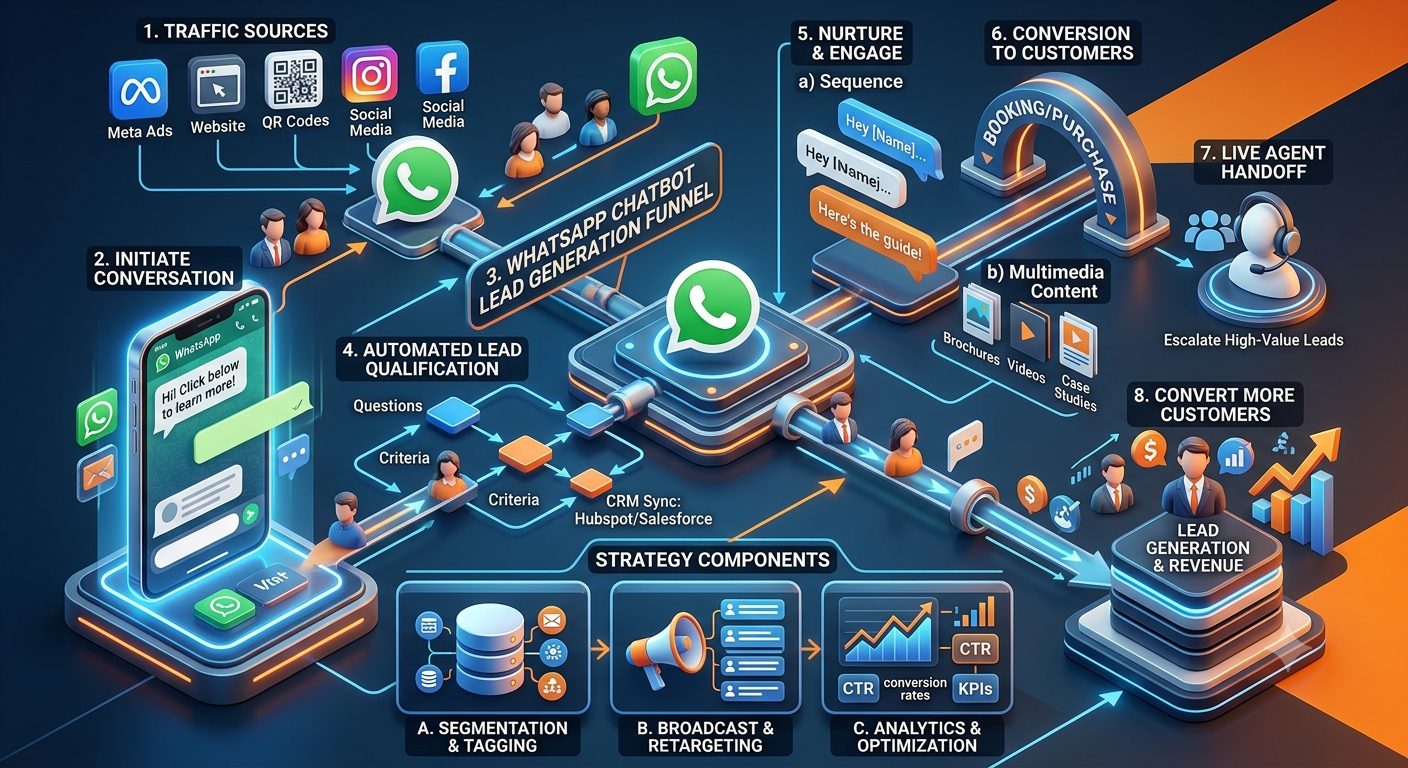
3. How a WhatsApp Lead Generation Funnel Works
A lead generation funnel describes the stages a prospect moves through, from discovering a business to becoming a qualified enquiry and progressing toward a sale.
A practical WhatsApp funnel usually contains seven stages.
Stage 1: Attract the right audience
Bring relevant prospects to a WhatsApp conversation through channels such as:
Website calls to action.
Click-to-WhatsApp advertisements.
Product or service landing pages.
Social media profiles and posts.
QR codes on brochures, packaging, or event materials.
Email campaigns where recipients have the appropriate permission.
Existing customer referrals.
The message or offer that brings the prospect to WhatsApp should match the conversation that follows.
For example, someone clicking an advertisement for a product demonstration should be taken to a flow that helps arrange a demonstration, not a generic menu that makes them search for the relevant option.
Stage 2: Welcome the prospect
The chatbot should explain what it can help with and present a small number of useful options.
Example:
Hi! Welcome to ABC Solutions.
What would you like help with today?
Explore our services
Request pricing
Book a demonstration
Speak with our team
The welcome message should be short and clear. Avoid lengthy introductions, multiple promotional claims, or unnecessary questions before the prospect can select an option.
Stage 3: Identify the prospect’s intent
Determine what the person wants to accomplish.
Common intents include:
Learning about a product or service.
Requesting pricing.
Booking a consultation.
Comparing available options.
Getting support with an existing purchase.
Speaking with a salesperson.
The intent determines the next question. A prospect requesting a product demonstration should not be forced through the same qualification process as someone who only wants a general brochure.
Stage 4: Capture essential details
Collect the minimum information needed to answer the enquiry or arrange the next step.
Depending on the business, this could include a name, preferred contact method, company type, product interest, or location.
Where possible, ask for information gradually rather than presenting a long form in the chat.
Stage 5: Qualify the enquiry
Assess whether the prospect fits the business’s intended customer profile and whether there is a reasonable next step.
Qualification might consider the prospect’s requirements, budget range, timeline, business size, location, or decision-making role. The criteria should reflect the product and sales process rather than being copied from a generic template.
Stage 6: Offer the next action
Based on the prospect’s intent, the chatbot may:
Share a relevant product page or brochure.
Provide approved pricing information.
Arrange a demonstration or consultation.
Submit a callback request.
Route the enquiry to a sales representative.
Record the lead for a suitable follow-up.
Appointments should only be confirmed after the relevant scheduling system verifies availability.
Stage 7: Handover and follow-up
Qualified leads should reach the appropriate salesperson with the available conversation context.
The sales team should know what the prospect is interested in, what information they have already received, and what action they requested.
If the prospect is not ready to proceed, the business can use an appropriate follow-up process based on their preferences and permissions.
The principle: Every stage should make the prospect’s next step clearer. If a step adds friction without improving the experience or helping the sales team, reconsider whether it is necessary.
4. How to Attract Prospects to WhatsApp
A chatbot can only work with the people who start or are appropriately brought into a conversation. Lead generation therefore begins with the traffic source, offer, and reason to make contact.
4.1. Add WhatsApp calls to action to relevant website pages
Place a clear WhatsApp call to action on pages where visitors are likely to need assistance.
Examples include:
Service pages: “Discuss Your Requirements.”
Product pages: “Ask About This Product.”
Pricing pages: “Request a Quote.”
Demo pages: “Book a Product Demonstration.”
Contact pages: “Chat With Our Team.”
Match the opening message to the page. A person contacting you from a pricing page may already be closer to a buying decision than someone reading a general educational article.
4.2. Use click-to-WhatsApp advertising
Click-to-WhatsApp advertisements can help prospects move directly from an advertisement to a conversation.
For the best experience, make sure the advertisement, landing message, and chatbot questions are consistent.
For example, if an advertisement promotes a free product demonstration, the chatbot should immediately offer the demonstration request process.
Track the campaign source and the quality of resulting leads. A campaign that generates many low-intent chats may be less valuable than one that produces fewer but more suitable enquiries.
4.3. Create useful offers
Give prospects a clear reason to start a conversation.
Depending on the business, this might be:
A product catalogue.
A service comparison.
A demonstration.
A consultation.
A quotation.
A course brochure.
A property shortlist.
A booking request.
The offer should be relevant to the customer and accurately described. Avoid promising discounts, consultations, or immediate responses that the business cannot reliably provide.
4.4. Use QR codes at relevant touchpoints
QR codes can connect offline activity to a digital conversation. They may be used at exhibitions, retail counters, packaging, printed brochures, events, and sales presentations.
Where possible, use different trackable links for different placements so the business can determine which materials generate meaningful enquiries.
4.5. Make the source of each lead visible
Use campaign identifiers, source fields, or CRM tracking where supported.
Useful lead sources might include:
Organic search.
Paid search.
Social advertising.
Website service page.
Referral.
Trade show or event.
Existing customer recommendation.
Source tracking helps businesses connect campaign spending to qualified enquiries and eventual sales.
5. How to Design an Effective Chatbot Conversation
A good lead generation flow should feel like a helpful conversation, not an interrogation.
Start with the prospect’s immediate need
The first question should help identify what the prospect wants.
For example:
What would you like help with?
Product information
Pricing
A demonstration
A customised solution
Speak with sales
This gives the prospect control and helps the chatbot select a relevant path.
Ask only questions that affect the next step
A business may want to collect ten fields, but that does not mean all ten should be required before the prospect receives help.
A better sequence might be:
Identify the product or service of interest.
Ask one or two questions to understand the requirement.
Provide relevant information.
Collect contact details when necessary for the requested action.
Offer a consultation, callback, or sales handover.
The appropriate sequence depends on whether the customer is seeking information, requesting a quote, or ready to speak with sales.
Use clear, conversational language
Avoid technical jargon, long blocks of text, and vague questions.
Instead of asking, “Please provide your complete requirement specification,” ask, “What are you looking to achieve?”
Instead of asking several questions in one message, ask one clear question at a time when that makes the conversation easier.
Provide a way out of the automated flow
Prospects should be able to change their selection, ask a different question, or request human assistance where available.
If the chatbot does not understand a message, it should ask a concise clarifying question or offer suitable alternatives. It should not repeat the same unhelpful response indefinitely.
Keep the next action visible
After collecting the required information, explain what happens next.
For example:
Thanks for sharing your requirements. Your enquiry has been recorded for our sales team. We’ll follow up during our stated business hours.
Use wording that reflects the actual process. Do not claim a lead has been assigned, a meeting has been booked, or a salesperson has been notified unless that action has genuinely completed.
6. How to Capture Lead Information Without Losing Prospects
Lead capture is a balance between collecting enough information for useful follow-up and keeping the conversation easy to complete.
What information should a chatbot collect?
The fields depend on the business model.
Information | Why it may be useful | When to collect it |
|---|---|---|
Name | Helps personalise the conversation | When needed for follow-up |
Contact details | Enables requested communication | When necessary and appropriately authorised |
Product or service interest | Identifies the enquiry category | Early in the conversation |
Business type or industry | Helps assess suitability for B2B offerings | When industry affects fit |
Location | Helps determine service availability or territory | When location matters |
Budget range | Helps determine whether an offer is suitable | When relevant to the sales process |
Purchase timeline | Helps prioritise follow-up | When the prospect is considering a purchase |
Specific requirements | Helps sales prepare a relevant response | Before a consultation or quotation |
Do not treat this table as a mandatory form. Collect only the fields needed for the particular request.
Use progressive information collection
Progressive collection means gathering details in stages as the prospect moves forward.
For example, a visitor requesting a brochure may only need to choose a product category. A prospect requesting a customised proposal may need to provide additional business requirements.
This approach avoids asking every visitor for extensive personal and business information before providing anything useful.
Explain why information is needed
If a question may seem intrusive, explain its purpose.
For example:
Which city is your business based in? This helps us confirm whether the requested service is available in your area.
The explanation should be honest and relevant.
Protect the information collected
Businesses should use suitable access controls, data-retention practices, and security measures for lead information. Avoid collecting sensitive details unless they are necessary and can be handled appropriately.
Marketing and follow-up messages must also comply with applicable consent requirements and WhatsApp policies. A person sharing contact information for one purpose should not automatically be treated as having agreed to every future marketing campaign.
7. How to Qualify Leads Using Practical Criteria
Capturing a lead does not automatically make it a good sales opportunity. Lead qualification helps determine whether a prospect’s needs align with the business’s offering and whether the sales team should take action.
7.1. Define your ideal customer profile
Before designing qualification questions, describe the customers your business can serve effectively.
For a B2B service, the ideal customer profile might include:
Industry or business category.
Company size or operational scale.
Relevant business problem.
Geographic availability.
Typical use case.
Required implementation capability.
Commercial suitability.
The profile should be grounded in actual customer experience and business capacity, not assumptions about which industries are automatically valuable.
7.2. Identify the prospect’s requirement
Ask what the prospect is trying to accomplish.
For example:
What are you looking to improve?
Managing incoming enquiries
Qualifying sales leads
Booking appointments
Automating customer support
Something else
The answers can help route the prospect to the right information or sales representative.
7.3. Understand timing and readiness
Some prospects are ready to buy, while others are researching or planning a future project.
A simple question might be:
When are you hoping to get started?
As soon as possible
Within the next month
In the next few months
Still researching options
Use the answer to plan appropriate follow-up, not to pressure the customer.
7.4. Ask about budget only when it is relevant
Budget can help determine whether a proposal is commercially realistic, particularly for customised B2B services.
However, asking about budget too early can create unnecessary friction. If the prospect has not yet understood the offering, first provide enough context for them to make an informed decision.
Where possible, offer ranges or allow the prospect to indicate that they are unsure.
7.5. Understand the decision-making process
For larger purchases, it may be useful to know whether the person is researching, recommending, evaluating, or approving a solution.
This information can help sales representatives tailor the discussion. It should not be used to dismiss an otherwise promising enquiry merely because the first contact is not the final decision-maker.
7.6. Route leads according to fit
A practical qualification system can place enquiries into categories such as:
Sales-ready: The requirement fits the offering and the prospect wants to take a concrete next step.
Needs further discovery: The requirement is relevant, but important details remain unclear.
Nurture: The prospect is interested but is not ready to make a decision.
Not currently suitable: The business cannot meet the requirement or the prospect falls outside the defined service scope.
Support or existing customer: The enquiry should go to customer support rather than new-business sales.
The objective is to send each enquiry to the correct next step, not simply to label people as good or bad leads.
8. How to Score and Prioritise Leads
Lead scoring assigns points to selected prospect characteristics or actions so a sales team can prioritise follow-up.
A scoring model is useful when a business receives more enquiries than its team can handle immediately. It is less useful when the criteria are arbitrary or disconnected from actual sales outcomes.
Example of a simple lead scoring model
The following is an illustrative framework. The point values should be adjusted using the business’s own conversion data.
Qualification signal | Example points |
|---|---|
Requirement matches the business’s core offering | +20 |
Prospect meets the ideal customer profile | +15 |
Prospect requests a demonstration or consultation | +20 |
Prospect has a defined purchase timeline | +15 |
Prospect has a relevant budget or commercial fit | +15 |
Prospect has a specific, documented requirement | +10 |
Prospect is outside the supported service area | -20 |
Prospect’s requirement cannot be met | -30 |
These points are not an industry benchmark. They are a starting example for designing a consistent prioritisation process.
Turn scores into practical actions
Rather than displaying a score without context, map score ranges to clear actions.
For example:
High priority: Route the lead to sales promptly.
Medium priority: Gather missing details or schedule a discovery conversation.
Lower immediate priority: Provide relevant information and use an appropriate nurture process.
Not suitable: Explain the limitation respectfully or direct the prospect to a relevant alternative when one is available.
Do not let the score override important context. A high score should not trigger an aggressive follow-up sequence, and a lower score should not prevent a customer from requesting human assistance.
Review scores against real outcomes
After enough leads have progressed through the sales process, compare the scores with outcomes such as completed consultations, qualified opportunities, and closed sales.
If the model consistently prioritises leads that do not convert while overlooking good opportunities, revise the criteria.
Lead scoring should support sales judgement, not replace it.
9. How to Connect WhatsApp Leads With a CRM
A CRM helps a business maintain a structured record of prospects, sales conversations, tasks, and opportunities.
When a WhatsApp lead generation workflow is connected to an appropriate CRM, the business can reduce duplicate data entry and make it easier for salespeople to follow up.
What should be recorded?
A useful lead record may contain:
Lead name and authorised contact information.
Original source or campaign.
Product or service of interest.
Qualification answers.
Conversation summary or relevant history.
Current lead status.
Assigned sales representative.
Next action and due date.
Follow-up preferences and relevant consent records.
The information recorded should be limited to what the business needs to manage the enquiry.
Example CRM workflow
A prospect starts a WhatsApp conversation.
The chatbot identifies the enquiry type.
Relevant details are collected.
A lead record is created or matched to an existing record.
The lead is assigned according to the business’s routing rules.
A task or reminder is created when a follow-up is required.
The salesperson updates the outcome after contact.
This process helps prevent leads from being lost in a shared inbox or forgotten after the initial conversation.
Prevent duplicate and incomplete records
Businesses should define how the system identifies existing leads, handles repeated enquiries, and updates information.
For example, if a prospect contacts the business twice about the same service, the system may need to update the existing record rather than creating two unrelated opportunities.
Also define what happens when a CRM integration fails. The business should have a way to detect failed submissions and recover the enquiry instead of silently losing it.
Connect the CRM to the sales process
A CRM integration is most useful when the sales team has clear stages and responsibilities.
Example stages might include:
New enquiry.
Contact details confirmed.
Qualification in progress.
Qualified opportunity.
Consultation or demonstration scheduled.
Proposal shared.
Won, lost, or deferred.
The exact stages should reflect how the business sells. A simple sales process with clear ownership is generally more useful than a complicated pipeline that nobody maintains.
10. How to Nurture Leads and Manage Follow-Ups
Not every prospect is ready to buy after the first conversation. Some need more information, internal approval, a budget decision, or time to compare options.
Lead nurturing helps maintain a useful relationship until the prospect is ready for the next step.
10.1. Match the follow-up to the prospect’s interest
A person who asked for pricing should receive information relevant to pricing. Someone who requested a brochure should receive the requested material.
Avoid sending the same generic sales message to every contact regardless of what they asked for.
10.2. Make each follow-up useful
A follow-up can answer an unresolved question, share a relevant case study, explain an important feature, or remind the prospect of a requested appointment.
Repeatedly sending “Are you interested?” adds little value and may frustrate customers.
10.3. Use a sensible follow-up schedule
The appropriate timing depends on the product, sales cycle, urgency, and customer preference.
For example, a requested callback may need prompt action, while a prospect researching a longer-term project may prefer occasional updates.
Define follow-up rules for each lead category and provide a clear way for customers to stop receiving marketing messages where applicable.
10.4. Respect WhatsApp messaging requirements
Businesses must follow applicable WhatsApp policies, permission requirements, and rules for business-initiated messages and approved templates.
Do not assume that because a person started one conversation, the business can send unlimited promotional messages indefinitely. Record relevant permissions and honour opt-out requests.
10.5. Stop or adjust follow-ups when the prospect responds
If a customer replies, changes their requirements, asks to stop, or has already purchased, the workflow should update accordingly.
A prospect who has already booked a demonstration should not continue receiving reminders to book the same demonstration.
10.6. Give human salespeople the right context
Before following up, the salesperson should know what the prospect asked, what information was shared, and what action was promised.
This avoids repetitive questions and helps the next conversation feel connected to the original enquiry.
11. Industry-Specific WhatsApp Lead Generation Strategies
The most effective lead generation workflow depends on the buying process, information requirements, and customer expectations within the industry.
11.1. Real estate
Real estate businesses often receive enquiries from prospects with different locations, budgets, property preferences, and purchase timelines.
A chatbot can ask whether the prospect wants to buy or rent, collect preferred locations and property types, share relevant listings, and arrange a site visit request.
Example qualification questions:
Which location are you interested in?
Are you looking to buy or rent?
What property configuration do you need?
What is your approximate budget range?
When would you like to visit a property?
The sales team can use these details to prepare a relevant shortlist. Property availability and pricing should be verified before being presented as current.
11.2. Education and coaching institutes
Educational institutions may receive enquiries about courses, admission eligibility, fees, schedules, and counselling.
A chatbot can share approved course information, collect the student's area of interest, and arrange a counselling session.
Example qualification questions:
Which course are you interested in?
What is your current educational qualification?
When are you planning to enrol?
Would you like course information or a counselling session?
The chatbot should provide accurate, approved information and avoid making unverified promises about admission, placements, or scholarships.
11.3. Healthcare and clinics
Healthcare providers can use conversational workflows to collect appointment enquiries, share clinic information, and route patients to the appropriate department.
Example qualification questions:
Which department or service do you need?
Which clinic location would you prefer?
Would you like to request an appointment?
What time would be convenient?
The workflow should focus on administrative coordination. Clinical assessment and treatment decisions require appropriate qualified professionals, and sensitive patient information must be protected.
11.4. SaaS and technology companies
Software companies often need to understand a prospect's business problem before deciding whether a product demonstration is appropriate.
A chatbot can ask about the intended use case, company type, team size, current process, and implementation timeline.
Example qualification questions:
What business process are you looking to improve?
Which tools or systems are you currently using?
How many people will use the solution?
Do you need a product demonstration?
When are you planning to evaluate a solution?
The sales team can use these details to tailor the demonstration rather than delivering the same presentation to every prospect.
11.5. B2B service providers
Consultancies, agencies, service providers, and technology vendors often need to understand a prospect's requirements before preparing a proposal.
A chatbot can collect the service category, business objective, approximate project scope, location, and desired start date.
Example qualification questions:
Which service do you need?
What business problem are you trying to solve?
Is this a new project or an existing requirement?
When would you like to begin?
Would you prefer a consultation or a written proposal?
The sales team can then determine whether the requirement is a suitable fit and prepare the next conversation.
11.6. Financial services and insurance
Financial organisations may use chatbots to collect general enquiries, explain approved product information, and arrange a conversation with an authorised representative.
The chatbot should not make unsupported promises about approval, returns, eligibility, or policy outcomes.
Sensitive financial information requires appropriate verification and safeguards. Individual recommendations or regulated decisions should follow the organisation's relevant compliance procedures.
11.7. E-commerce and retail
Retailers can use a chatbot to help shoppers find products, ask about availability, request assistance, or receive relevant catalogue information.
A product enquiry can be qualified using the category, intended use, preferences, and any relevant constraints.
For example, a shopper looking for a laptop might select a use case and budget range before receiving suitable product options.
The chatbot should use current catalogue information and avoid presenting unavailable products or outdated prices as current.
11.8. Travel and hospitality
Travel businesses can collect information about destinations, travel dates, group size, accommodation preferences, and budget.
The chatbot can then share suitable package information or route the enquiry to a travel consultant.
Availability and final pricing should be confirmed using current booking information before a reservation is represented as confirmed.
12. WhatsApp Chatbot Message Examples and Templates
The following examples can be adapted to different businesses. Replace the placeholders with accurate information and make sure the actual workflow supports each promised action.
Template 1: Welcome message
Hi! Welcome to [Business Name].
How can we help you today?
Product or service information
Pricing or quotation
Book a consultation
Speak with our team
Purpose: Help the prospect identify the reason for contacting the business.
Template 2: Lead qualification
Thanks for your interest in [Product or Service].
To help us guide you to the right option, could you tell us what you are looking to achieve?
You can describe your requirement in a few words.
Purpose: Understand the need before collecting additional details.
Template 3: Contact details
Thanks for sharing your requirement.
Would you like our team to contact you about this?
If yes, please share your preferred contact details and a convenient time to reach you.
Purpose: Collect the information needed for requested follow-up.
Template 4: Request for a quotation
We can help you explore the right option.
Could you share a few details about your requirement?
Product or service needed
Approximate quantity or project scope
Location, if relevant
Expected timeline
Our team can review the information and follow up with the next steps.
Purpose: Collect the information needed to prepare a relevant quotation without promising an instant quote when one requires review.
Template 5: Product demonstration
Would you like to see how [Product Name] works?
You can request a demonstration by sharing your preferred date and time.
We’ll check availability and confirm the appointment.
Purpose: Convert product interest into a concrete next step.
Template 6: Lead handover
Thanks for sharing your requirements.
Your enquiry needs assistance from our team. We’ll pass along the relevant details so you do not need to repeat everything.
[Add the actual expected response time or next step.]
Purpose: Set clear expectations when human assistance is needed.
Template 7: Relevant follow-up
Hi [Name], you recently asked us about [Product or Service].
I’m sharing [Relevant Information] in case it helps with your decision.
If you have a question or would like to discuss your requirements, you can reply here.
Purpose: Provide a useful follow-up where the customer has the appropriate communication permissions.
Template 8: Enquiry confirmation
Thanks for contacting [Business Name].
We’ve received your enquiry about [Requirement].
[Explain the actual next step, such as a review by the sales team or a confirmed appointment.]
If you need to add information, you can reply to this conversation.
Purpose: Confirm receipt without claiming that an action has been completed when it has not.
13. Common WhatsApp Lead Generation Mistakes
Asking too many questions at the beginning
A long qualification form can discourage prospects before they receive any useful information.
How to improve: Ask only the questions needed for the immediate next step, then collect further details as necessary.
Treating every enquiry as a sales-ready lead
Some visitors are researching, seeking support, or looking for information outside the business's scope.
How to improve: Identify the intent first and route the enquiry accordingly.
Using generic opening messages
A generic menu can feel disconnected from the advertisement, page, or offer that brought the prospect to WhatsApp.
How to improve: Match the opening message to the campaign and provide the relevant action immediately.
Failing to record lead sources
Without source information, a business may know how many leads it received but not which marketing activity generated suitable prospects.
How to improve: Record campaign and source details in the CRM where supported, then compare lead quality and downstream outcomes.
Ignoring sales handover
Collecting lead details has limited value if the sales team does not receive them or nobody owns the next action.
How to improve: Define assignment rules, response expectations, and responsibility for follow-up.
Sending irrelevant follow-up messages
Repeated promotional messages can reduce trust and lead to opt-outs or complaints.
How to improve: Base follow-ups on the prospect's interest, preferences, and permissions. Stop messages when they are no longer relevant or requested.
Making unsupported AI recommendations
An AI model may produce an unsuitable answer if it lacks accurate product information or a clear boundary for what it can recommend.
How to improve: Use approved information, test realistic questions, and route uncertain or high-impact decisions to a qualified person.
Failing to handle technical errors
A CRM connection or booking integration may fail, leaving a prospect's request incomplete.
How to improve: Monitor failed actions, provide an appropriate fallback, and make sure the business can recover the enquiry.
Optimising for lead volume alone
A campaign may produce many conversations but few relevant opportunities.
How to improve: Measure qualified leads, completed sales conversations, and business outcomes alongside total lead count.
14. How to Measure WhatsApp Chatbot Lead Generation Performance
A lead generation strategy needs clear measurements. Without them, it is difficult to determine whether the chatbot is improving the sales process or merely creating more conversations.
14.1. Conversation start rate
Measure how many people who see or click a relevant call to action actually start a WhatsApp conversation, where the required tracking is available.
This can help identify friction in the transition from advertisement or website to chat.
14.2. Lead capture rate
Calculate the percentage of relevant conversations that produce a usable lead record.
A high rate is not necessarily better if the process pressures people to share unnecessary information. Evaluate it alongside customer experience and lead quality.
14.3. Qualification rate
Measure the proportion of captured leads that meet the business's defined qualification criteria.
Review whether the criteria accurately reflect real sales opportunities.
14.4. Conversation completion rate
Measure how often prospects complete the intended workflow, such as submitting an enquiry, requesting a quote, or arranging a consultation.
A low completion rate may indicate confusing questions, excessive steps, technical errors, or a mismatch between the offer and the audience.
14.5. Sales follow-up time
Track how long it takes for a sales representative to act on an enquiry that requires human follow-up.
Fast automated acknowledgement does not replace timely sales action when the next step depends on a person.
14.6. Appointment or demonstration booking rate
For businesses that sell through consultations, track the proportion of relevant leads that book a meeting and, where possible, attend it.
This helps identify whether the chatbot successfully moves prospects from interest to action.
14.7. Lead-to-customer conversion rate
Measure how many captured or qualified leads eventually become paying customers.
Use a consistent definition and account for the time required for the sales cycle. Recent leads may not have had enough time to convert.
14.8. Cost per qualified lead
Calculate the cost of generating qualified leads, including relevant campaign spending and the costs included in your chosen measurement.
Keep the calculation consistent when comparing campaigns or periods. A cheaper lead is not necessarily better if the lead rarely becomes a customer.
14.9. Sales acceptance rate
Track the percentage of chatbot-generated leads that sales representatives accept as suitable for follow-up.
If the acceptance rate is low, review the qualification questions, campaign targeting, and the criteria used to classify leads.
14.10. Follow-up and opt-out performance
Review whether follow-ups produce meaningful engagement and whether customers frequently opt out or complain.
These signals can reveal whether the messaging cadence, relevance, and permissions process need improvement.
Example lead generation dashboard
Metric | What it helps you understand |
|---|---|
Conversations started | Initial interest in the WhatsApp journey |
Leads captured | Ability to collect usable enquiry records |
Qualified leads | Suitability of the captured prospects |
Workflow completion rate | How effectively prospects reach the intended action |
Sales follow-up time | How quickly the team acts on enquiries |
Appointments booked | Progress toward a sales conversation |
Sales acceptance rate | Relevance of leads to the sales team |
Lead-to-customer rate | Contribution to actual business outcomes |
Cost per qualified lead | Efficiency of lead acquisition |
Opt-out or complaint rate | Potential problems with messaging relevance or consent |
Establish a baseline before changing the process, then compare performance using consistent definitions and comparable time periods.
15. How to Improve Lead Conversion Over Time
A chatbot should not be treated as a one-time setup. The business should review where prospects stop, which enquiries progress, and whether the sales team receives useful information.
Identify drop-off points
Review the stages where prospects abandon the conversation.
If many people leave after a budget question, investigate whether the question is too early, unclear, or unnecessary. If prospects complete the chatbot but rarely attend meetings, review appointment availability, reminders, and the quality of the leads being booked.
Improve one part of the funnel at a time
Changing the welcome message, qualification questions, follow-up timing, and sales routing simultaneously makes it difficult to determine what caused a change in results.
Prioritise one issue, test a change, and compare the outcome where sufficient data is available.
Match campaigns with relevant conversation flows
A campaign targeting one product should not send every prospect into a generic flow covering unrelated services.
Use the context of the campaign to provide a relevant first step, then allow customers to explore other options if needed.
Review lead quality with sales representatives
Salespeople can identify recurring issues that analytics alone may not reveal.
For example, leads may be missing essential information, asking for an unsupported service, or expecting a price that differs from the actual offering.
Use this feedback to improve targeting and qualification rather than simply adding more questions.
Keep product and service information updated
If prices, availability, features, or policies change, make sure the information used by the chatbot is updated.
Where information cannot be verified, the chatbot should explain the limitation and offer an appropriate next step.
Improve routing and ownership
A lead should reach the correct person or team. Review whether enquiries are being assigned to the wrong department, waiting too long, or sitting without a clear owner.
Make human handover part of the design
Automation should support the sales process, not trap prospects inside it.
Provide a practical route to human assistance for complex requirements, unresolved questions, and customers who explicitly request a representative.
16. WhatsApp Lead Generation Implementation Checklist
Before launching a chatbot lead generation workflow, use the following checklist.
Strategy and targeting
Define the business outcome you want the chatbot to support.
Identify the target customer profile.
Choose the main lead source or campaign.
Define what qualifies as a usable lead.
Establish the criteria for prioritising enquiries.
Conversation design
Write a concise welcome message.
Match the opening flow to the prospect's source and intent.
Ask only necessary qualification questions.
Provide useful information before requesting excessive details.
Include options for unclear requests and human assistance.
Confirm that all example messages reflect the actual business process.
Data and integration
Define the lead fields the business genuinely needs.
Confirm where the information will be stored.
Set up CRM field mapping and assignment rules where applicable.
Test duplicate lead handling.
Test integration failures and recovery procedures.
Apply suitable privacy, access, and retention controls.
Sales operations
Decide which team owns each lead category.
Define follow-up expectations.
Make sure agents receive the relevant conversation context.
Establish how leads will be marked as qualified, deferred, won, or lost.
Train sales staff on the workflow.
Compliance and testing
Review applicable WhatsApp messaging and consent requirements.
Confirm how opt-outs and customer preferences will be handled.
Test common, ambiguous, and out-of-scope enquiries.
Test appointment booking and other actions before confirming them to customers.
Define when a human must take over.
Monitor the workflow after launch and review it regularly.
Measurement and optimisation
Record baseline performance.
Set up tracking for lead sources where supported.
Monitor lead capture and qualification.
Review sales follow-up time.
Track downstream outcomes, not just conversations.
Collect feedback from sales representatives and customers.
Improve the workflow using actual results.
17. Frequently Asked Questions
What is a WhatsApp chatbot for lead generation?
It is an automated conversation system that helps businesses engage prospects on WhatsApp, collect relevant enquiry details, qualify leads, and guide them toward an appropriate next step, such as requesting a quote or booking a consultation.
How does WhatsApp chatbot lead generation work?
A prospect starts a conversation through a website link, advertisement, QR code, or another suitable source. The chatbot identifies the prospect's intent, collects necessary information, provides relevant responses, and routes the enquiry to the appropriate next step. Qualified leads can then be assigned to sales for follow-up.
Can a WhatsApp chatbot automatically qualify leads?
Yes. A chatbot can ask predefined questions and classify enquiries according to business rules. Qualification may consider the customer's requirements, industry, location, budget range, purchase timeline, or other relevant criteria. Human review remains useful for ambiguous cases and complex commercial decisions.
Can WhatsApp leads be sent to a CRM automatically?
Yes, if the chatbot platform and CRM support the required integration and it has been configured correctly. The integration may create or update lead records, assign leads, record source information, and create follow-up tasks. Businesses should test duplicate handling, permissions, and integration failures before relying on the process.
Does a WhatsApp chatbot guarantee more sales?
No. A chatbot can help organise enquiry handling and reduce certain delays, but sales outcomes depend on audience quality, the offer, product suitability, pricing, follow-up, and the overall sales process. Businesses should measure actual results rather than assume automation will guarantee conversion improvements.
What information should a chatbot collect from a lead?
Collect only the information needed for the next step. Depending on the business, this may include the prospect's name, authorised contact details, product interest, requirement, location, timeline, or relevant business information. Avoid unnecessary or sensitive information.
How can businesses improve WhatsApp lead quality?
Define the ideal customer profile, attract the relevant audience, ask focused qualification questions, track lead sources, and review the quality of leads with the sales team. Use actual conversion outcomes to refine the criteria rather than relying on assumptions.
Can a WhatsApp chatbot schedule sales meetings?
It can support meeting requests and scheduling when connected to an appropriate calendar or booking system. The workflow should verify availability before confirming a meeting and communicate what happens if the preferred time is unavailable.
Should every WhatsApp lead receive automated follow-ups?
No. Follow-ups should reflect the prospect's request, preferences, and applicable messaging permissions. Businesses should avoid irrelevant or excessive messages and provide a way to opt out of marketing communications where required.
Which industries can use WhatsApp chatbot lead generation?
Potential applications include real estate, education, healthcare administration, e-commerce, SaaS, financial services, travel, and B2B services. The best workflow depends on the industry's customer journey, the business's ability to serve the prospect, and the applicable privacy and regulatory requirements.
How should a business measure lead generation success?
Track conversation starts, usable leads captured, qualification rate, workflow completion, sales follow-up time, appointment bookings, sales acceptance, cost per qualified lead, and lead-to-customer conversion. Select metrics that reflect the business objective and use consistent definitions.
Conclusion
WhatsApp chatbot lead generation works best when automation is connected to a clear sales process. Attracting prospects to a conversation is only the beginning. Businesses also need to understand customer intent, collect useful information, qualify enquiries responsibly, route leads to the right people, and follow up appropriately.
Start with one well-defined use case, such as collecting product enquiries, qualifying B2B prospects, or arranging consultations. Keep the conversation short, integrate lead records where practical, and define what happens when a prospect needs human assistance.
Measure the quality of the leads and their progress through the sales process rather than focusing only on the number of chats. Use those results to improve targeting, qualification, and follow-up over time.
The goal is not to automate every sales conversation. It is to help the right prospects reach the right next step with less friction and better context for the sales team.
More in AI and chatbot guides.