
Introduction: What Is an AI WhatsApp Chatbot?
Customers expect businesses to provide quick answers, convenient support and personalized assistance. However, responding manually to every inquiry can become difficult as customer conversations increase across sales, marketing and support teams.
An AI WhatsApp chatbot is an automated conversational assistant that communicates with customers through WhatsApp and uses artificial intelligence to understand messages, retrieve relevant information and provide useful responses. Depending on its capabilities and integrations, it can answer frequently asked questions, qualify leads, share product information, check order status, schedule appointments and connect customers with human agents.
Unlike a basic chatbot that responds only to predefined keywords or menu selections, an AI-powered chatbot can interpret different ways of expressing the same request. For example, a customer might ask, “What are your prices?”, “Can you share your packages?” or “How much does your service cost?” The chatbot can recognize that all three questions concern pricing and respond using approved business information.
When connected to the WhatsApp Business Platform, a chatbot can become part of a broader customer communication system that connects messaging, business data, customer relationship management (CRM) software and automated workflows.
This guide explains what an AI WhatsApp chatbot is, how it works behind the scenes, how it differs from a traditional chatbot, what businesses can use it for and what to consider before implementing one.
What Is an AI WhatsApp Chatbot?
An AI WhatsApp chatbot is a software application that interacts with customers on WhatsApp using artificial intelligence, natural language processing, business information and predefined workflows.
It combines two main capabilities:
WhatsApp messaging: Enables the business to receive and send messages through the supported WhatsApp Business Platform integration.
AI-powered conversation: Helps the system interpret customer intent, retrieve relevant information and generate or select an appropriate response.
Depending on the implementation, a chatbot may also connect to a CRM, order-management system, booking platform, helpdesk or other business application.
For example, consider a customer who messages an online store:
“Hi, I ordered a product yesterday. Can you tell me when it will arrive?”
A basic chatbot might display a menu asking the customer to select an option. An AI-enabled chatbot can recognize that the customer is asking about an order, request an order reference if needed, retrieve the available delivery information from an authorized system and respond with the result.
If the order information is unavailable, the chatbot should explain that limitation or transfer the request to a support representative rather than inventing a delivery date.
The exact capabilities of an AI WhatsApp chatbot depend on its AI model, knowledge sources, workflow design, permissions and connected systems. AI does not automatically provide access to customer records or perform business actions without the required integrations.
How Does an AI WhatsApp Chatbot Work?
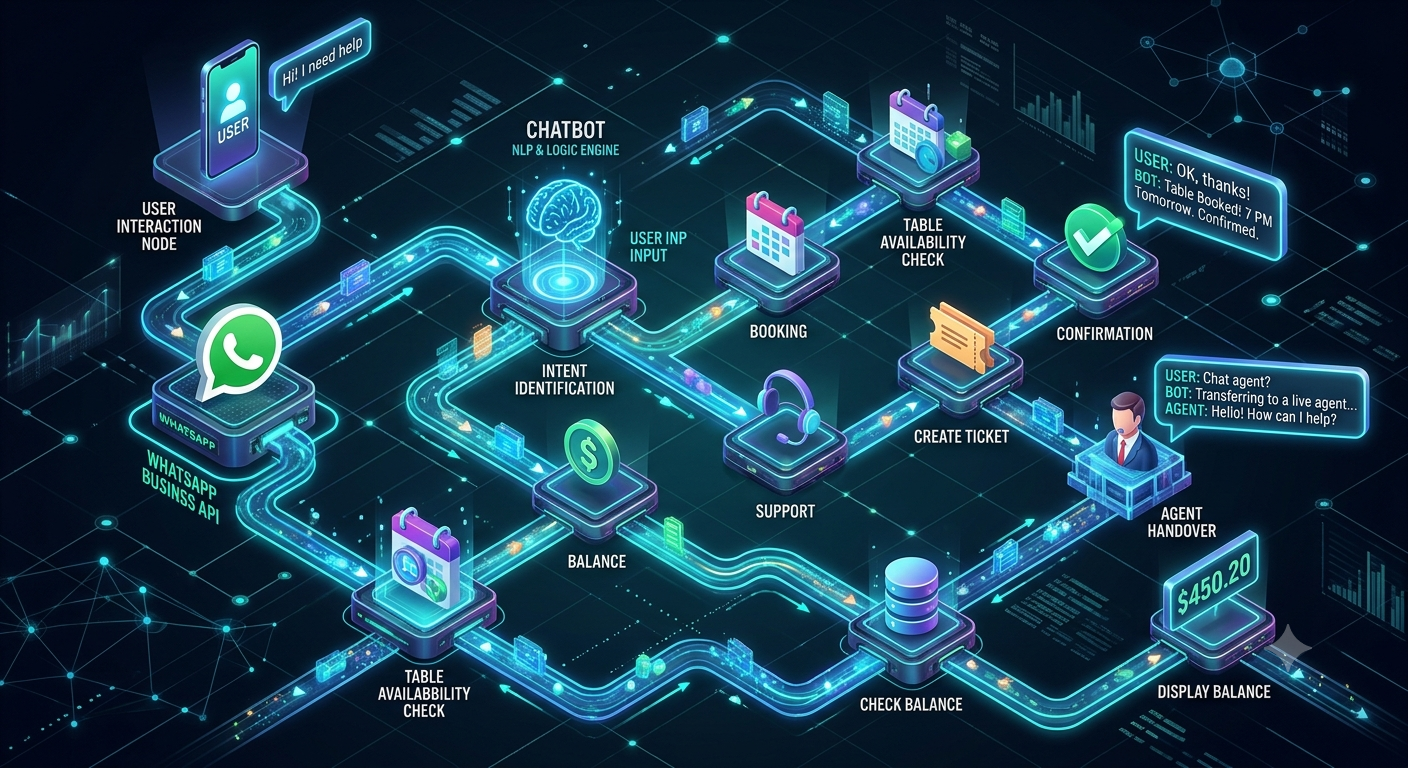
An AI WhatsApp chatbot combines messaging infrastructure, message processing, artificial intelligence, business data and response delivery.
Here is a typical conversation lifecycle.
Step 1: A customer sends a WhatsApp message
A customer sends a message to the business's WhatsApp number.
For example:
“I want to know more about your Bulk SMS service and pricing.”
The message reaches the business's chatbot system through the configured WhatsApp Business Platform integration.
Step 2: The system receives and processes the message
The messaging integration passes the incoming message to the chatbot application, often through a webhook or a provider-managed interface.
The application identifies the relevant conversation and prepares the message for processing.
Depending on the implementation, it may also retrieve appropriate conversation context, customer preferences or other information that the system is authorized to use.
Step 3: AI identifies the customer's intent
The chatbot analyzes the message to understand what the customer wants.
In the example above, the likely intent is a service inquiry combined with a pricing request.
The system may identify important details, such as the service name, intended use case or requested quantity, when those details are available.
AI helps customers communicate naturally without requiring them to select an exact keyword or follow a rigid menu.
Step 4: The chatbot retrieves relevant information
The chatbot determines which information is needed to answer the question.
It may search an approved knowledge base containing service descriptions, frequently asked questions and pricing information. If an authorized integration is available, it may retrieve current information from a CRM or another business system.
For example, a customer asking about a company's services may need a general description. A customer asking for an account-specific quotation may require a sales representative or a pricing system.
The chatbot should distinguish between information it can verify and information it does not have.
Step 5: The system prepares a response
The chatbot uses the customer's message and the available information to prepare a response.
Depending on the configuration, the response may be selected from an approved template, generated by an AI model or assembled through a structured workflow.
The system can also decide whether it needs to ask a follow-up question, execute an authorized action or transfer the conversation to a human agent.
Step 6: The response is delivered through WhatsApp
The chatbot sends the response through the configured messaging integration.
For example:
“Thanks for your interest in our Bulk SMS service. Could you share your approximate monthly message volume so we can direct you to the most suitable option?”
This response moves the conversation forward rather than simply returning a generic description.
Step 7: The conversation continues or reaches a resolution
The chatbot processes the customer's next response and continues the workflow.
Depending on the use case, it may answer another question, collect lead information, retrieve an order update, create a support ticket or route the conversation to an employee.
The conversation may be considered resolved when the customer's request has been completed, but important outcomes should be verified through the relevant business system.
Step 8: The business reviews performance
Chatbot analytics can help the business identify common questions, unsuccessful responses, integration failures, customer satisfaction issues and opportunities for improvement.
These findings can be used to update the knowledge base, improve instructions, refine workflows and improve the customer experience.
The complete AI WhatsApp chatbot workflow
Customer message → WhatsApp integration → Message processing → Intent recognition → Knowledge retrieval or business action → Response generation and checks → WhatsApp reply → Resolution or human handover
This workflow explains the general architecture. Individual platforms may combine, reorder or automate several of these steps.
What Technologies Power an AI WhatsApp Chatbot?
Several technologies can work together to create an AI-powered WhatsApp experience.
1. WhatsApp Business Platform
The WhatsApp Business Platform provides the messaging infrastructure through which a business can exchange messages with customers using supported integrations.
It supports business messaging workflows and can be connected to chatbot applications, customer support tools and other business systems.
The messaging platform itself does not automatically provide every AI feature. The chatbot application or connected provider supplies the required conversational intelligence and workflow capabilities.
2. Natural Language Processing
Natural language processing (NLP) helps computer systems interpret human language.
In a chatbot, NLP-related capabilities can help identify customer intent, extract important information and recognize that differently worded messages may have the same meaning.
For example:
Customer message | Likely intent |
|---|---|
“What are your plans?” | Pricing inquiry |
“I need help with my order.” | Order support |
“Can I book a demo?” | Appointment or demo booking |
“I want to speak to someone.” | Human-agent handover |
“How do I get started?” | Onboarding inquiry |
The system's accuracy depends on the model, instructions, available context and implementation.
3. Large language models
Large language models (LLMs) can interpret natural-language requests, use supplied context and generate conversational responses.
They can help a chatbot handle questions that do not follow a fixed format, summarize information and guide a customer through a multi-step conversation.
However, an LLM should not be treated as an automatically reliable source of business facts. Important answers should be grounded in approved information, and consequential actions should be validated by application logic.
4. Knowledge bases and retrieval-augmented generation
A knowledge base stores the information the chatbot is expected to use, such as service descriptions, product documentation, policies and FAQs.
For larger collections of information, retrieval-augmented generation (RAG) can help the system find relevant passages and provide them to the AI model as context for an answer.
For example, if a customer asks about a refund policy, the chatbot can retrieve the relevant policy section before preparing its response.
The quality of the result depends on whether the correct information is available, up to date and successfully retrieved.
5. APIs and webhooks
APIs allow the chatbot to request information from business applications or initiate permitted actions. Webhooks can notify the application when an event occurs, such as a new incoming message.
Together, these technologies can connect the chatbot to CRM systems, order-management platforms, booking software, helpdesks and other applications.
6. Workflow automation
Workflow automation controls the sequence of actions required to complete a task.
For example, a lead qualification workflow might collect the customer's requirements, validate contact information, record the inquiry in a CRM and assign the lead to a sales representative.
AI can interpret the customer's responses, while the workflow ensures that required steps and business rules are followed.
AI WhatsApp Chatbot vs Traditional Rule-Based Chatbot
AI chatbots and rule-based chatbots both automate conversations, but they handle customer input differently.
Feature | Traditional rule-based chatbot | AI WhatsApp chatbot |
|---|---|---|
Message understanding | Primarily predefined rules and patterns | Can interpret natural-language meaning |
Conversation structure | Usually follows configured paths | Can combine flexible conversation with structured flows |
Handling alternate wording | Depends on configured rules | Can recognize varied expressions when supported by the model |
Knowledge access | Usually fixed responses or configured lookups | Can use a knowledge base or connected business data |
Complex questions | Often requires predefined paths | May handle more varied questions, subject to available information |
Business actions | Can execute configured workflows | Can interpret requests and invoke authorized workflows |
Predictability | High for well-defined paths | Depends on model, instructions, retrieved information and safeguards |
Human escalation | Can be configured | Can be configured based on intent, uncertainty or business rules |
Maintenance | Update rules and conversation flows | Maintain rules, knowledge, instructions, integrations and evaluation tests |
Neither approach is automatically better for every task.
A rule-based chatbot may be ideal for a simple menu or a fixed registration workflow. An AI chatbot may be more useful when customers ask questions in different ways. Many effective business implementations combine both approaches: AI handles interpretation, while structured workflows control important actions.
Key Features of an AI WhatsApp Chatbot
The features available depend on the chatbot platform and the integrations configured by the business.
1. Natural-language conversations
Customers can ask questions in their own words instead of memorizing commands or selecting from a long menu.
This is useful when customers describe their requirements differently or ask follow-up questions during a conversation.
2. Automated customer support
A chatbot can answer frequently asked questions about products, services, business hours, account procedures and troubleshooting.
It can also collect the information needed to create a support ticket or route a more complicated issue to an agent.
3. AI-powered knowledge search
The chatbot can retrieve information from an approved knowledge base to answer questions about products, services, policies and documentation.
This can make information easier to access without requiring customers to search a website or wait for an employee to respond.
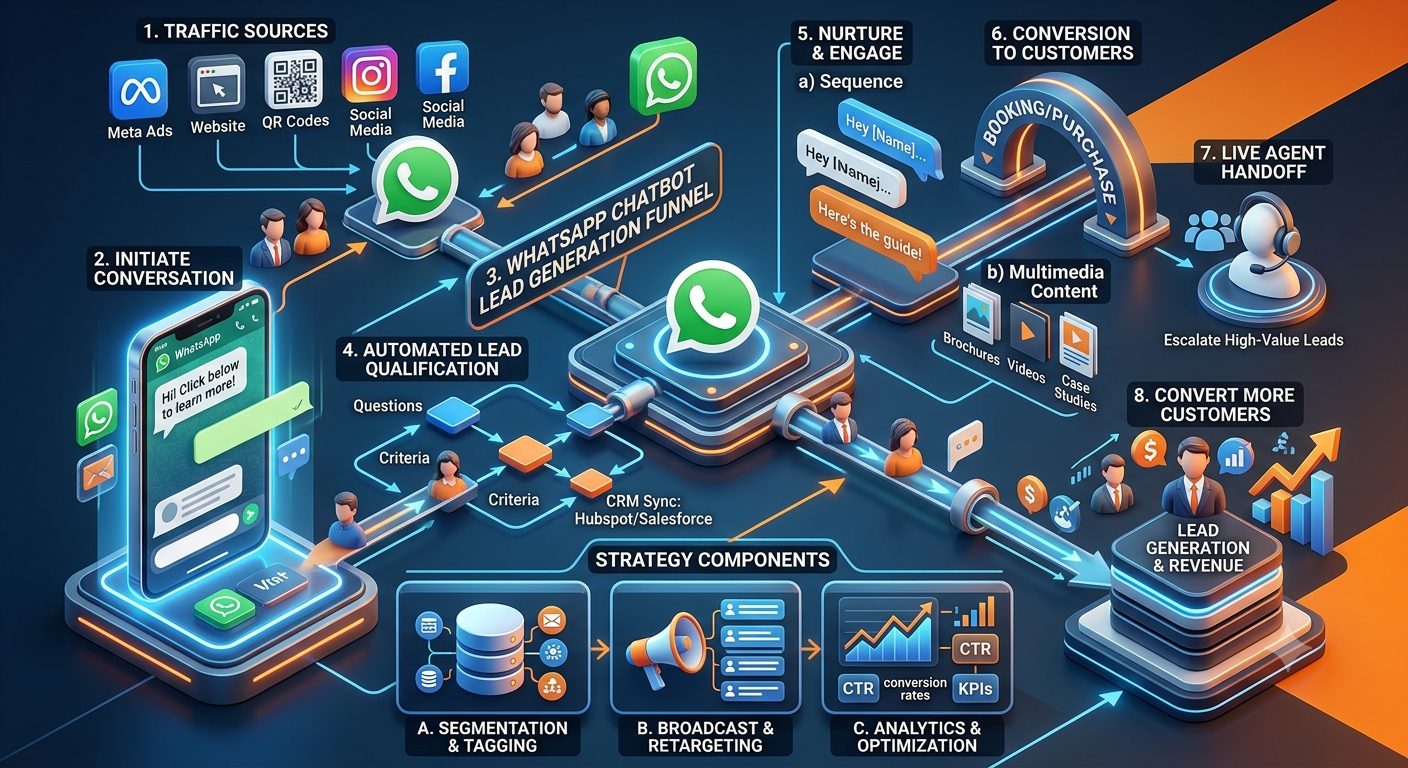
4. Lead generation and qualification
A chatbot can collect relevant inquiry details, ask qualification questions and route suitable leads to a sales team.
For example, a B2B service provider could ask about the customer's business requirements, expected usage and preferred time for a demonstration.
The chatbot should request only information relevant to the intended purpose and handle it appropriately.
5. Product discovery and recommendations
When connected to suitable product information, a chatbot can help customers compare available options and discover relevant products.
Recommendations should be based on actual product information and clearly defined criteria rather than invented availability or unsupported claims.
6. Appointment and booking assistance
A chatbot can collect booking requirements, check availability through an integrated booking system and confirm a reservation after the system verifies that it has been successfully created.
Without a live availability integration, it should collect preferences or direct customers to the appropriate booking process rather than promise a confirmed appointment.
7. CRM integration
CRM integration can allow the chatbot to create leads, update customer records, capture inquiry details and assign conversations to sales or support teams.
This helps businesses connect messaging conversations with their existing customer-management processes.
8. Order and service-status updates
When connected to an authorized system, the chatbot can retrieve order status, delivery details, ticket progress or other relevant information.
Customer-specific information should only be disclosed after applying appropriate access and verification checks.
9. Multilingual communication
AI models and chatbot platforms may support several languages, helping businesses communicate with customers who prefer different languages.
Support quality can vary across languages and regional expressions, so businesses should test the languages their customers actually use.
10. Human-agent handover
A chatbot can transfer a conversation to a human agent when the customer requests assistance, the system cannot answer confidently or a task requires human judgment.
A good handover preserves relevant context and clearly communicates the next step to the customer.
11. Analytics and reporting
Depending on the platform, reporting can show conversation volume, common inquiries, response outcomes, handover rates, integration errors and other operational measures.
These insights help businesses identify where automation is working and where it needs improvement.
Benefits of AI WhatsApp Chatbots for Businesses
AI WhatsApp chatbots can improve business communication when they are designed around real customer needs and integrated with the right systems.
Faster responses
A chatbot can respond to supported questions without requiring an employee to manually type every answer. This helps reduce waiting time for routine inquiries.
More efficient customer support
Automating repetitive questions gives support agents more time to handle complaints, unusual situations and cases that require human judgment.
Better lead management
A chatbot can collect qualification details, organize inquiries and route leads to the appropriate team. This can reduce delays between a customer expressing interest and a sales representative following up.
More convenient customer journeys
Customers can ask questions, receive relevant information and complete supported tasks through a familiar messaging channel.
Consistent information
When connected to an approved and maintained knowledge base, a chatbot can provide consistent answers to common questions.
This does not guarantee accuracy, but it reduces the need for employees to manually repeat standard information.
Scalable routine automation
A chatbot can automate repetitive workflows across many conversations. Actual capacity depends on platform limits, integrations, system performance and the complexity of the tasks.
Better use of business data
Integrations can help connect customer conversations with CRM records, order information and support tickets, reducing fragmented workflows.
More measurable customer interactions
Businesses can analyze common questions, conversation outcomes and failure points to improve their support and sales processes.
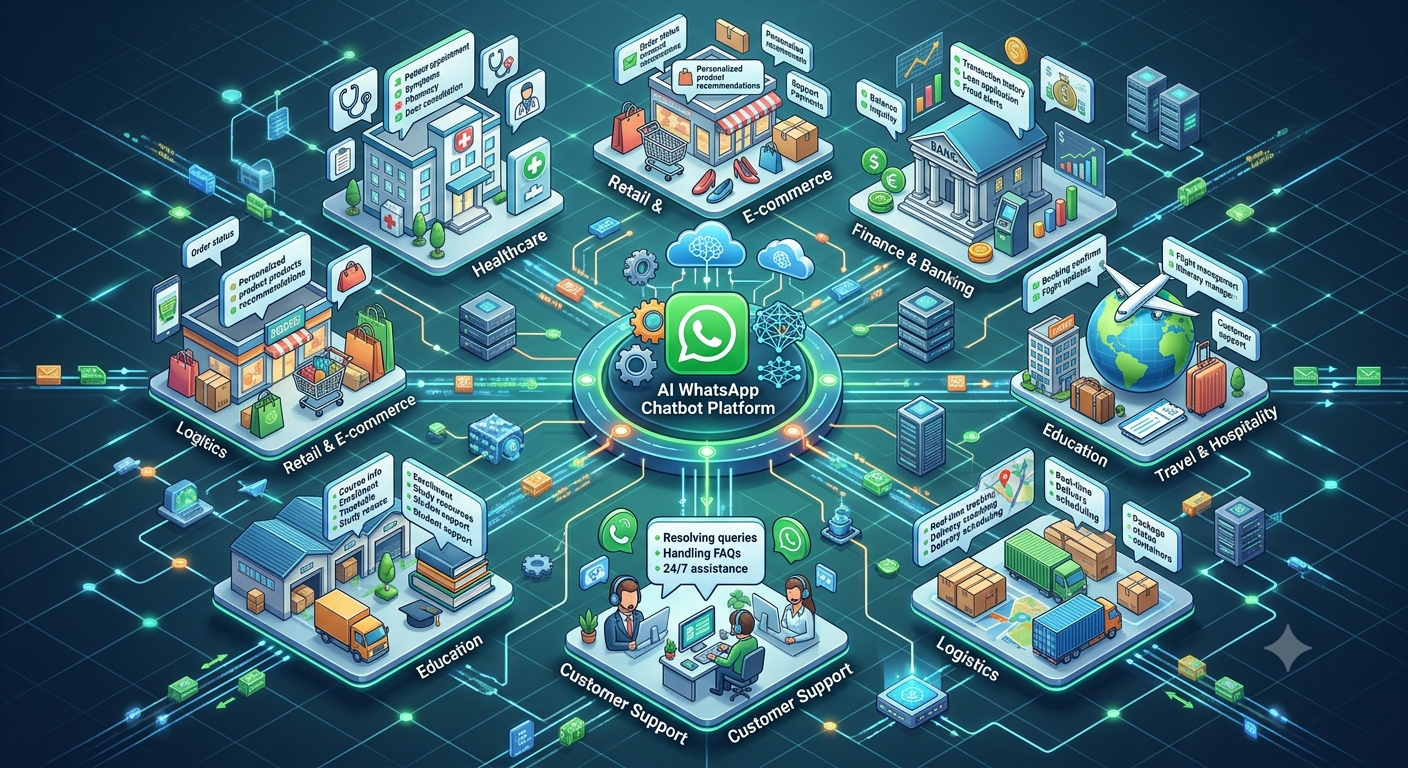
Practical Use Cases of AI WhatsApp Chatbots Across Industries
The same chatbot technology can support different business objectives depending on the information and systems available.
E-commerce and retail
Online stores can use AI WhatsApp chatbots to:
Answer product questions.
Help customers compare products.
Retrieve order and delivery status.
Explain return procedures.
Route complaints to support teams.
Provide assistance during the purchase journey.
For example, a customer asking whether a particular product is available can receive a verified answer when the chatbot is connected to a current inventory system.
Healthcare and clinics
Healthcare organizations can use chatbots for administrative communication, including:
Clinic and service information.
Appointment inquiries.
Booking assistance.
Appointment reminders.
Routing requests to the appropriate staff.
Healthcare deployments require particular care with sensitive personal information. A general-purpose chatbot should not replace qualified clinical judgment or disclose protected information without appropriate safeguards.
Education and training
Educational institutions can automate common inquiries about:
Courses and programs.
Admission procedures.
Application requirements.
Class schedules.
Fee information.
Counselling appointments.
A chatbot connected to the institution's current information can help students find relevant details and route unusual questions to the admissions team.
Real estate
Real estate businesses can use WhatsApp chatbots to:
Capture property inquiries.
Ask about location and budget preferences.
Share verified property information.
Qualify prospective buyers or tenants.
Arrange site visits through a booking integration.
Assign promising leads to sales agents.
The chatbot should not promise property availability unless that information has been verified.
Banking and financial services
Potential uses include general product information, service-request routing, loan inquiries and procedural FAQs.
Sensitive financial actions require appropriate authentication, authorization and secure integrations. A chatbot should not expose account information or execute restricted transactions solely because a message requests it.
Travel and hospitality
Hotels, travel companies and service providers can use chatbots to answer booking questions, share relevant travel information, retrieve reservation details and route special requests to staff.
B2B and technology companies
Business-to-business organizations can use AI WhatsApp chatbots to:
Answer product and service inquiries.
Explain technical documentation.
Capture sales inquiries.
Qualify leads.
Schedule demonstrations.
Create support tickets.
Route technical questions to specialists.
For a communications service provider, for example, a chatbot could explain Bulk SMS, WhatsApp API or RCS offerings and direct customers to the appropriate sales team for a quotation.
AI WhatsApp Chatbot Examples: How Businesses Can Use It
The following examples illustrate how a chatbot can combine AI with structured workflows.
Example 1: Customer support
Customer: “I am having trouble using your service.”
Chatbot: “I can help with that. Are you having trouble with setup, account access or a technical issue?”
The customer selects a category or explains the issue in natural language. The chatbot provides relevant troubleshooting instructions or creates a support ticket if the issue requires further investigation.
Example 2: B2B lead qualification
Customer: “I want to know more about your WhatsApp API.”
Chatbot: “Certainly. Are you planning to use WhatsApp for customer support, lead generation or marketing communications?”
The chatbot collects relevant requirements and, where appropriate, records the inquiry in the CRM and routes it to a sales representative.
Example 3: Order tracking
Customer: “Can you tell me where my order is?”
Chatbot: “I can help check that. Please provide the order reference required by our order-support process.”
After the required checks, the chatbot retrieves the current status from the connected order-management system. It should not fabricate tracking information if the system is unavailable.
Example 4: Appointment booking
Customer: “I want to book a consultation next week.”
Chatbot: “I can help you check available appointments. Which day or time works best for you?”
The chatbot checks the booking system, presents available options and confirms the appointment only after successful booking.
Example 5: Product information
Customer: “Which plan is suitable for my business?”
Chatbot: “I can help you compare the options. Could you tell me what you want to use the service for and your approximate monthly requirements?”
The chatbot retrieves the relevant plan information and provides a comparison based on verified details.
These examples show why useful chatbot design requires more than generating conversational text. The system must also know when to retrieve information, ask a question, perform an action or involve a person.
What Is the Role of the WhatsApp Business API in an AI Chatbot?
The WhatsApp Business Platform, commonly referred to in business discussions as the WhatsApp Business API, enables supported programmatic messaging and business integrations.
It provides the messaging layer that allows a chatbot application to communicate with customers through WhatsApp.
The AI layer and the messaging layer serve different purposes:
WhatsApp integration: Handles supported message exchange and platform events.
AI engine: Interprets customer messages and prepares responses.
Knowledge base: Supplies approved information for answering questions.
Workflow engine: Controls the steps required to complete business tasks.
Business integrations: Retrieve information or perform permitted actions in connected systems.
Human-agent interface: Allows employees to take over conversations when needed.
For example, a customer may ask a chatbot to check an order. The AI interprets the request, the workflow determines what information is required, the order-management integration retrieves the current status, and the WhatsApp integration delivers the response.
The API does not automatically supply a CRM, knowledge base, AI model or booking system. Those capabilities must be provided by the chatbot platform or connected applications.
Businesses should also review current WhatsApp policies, messaging permissions, template requirements and applicable conversation rules before launching automated messaging.
For further reading, see the official WhatsApp Business website and its Business Messaging Policy.
How Does an AI WhatsApp Chatbot Integrate With CRM and Other Business Systems?
Integration allows a chatbot to move beyond answering general questions and support real business processes.
CRM integration
A CRM can store lead details, customer records, sales activities and follow-up information.
A chatbot may use a CRM integration to:
Create a new lead.
Update an existing customer record.
Record customer requirements.
Assign an inquiry to a salesperson.
Record the conversation outcome.
Trigger an approved follow-up workflow.
Helpdesk integration
A helpdesk integration can create tickets, classify support issues, attach relevant conversation context and route cases to appropriate teams.
E-commerce integration
An e-commerce connection can retrieve current product information, order status and other permitted details.
ERP and inventory integration
An ERP or inventory system can provide operational information that the chatbot needs to answer specific customer questions.
Booking integration
A booking integration can check actual availability, create appointments and return confirmation details.
Integration safeguards
Every integration should use appropriate authentication and access controls. Important actions should be validated by the backend, and the application should handle timeouts, failed requests and duplicate events.
For example, if a webhook is delivered more than once, the system should not create multiple identical leads or bookings.
These safeguards are especially important when chatbot actions affect customer accounts, orders, appointments or other business records.
Limitations of AI WhatsApp Chatbots
AI chatbots can automate many routine interactions, but businesses should understand their limitations before relying on them.
AI can provide incorrect information
A language model may produce a plausible answer that is not supported by the available facts.
How to address it: Use approved knowledge sources, retrieve current information where necessary, test responses and provide a clear fallback when the system is uncertain.
The chatbot may misunderstand a request
Unusual wording, mixed languages, missing details or ambiguous questions can lead to incorrect intent recognition.
How to address it: Ask clarifying questions, test realistic customer messages and make escalation available.
Some tasks require live integrations
An AI model cannot independently know the current stock level, order status or appointment availability of a business system it cannot access.
How to address it: Connect the chatbot to authorized data sources and verify results before responding.
Not every conversation should be automated
Complaints, sensitive situations, complex negotiations and decisions requiring human judgment may need an employee.
How to address it: Define escalation conditions and make the handover process easy to use.
Costs can increase with complexity
Messaging, AI usage, platform subscriptions, integration development and ongoing maintenance may involve separate charges.
How to address it: Estimate the total operating cost and compare it with measurable business outcomes.
Privacy and security require deliberate design
Chatbot conversations can contain personal or confidential information.
How to address it: Minimize data collection, restrict access, secure credentials, define retention practices and assess the data-handling practices of connected providers.
Best Practices for Implementing an AI WhatsApp Chatbot
Define the business objective
Decide whether the chatbot is primarily for support, lead generation, sales assistance, booking or another use case.
Clear objectives make it easier to select features and measure results.
Keep the knowledge base accurate
Review product information, pricing, policies and support documentation regularly. Assign responsibility for updating the information used by the chatbot.
Combine AI with structured workflows
Use AI to interpret natural language and structured logic to control important business actions.
This helps preserve flexibility without allowing unverified AI output to determine sensitive outcomes.
Design for human handover
Tell customers when their request needs a person and transfer the relevant context to the employee handling it.
Protect customer information
Collect only the data required for the intended task and apply appropriate access, security and retention controls.
Test before deployment
Test common questions, unexpected messages, unsupported requests, multilingual conversations, integration failures and human-agent escalation.
Monitor real performance
Review response quality, resolution outcomes, customer feedback, integration failures and the cost of successful automation.
Respect messaging requirements
Follow the applicable WhatsApp policies, consent expectations and messaging requirements. Do not assume that access to the messaging platform permits unrestricted promotional communication.
How to Measure AI WhatsApp Chatbot Performance
The most useful performance metrics depend on the chatbot's purpose.
Metric | What it measures |
|---|---|
First response time | How quickly customers receive an initial response |
Resolution rate | The share of conversations that reach a valid resolution |
Human handover rate | How frequently conversations require an agent |
Unanswered question rate | How often the chatbot cannot provide an appropriate answer |
Lead qualification rate | How effectively the chatbot identifies suitable leads |
Booking completion rate | The share of supported booking journeys that complete successfully |
Customer satisfaction | How customers rate the interaction |
Integration failure rate | How frequently required system actions fail |
Cost per resolved conversation | The operating cost of achieving a successful resolution |
Metrics should be interpreted in context. A high handover rate is not necessarily negative when the chatbot is designed to identify complex issues and direct them to specialists.
Similarly, the number of messages answered automatically is not enough to determine success. A chatbot that responds quickly but gives incorrect information may create more work for the business.
Measure whether the chatbot achieves its intended outcome accurately, reliably and at an acceptable cost.
How to Choose an AI WhatsApp Chatbot Solution
Before choosing a provider, evaluate its capabilities against your actual business requirements.
Consider the following questions:
Does the solution support the official WhatsApp Business Platform?
Can it handle natural-language conversations as well as structured workflows?
Can it retrieve information from an approved knowledge base?
Does it integrate with your CRM, helpdesk, booking system or other required applications?
Can it transfer conversations to a human agent?
Does it provide analytics and error monitoring?
How does it handle security, customer information and access permissions?
Can you test the chatbot before rolling it out widely?
What are the messaging, platform, AI and integration costs?
Can the solution accommodate your future requirements?
The right solution depends on the complexity of the use case. A business with a few FAQs may need only a simple chatbot, while an organization with CRM synchronization, live order tracking and multiple support workflows may require a more advanced implementation.
Businesses evaluating a solution can explore Nexcomm's WhatsApp API and chatbot services to understand the available approach and discuss their requirements.
Frequently Asked Questions About AI WhatsApp Chatbots
1. What is an AI WhatsApp chatbot?
An AI WhatsApp chatbot is an automated assistant that communicates with customers through WhatsApp and uses artificial intelligence to interpret messages, retrieve information and provide responses. Depending on its integrations, it can also support lead generation, customer service and business workflows.
2. How does an AI WhatsApp chatbot work?
It receives a customer message through the WhatsApp integration, processes the message, identifies the customer's intent, retrieves relevant information or performs an authorized action, prepares a response and sends it back through WhatsApp. It can also transfer the conversation to a human agent when necessary.
3. What is the difference between AI chatbots and rule-based chatbots?
Rule-based chatbots follow predefined rules and conversation paths. AI chatbots can interpret natural-language questions and respond using context and available information. Businesses often combine both approaches to balance flexibility with predictable workflows.
4. Is the WhatsApp Business API required for an AI chatbot?
A production business chatbot generally uses the WhatsApp Business Platform or a provider-supported integration to exchange messages programmatically. The exact setup depends on the solution and the functionality required.
5. Can an AI WhatsApp chatbot answer customer questions automatically?
Yes. It can answer supported questions using configured responses, approved knowledge sources and connected systems. It should ask for clarification or escalate a request when the required information is unavailable.
6. Can an AI WhatsApp chatbot generate leads?
Yes. A chatbot can collect relevant inquiry details, ask qualification questions and send suitable leads to a CRM or sales team. Its effectiveness depends on the conversation design, qualification criteria and follow-up process.
7. Can an AI WhatsApp chatbot integrate with a CRM?
Yes, if the selected platform or custom application supports the required integration. A chatbot can create leads, update customer records, record inquiry details and assign conversations to sales or support teams.
8. Can AI WhatsApp chatbots support multiple languages?
Many AI models and chatbot platforms support multiple languages. Actual performance varies, so businesses should test the languages, regional expressions and mixed-language messages used by their customers.
9. Can an AI WhatsApp chatbot work 24/7?
Automated responses can operate outside business hours when the chatbot infrastructure and connected services are available. Human support and third-party integrations may have separate availability limitations.
10. Is an AI WhatsApp chatbot suitable for small businesses?
Yes. Small businesses can use chatbots to answer common questions, capture inquiries, schedule appointments and route customers to the right person. A simple, focused implementation may be more suitable than a complex custom system.
11. Can an AI WhatsApp chatbot replace human customer support?
It can automate repetitive and well-defined tasks, but it should not be assumed to replace human support entirely. Complex complaints, sensitive situations, ambiguous requests and decisions requiring human judgment may still need an employee.
12. How can I improve an AI WhatsApp chatbot's accuracy?
Maintain accurate knowledge sources, test realistic customer questions, improve retrieval, refine instructions, validate important actions and review unsuccessful conversations. Accuracy should be evaluated regularly rather than assumed from a successful initial demonstration.
13. How much does an AI WhatsApp chatbot cost?
Costs depend on the provider, messaging volume, AI usage, subscription fees, integrations, customization and maintenance. Request a complete pricing breakdown and compare it with the business outcomes the chatbot is expected to deliver.
14. How do I know whether my AI WhatsApp chatbot is successful?
Measure the outcomes that matter to your business, such as resolved support inquiries, qualified leads, completed bookings, customer satisfaction, integration reliability and cost per successful resolution.
Conclusion: Why AI WhatsApp Chatbots Matter for Modern Businesses
An AI WhatsApp chatbot brings together messaging, artificial intelligence, business information and automation to help organizations manage customer conversations more effectively.
It can answer routine questions, qualify leads, provide relevant product information, retrieve data from connected systems and guide customers through supported workflows. When the system cannot resolve a request reliably, it should make it easy for a human employee to take over.
The most effective chatbot implementations are not simply those that use the most advanced AI. They are the ones that solve a clearly defined business problem, use reliable information, protect customer data and produce measurable results.
Businesses looking to improve customer communication can explore Nexcomm's WhatsApp API and chatbot solutions to evaluate how conversational automation could support their customer service, lead management and sales workflows.
More in AI and chatbot guides.
More guides in this series
- WhatsApp chatbot conversation flow examples with templates
- How AI chatbots improve WhatsApp customer support
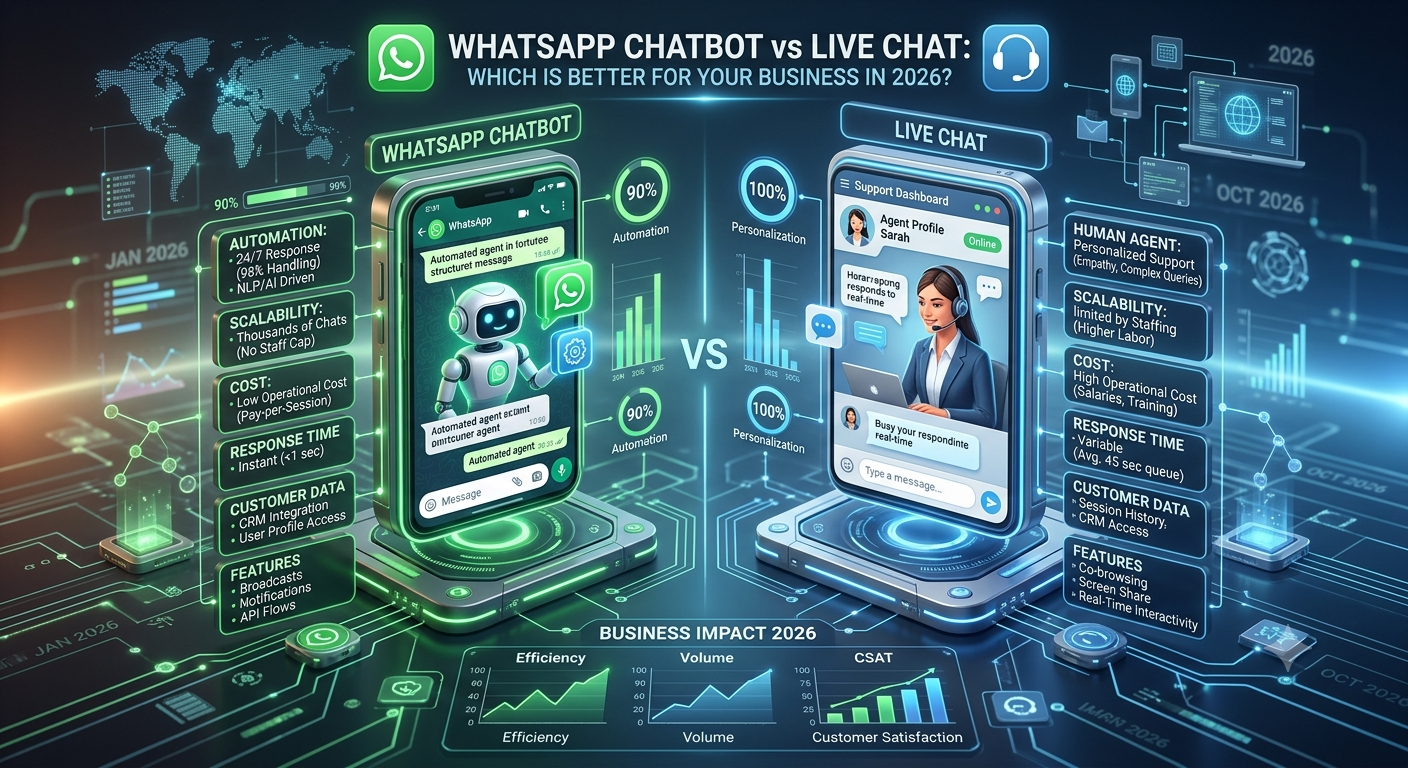
- WhatsApp chatbot vs live chat
- WhatsApp chatbot for lead generation
- 12 benefits of AI WhatsApp chatbots for businesses
- AI WhatsApp chatbot use cases across industries
- How to build an AI WhatsApp chatbot, step by step